What Is Claude Design?
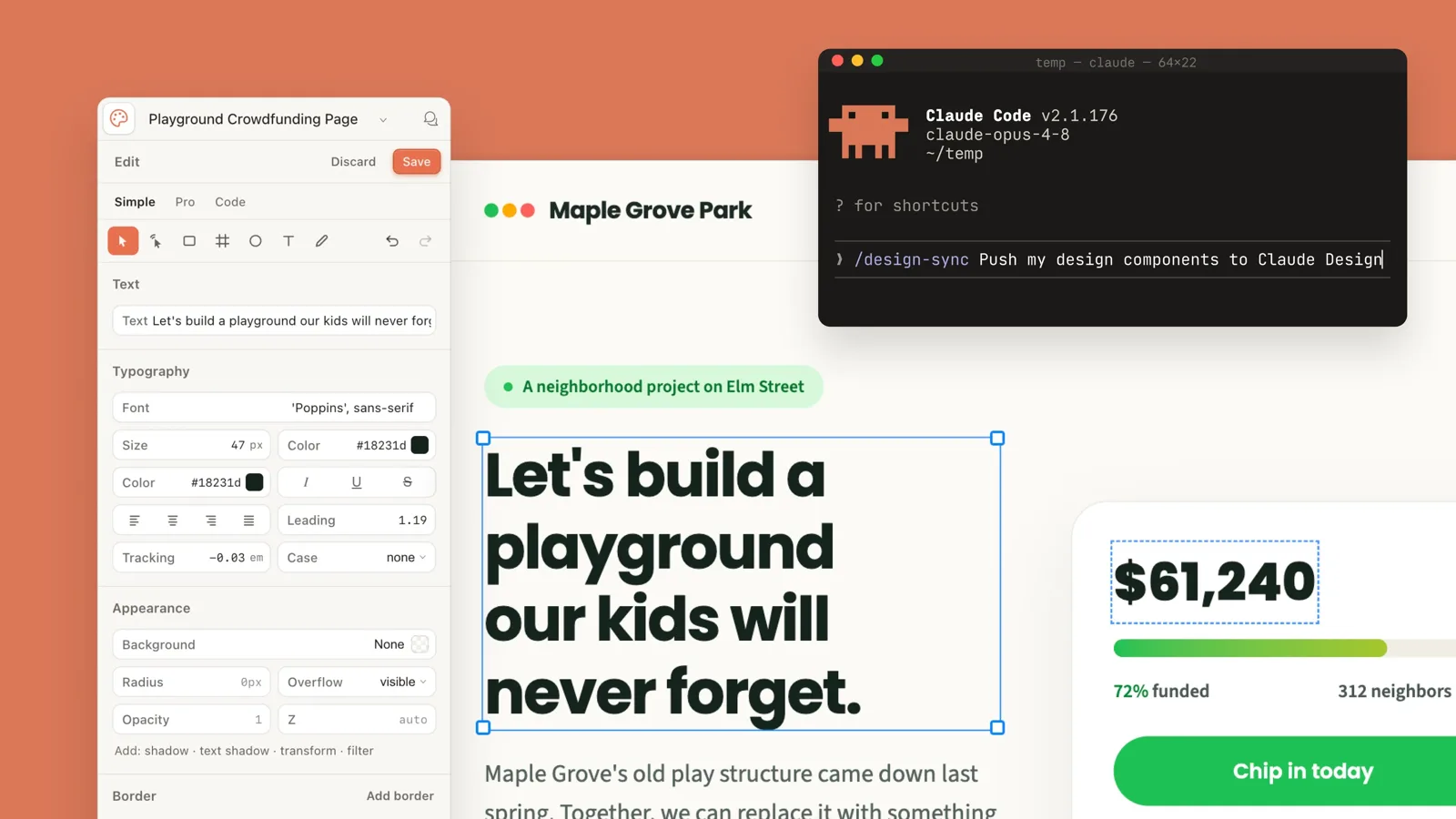
Claude Design is a research-preview product from 'Anthropic Labs.' If the Claude chat we all know is an AI that 'answers in words,' Claude Design is an AI that 'produces something you can see.' Give it a prompt and it draws a website mockup, a clickable prototype, presentation slides, an ad layout, or a document like a resume or contract right onto the screen.
It runs on Claude's frontier (top-tier) model — Opus 4.8 at the time of the tutorial this article draws on. The point is that you don't have to learn a separate design program; you just ask the way you already talk to Claude, and a result comes out.
One important distinction: Claude Design makes the 'design and the mockup.' Turning that mockup into working code and putting it on the internet (deployment) is handled by Claude Code, which we'll cover later. The two are a pair, but they are not the same thing.
Where and How Do You Start?
First you need a Claude account and a paid subscription. Because Claude Design is currently in research preview, it's open to Pro, Max, Team, and Enterprise subscribers. The starting point is signing in at claude.ai (you can sign up with a Google account, for example).
There are two ways in. One is the web browser: go to claude.ai, open the sidebar at the top left, and you'll see a 'Claude Design' entry you can open right there.
The other is the Claude desktop app. It gives you more screen space, which is why the tutorial's author prefers it. Use the download button at the bottom left to grab the app for your operating system (macOS or Windows), install it, and sign in — a 'Design' button then appears at the bottom left. Click it and Claude Design opens in its own window.
The first time you open it you might see a few example designs, or a blank screen — it varies from person to person. Don't let that throw you; just start with the next step, creating a design system.
Why Build a 'Design System' First?
Whatever you're making in Claude Design, the first step is a 'design system.' A design system is a single bundle that holds a brand's visual rules in one place. Think of it as a 'brand manual' that fixes which fonts you use, which colors, what the logo looks like, and the shape of elements like buttons and cards.
The reason to build this first is consistency. Once a design system is set, every website, slide, and ad you make afterward comes out with the same fonts and colors. You no longer have to re-explain your brand each time.
There are several ways to create one. If you already have code or design assets, you can paste a GitHub repo URL, point to a code folder on your computer, or connect a Figma file so Claude reads that style. If you have nothing, just give a company name and a sentence or two of description, and ask Claude for font and color options. Ask the Claude chat to suggest matching Google font pairings and color palettes with previews, and it hands you options to choose from.
If you don't have a logo, you make one first with a separate image-generation tool and drop it in. In the tutorial, the author used a third-party tool (not Anthropic's) to make an SVG logo that stays crisp at any size, then dragged it in. Just remember this part is the author's choice, not a feature of Claude Design — you can make the logo image with any tool.
Once you've entered everything and hit generate, a brand guide is ready a few minutes later. You get a 'living document' — always editable — that organizes logo variations, a color palette, and elements like buttons, cards, and forms. If you like it, switch it to 'published,' and if you want, set it as your default design system so it applies automatically to everything you make afterward.
Suggest 4 Google font pairings that would suit this company.
Pair a heading font with a body font — distinctive but not over the top.
Show a preview for each pairing.

(after choosing fonts)
Suggest 4 color palettes that feel trustworthy while keeping a local small-business feel.
Actually Building a One-Page Website
Once your design system exists, click 'New design,' pick the design system you just made, and describe in a sentence what you want. For example: a landing page with a free-quote form at the top, a hero (first-screen) section, a services section, a location section, the same form once more at the bottom, and a top navigation bar.
Claude Design doesn't start building the moment it gets your prompt — it asks questions first. 'Which services should this list?' 'What phone number?' 'Which trust signals to highlight?' 'What fields go in the quote form?' Answer those and it starts building the site with your answers baked in. This checking-first step means fewer wrong guesses.
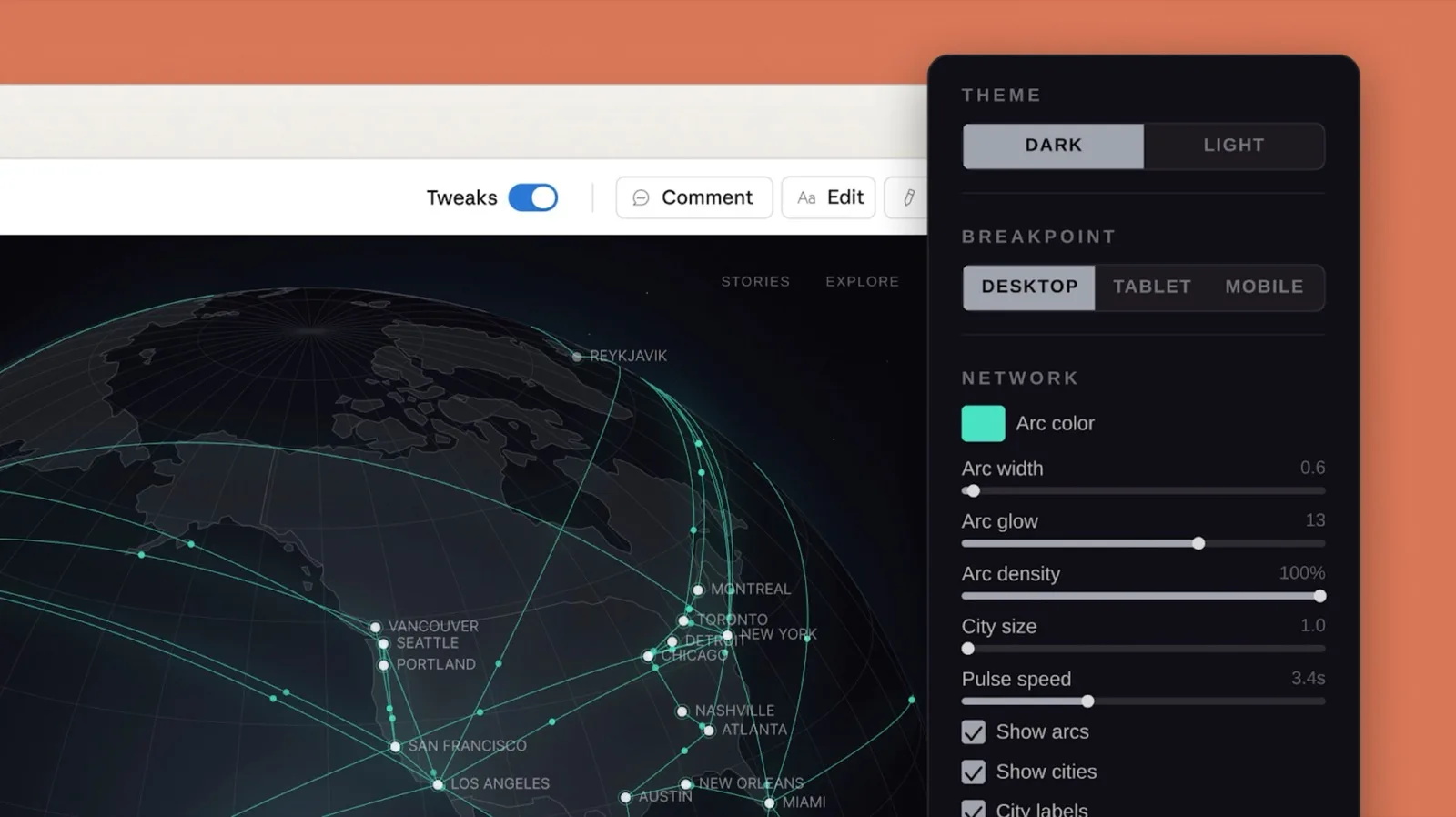
While it builds, a 'tweaks' panel appears. Without knowing any code, you can change the form's position (right/below), its style (inline/card), the headline text, and the overall tone (subtle/balanced/bold) on the spot with sliders and buttons. The breakpoint switch at the top right (desktop, tablet, mobile) lets you preview how it looks on each device.
Spots where images go are left as hatched placeholders, and for each spot Claude even tells you a prompt for the image and the aspect ratio it needs (e.g., 16:9). Generate the images with that prompt (image generation, again, uses a separate tool), drag them in by number, and Claude Design places them where they belong.
Using our design system, build a one-page landing page.
- First screen: free-quote form on the right + company intro on the left (local, trustworthy)
- Services section / location section / the quote form once more at the very bottom
- Top navigation (services as a dropdown)
Leave image spots empty, and for each spot give me an image prompt and the aspect ratio it needs.
Not Just Websites — Ads, Slides, Documents
Claude Design's output isn't limited to websites. The type changes with the template you pick at the start.
Pick the 'animation' template and you get an ad studio. It builds a dashboard for adjusting text overlays, intro/outro motion, and colors and copy to fit each ad format for Instagram, Facebook, and so on. That said, the background video or image inside the ad isn't something Claude Design generates — you make that with a separate tool and drop it in. Claude Design builds the 'ad frame and motion' that your material sits on.
The 'slides' template makes presentations. For instance, it builds a proposal deck with your product's colors and specs, complete with image placeholders. You can export the finished deck as a PPTX (PowerPoint), so you can put it on a tablet and show it to a customer on the spot.
The 'document' template makes documents like contracts and proposals in your brand's tone. It leaves the parts you need to change — customer name, line items — as placeholders, so you just swap the values each time. (Anything with legal force obviously needs a professional's review.)
In short, the picture behind Claude Design is producing your web, ads, presentations, and documents all in the same brand, on top of one design system.
Handing the Design to Claude Code for Code and Deployment
Everything so far is a 'design you can see.' To actually put it on the internet and make it work, you need Claude Code — the AI coding tool that writes and runs code by command.
Handing it over is simple. From your Claude Design output, use 'Share → Send to Claude Code,' and a prompt to paste appears. Paste it into Claude Code. You can transfer the design system the same way, and inside Claude Code you can also exchange design systems with the /design-sync command.
From there it's Claude Code's job. It organizes the handed-off designs into a single code repository, actually deploys the website, and can bundle repetitive work — making documents, slides, ads — into reusable 'skills.' In the tutorial, the author took the site built this way, put it on a hosting service at a real address, and even wired up admin-only login to review incoming quote requests. Remember that this deployment-and-assembly part was done by Claude Code, not Claude Design.
Here's the core value: Claude Design gives you a fast prototype, and Claude Code turns it into a real, maintainable, extensible code asset. The design doesn't end as a picture — it lives on as code.
Why This Matters — The SH Consulting View
It used to take a designer, a web developer, a video editor, and someone for documents — each attached separately — just to stand up one brand. Claude Design pulls those roles into one person's flow of conversation. Set up a single design system, and web, ads, presentations, and documents all come from the same hand.
It matters most for small businesses and solo operators. The brand cleanup you kept putting off because you had no agency budget can now be drafted by one owner over a weekend. The real change isn't a perfect final version — it's that a 'starting point you can edit' lands in your hands in a few hours.
But turning the tool on isn't the finish line. Deciding what to make, tuning the output to fit the brand, and choosing whether to keep it as a code asset are still the human's job. That's where SH Consulting looks: shifting the question from 'which design tool should we buy?' to 'how should we redesign our brand-production process?' The tools are already strong enough; the contest is decided by where in your workflow you plug them in.