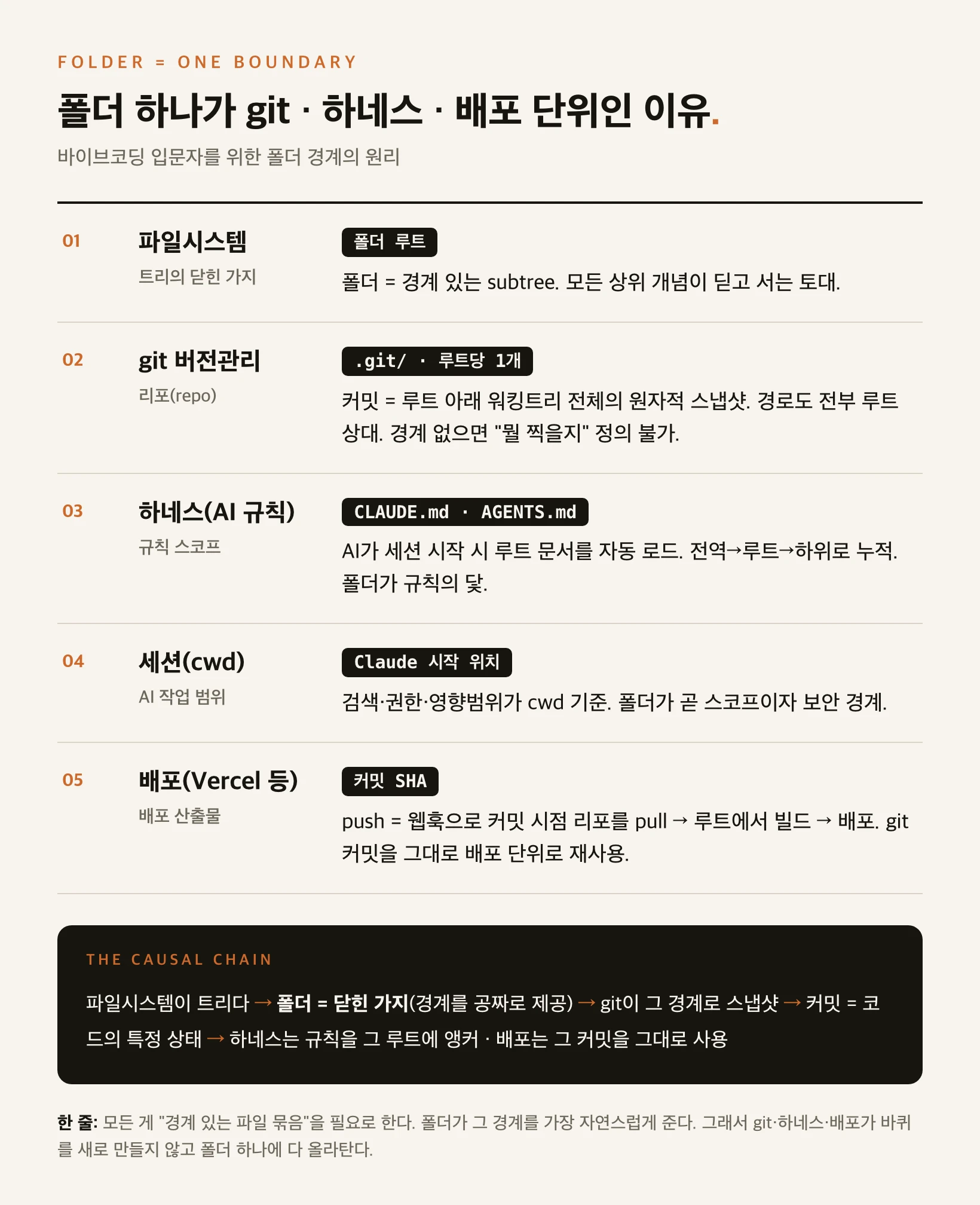
What's confusing
In office work you nest folders deeply — '2026 > Q3 > Contracts > Final' feels natural. So when you first start coding, it seems like you should organize projects the same way, folder inside folder.
But AI coding tools like Claude Code ask you to keep one project in one flat folder and start work from that folder. Why? There is a single reason: the three core machines that run software all share the same boundary — the folder.
First, three terms — what are git, harness, and deploy
git is a version-saving tool for code. It snapshots the state of your files at this exact moment (a commit) so you can later revert or compare. One unit of storage is called a 'repository' (repo).
A harness is the practice of pre-configuring a project so an AI can work well — like an onboarding document you hand a new hire. Its core is rule documents named CLAUDE.md and AGENTS.md; when the AI opens that folder it reads them automatically, so you don't have to re-explain 'this is what the project is, don't do this' every time.
Deployment means putting your finished code on the internet so others can see it — via services like Vercel or Railway. Below we see how these three get bound together by one folder.
Starting point: a filesystem is a tree
A computer's file structure is a tree turned upside down. Branches spread from top to bottom, and one folder means one whole branch of that tree — that folder plus every subfolder and file beneath it, as a single lump. This is called a closed branch, or subtree.
Why does this matter? Because one folder gives you, for free, the boundary of 'everything from here to here is one bundle.' git, the harness, and deployment all need a clearly bounded bundle of files, and the folder already provides that boundary. So they don't reinvent the wheel — they ride on the folder.
git: the folder is the repo
git creates a hidden .git folder inside your folder and treats the .git's parent as the 'root,' tracking everything under it. So one .git = one repo = one folder.
A commit (snapshot) captures 'the state of every file under this folder' atomically — all at once. Without a boundary you can't define what to capture. And inside git every file location is stored as a path relative to the root (like src/app.js). Without a common root — a folder — that relative-path system can't exist. So a repo being one folder is a design necessity.
Harness: rules are anchored to the folder root
When an AI tool starts a session it automatically reads CLAUDE.md and AGENTS.md at the working folder's root. So just opening the right folder lets the AI start already understanding the project — no need to re-explain the stack, the don'ts, and the verification commands each time.
Rule loading is cumulative, not overwriting: global (~/.claude/CLAUDE.md) → project root → subfolders, stacking downward, each level adding detail to the one above. So the folder structure becomes the scope of the rules; the folder is the anchor. CLAUDE.md is Claude-specific while AGENTS.md is a shared standard for other agents (Codex, Gemini). Link them as one and the same rules apply whichever AI you use.
Deploy: the git commit is reused as the deploy artifact
A deploy service like Vercel connects to one git repo. When you push to that repo, a webhook wakes the service; it pulls the repo at that commit, builds from the root, and puts it on the internet.
Here deployment reinvents nothing. A git commit already perfectly defines 'a specific state of the code,' so it reuses that commit as the deploy unit (artifact). Each deploy is stamped with a commit hash (SHA), and a rollback is just redeploying an older commit. That is why one push runs 'save version + apply rules + reflect on the web' all at once.
Five axes, side by side
Lay the five axes side by side and it becomes obvious why one folder plays so many roles at once. They all connect through one fact: each needs a bounded bundle of files, and the folder provides that boundary.
| Axis | Unit | Anchor | Why it must be a folder |
|---|---|---|---|
| Filesystem | Closed branch of the tree | Folder root | Folder = a bounded subtree. The base every higher concept stands on. |
| git version control | Repo | .git/ (one per root) | Commit = an atomic snapshot of the whole working tree under the root; paths are all root-relative. |
| Harness (AI rules) | Rule scope | CLAUDE.md · AGENTS.md | The AI auto-loads root docs at session start; global→root→subfolder, cumulative. |
| Session (cwd) | AI's working scope | Where Claude starts | Search, permissions, blast radius are cwd-based. The folder is scope and security boundary. |
| Deploy (Vercel etc.) | Deploy artifact | Commit SHA | Push builds/deploys the repo at that commit — the git commit reused as the deploy unit. |
Recommended folder structure
So the practical standard is simple: place projects side by side rather than nested, put a .git and a CLAUDE.md at each project's root, and start AI work from that root. Align three things in one folder — git root = rule-doc location = AI start point.
Conversely, nesting another independent project inside a project folder creates a repo-inside-a-repo, so git commands get confused about which repo they target, and it's easy to launch the AI at the wrong depth, throwing off the rule and search scope.
workspace/
├── project-A/          <- start Claude here
│   ├── .git/           (version-control boundary)
│   ├── CLAUDE.md       (harness rules)
│   └── src/
├── project-B/          <- start Claude here
│   ├── .git/
│   ├── CLAUDE.md
│   └── src/
└── project-C/
    ├── .git/
    ├── CLAUDE.md
└── src/workspace/
└── project-A/
├── .git/
├── CLAUDE.md
└── project-B/ <- repo inside a repo · cwd confusion
├── .git/
└── CLAUDE.mdSo is folder-inside-folder ever allowed?
No misunderstanding: dividing folders inside one project is normal and recommended. Organize files into branches like src/, docs/, tests/ all you want. The problem is nesting independent projects — separate boundaries — inside one another.
Even the three apparent exceptions don't break the rule. A monorepo splits several packages only logically inside one repo (one folder), so the repo is still one — deployment targets each package via a Root Directory setting. A submodule merely references another repo from inside a repo, each keeping its own .git. A worktree just spreads one history across several folders, but the source .git is one. All three compose on top of the 'one repo = one folder' principle rather than breaking it.
In one line
Everything needs a bounded bundle of files, and a folder provides that boundary most naturally. So git, the harness, and deployment all ride on one folder instead of reinventing the wheel. Once you understand 'folder = boundary' in vibe coding, why the tools behave the way they do falls into place in one move.