What happened in the second week of September 2026
In a single week, several AIs that do work on your behalf arrived. An agent here means an AI that does not stop at answering a question but opens a browser, sends email and even pays. It is the difference between telling an assistant 'look into it' and 'take care of it'.
On September 8 Meta launched its personal AI agent Muse in the US. On September 9 Suno released its v6 music models, and on September 10 OpenAI introduced the Data agent in ChatGPT Work. The same day Google shipped the Gemini app for Windows, and Apple said the new Siri AI would roll out as a beta (a pre-release trial version) with iOS 27 on September 14.
This article is not a list of announcements. Read side by side, the announcements spend as much space on something else as on features: when the tool stops, what it can see, how much you can use it, and what it was built from. Those are exactly the four things a person handing over work needs to check.
First, where does it stop to ask a person?
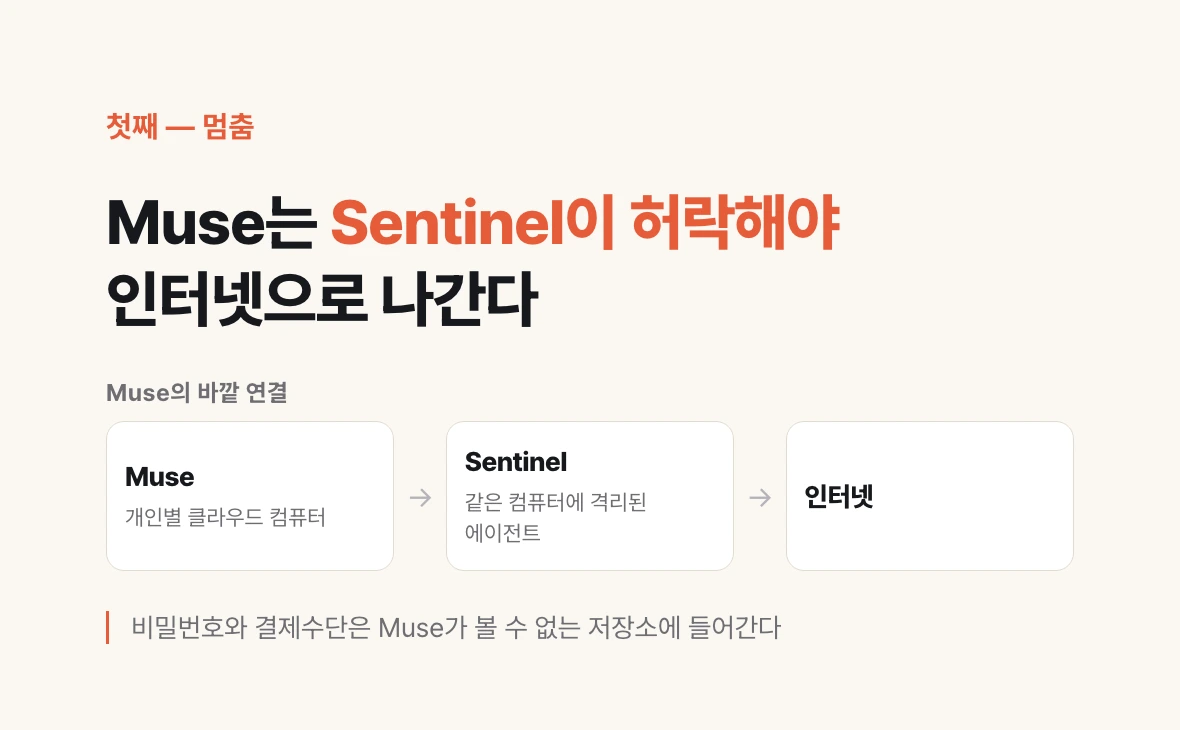
Meta describes Muse this way. Tell it what needs doing in a message and it opens a browser, fills out forms and negotiates on your behalf. It keeps working after you close the app and comes back when something changes or it needs approval. It checks with you before sending an email or making a purchase.
What stands out is that stopping is not left to human attention alone. Muse runs on a dedicated cloud computer set aside for each person, and a separate agent called Sentinel, isolated on the same machine, must approve anything before it reaches the internet. Passwords and payment methods go into storage Muse cannot see, and everything it has done and plans to do is shown as a record.
The response was quick. Citing Sensor Tower data, TechCrunch reported that on September 10, two days after launch, Muse reached No. 2 on the US App Store with more than 83,000 US iOS downloads.
Google is moving the same way. The Gemini app for Windows opens over any screen with Alt+Space, and multi-step tasks are meant to be handed to a personal agent called Gemini Spark. According to the announcement's footnote, however, Spark requires a Google AI subscription, availability varies by region, and it is for users 18 and over.
The question to check is simple. Does this tool stop right before money leaves or something goes out? If it does, who sets that rule?
Second, how much can it see?
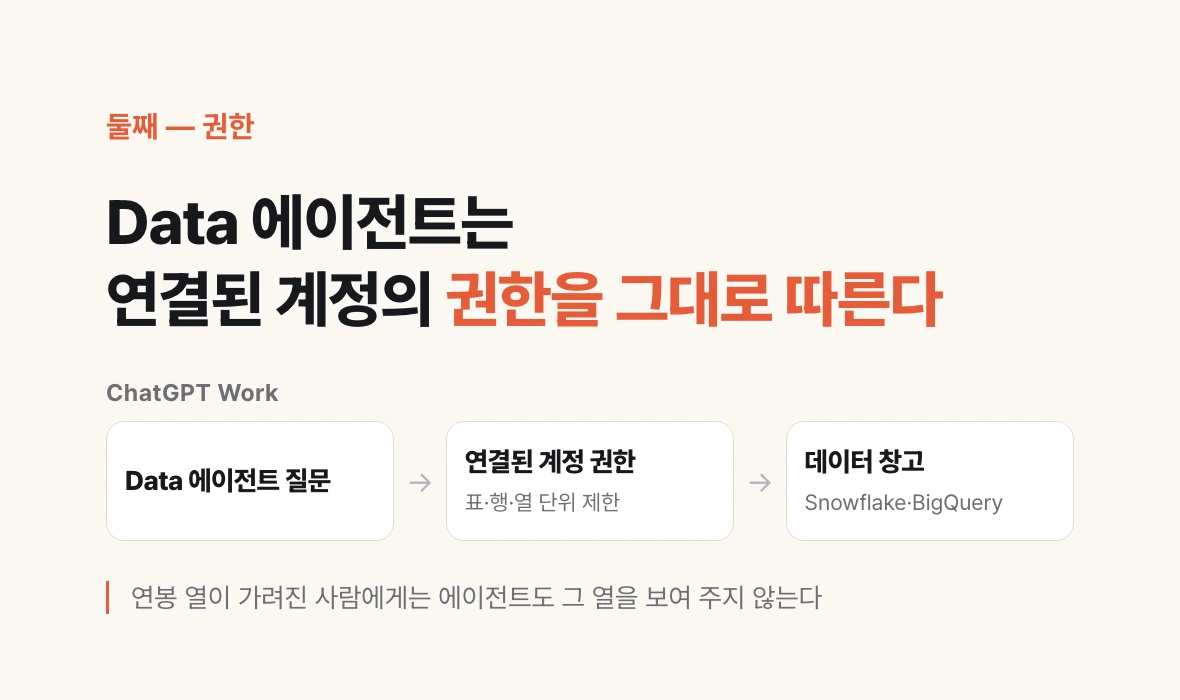
OpenAI's Data agent lets you ask questions of company data in plain language. It connects to the warehouses where companies keep their data, such as Snowflake, Google BigQuery, Databricks, Amazon Redshift and MongoDB, finds what changed, and builds dashboards. A dashboard is a status board that gathers numbers into charts and tables on one screen. It can also pull documents from Google Drive and SharePoint into the analysis.
The permissions description is specific. Administrators choose which data connections are available to which roles. The questions the agent sends to the data follow the permissions already set on the connected account, including not just table-level but row- and column-level restrictions. If the salary column in an HR table is hidden from you, the agent will not show it to you either.
For interpretation it uses the metric definitions the company has set. A metric definition is an internal agreement, such as 'revenue means the amount excluding VAT', that makes everyone read the same word as the same number. If those agreements are not written down, the agent produces plausible numbers that differ by department.
Muse describes the same axis. People choose which apps it connects to and, for email, whether it only reads or can also send on their behalf, and they can disconnect at any time. Meta says Muse does not share conversations or data with its ad systems.
The question to check: does the tool follow the permissions of the person using it, or does it run on broad permissions granted to the tool itself? If a company has not sorted out permissions per person, that comes before adopting an agent.
Third, how much can you use it per day?
Apple is rolling out Siri AI as a beta with iOS 27 on September 14. At first only users with their device language set to English can use it, with French, Japanese, Korean, Portuguese and Spanish coming in October. It will not initially be available on iPhone in the EU, and it is not available to users under 13.
The part worth a closer look is the footnote. Features that rely on models running on Apple's servers rather than on the device are subject to daily usage limits. Apple lists Siri AI, intelligent photo editing tools, Image Playground and AFM 3 cloud models in Shortcuts. Limits vary by feature, request complexity and system demand, and expanded access will be offered for a fee in the future.
Limits appear in the other announcements too. Muse is free of charge for most of what people need, with subscription plans for those who want to do more. Suno v6 opens its flagship model to Pro and Premier subscribers and the lighter v6-mini to everyone.
Why limits matter at work is simple. If you do not know when during the day the tool gets cut off, you cannot put it in the middle of a workflow. The question to check: what is the limit? If it is not published, what do you fall back on when you hit it?
Fourth, are the rights to use the output settled?
Suno announced v6 on September 9 and said it was developed with music industry partners including Warner Music Group, BMG and Believe. According to TechCrunch, Suno said v6 was not trained on the data used to train its previous versions. The same report noted that lawsuits brought by Sony and Universal Music Group are still ongoing.
The features have also shifted toward editing. You can change one section of a song in plain language, swap a single lyric, or lift a passage to build a new beat. As a next step, Suno previewed products where artists choose whether to participate and get paid when they do.
There is one more point for work. Suno says it will retire its previous models as v6 rolls out. Even if you enter the same prompt, the instruction you give an AI, a different model will answer next month. If the output goes outside the company, you need to record which model version made it and when, so you can explain it later.
The question to check: where are this tool's training data and output usage terms written down? When the model changes, does the production record of your output survive?
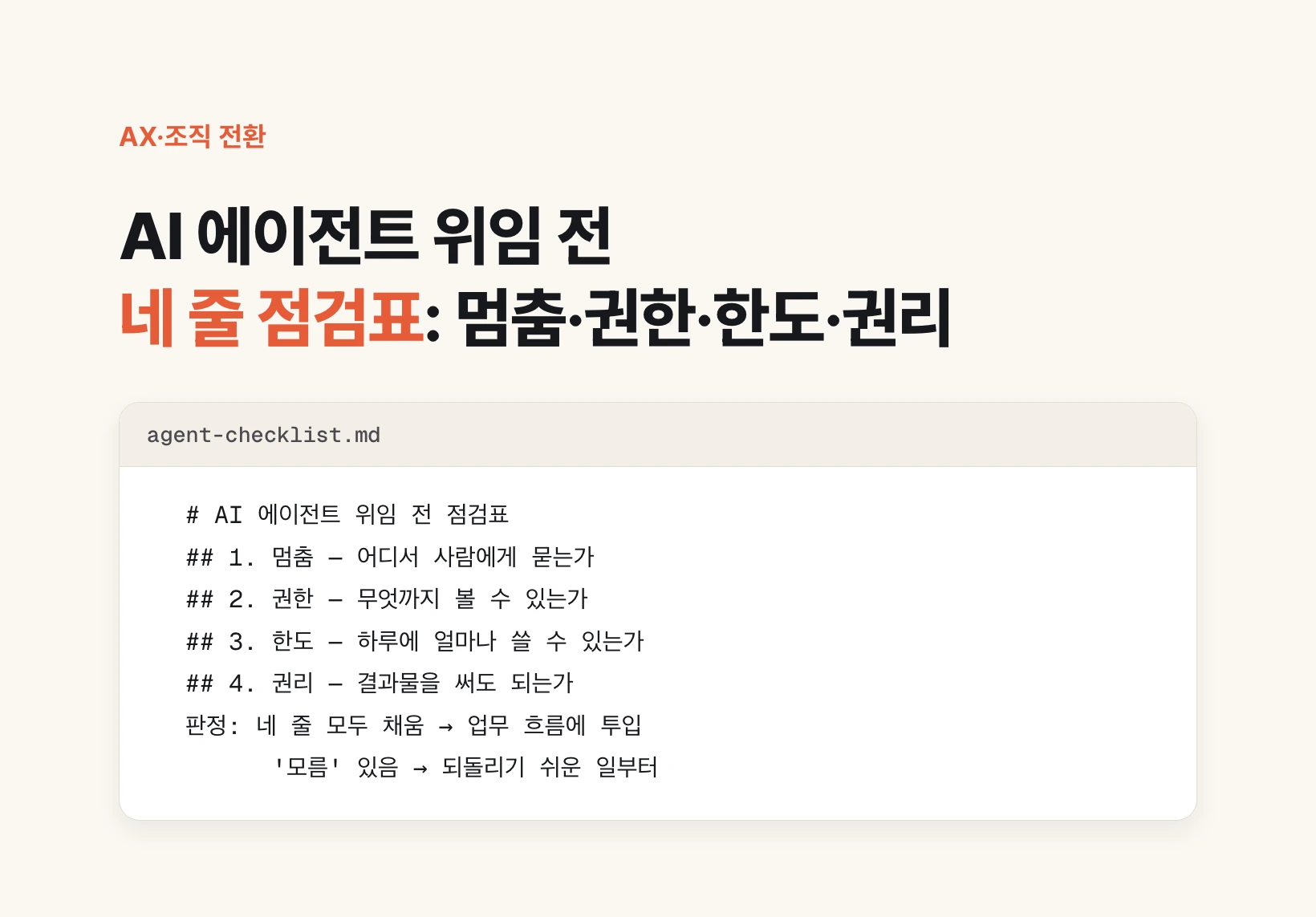
So what should you do? A four-line checklist
Before attaching a new AI tool to your work, and before building a feature comparison table, fill in the four lines below. The answers are usually in the announcement footnotes, pricing pages and terms of use.
Fill them in this order. First, list the actions where the tool stops to ask a person. If hard-to-undo actions such as payments, sending email or deleting files are missing from that list, flag them. Second, write down whose permissions the tool runs on. Third, write down the daily limit and your fallback when you hit it. Fourth, decide where to record output usage terms and the model version.
If any of the four lines says 'unknown', you do not have to stop adoption. Instead, attach the tool only to work that is easy to undo first: drafting, internal summaries, lookups a person checks at the end. Each time an 'unknown' gets filled in, widen what you hand over by one step.
# Checklist before delegating to an AI agent

Tool:
Checked on:

## 1. Stop: where does it ask a person?
- Actions it never takes without approval: (e.g. payment, sending email)
- Hard-to-undo actions missing from that list:

## 2. Permissions: how much can it see?
- Whose permissions does it run on: (the user / a tool-only account)
- Do row- and column-level restrictions carry over:

## 3. Limits: how much per day?
- Published limit:
- Fallback when blocked:

## 4. Rights: can you use the output?
- Where training data and usage terms are documented:
- Where the model version is recorded:

Verdict: all four filled → put it into the workflow
         any 'unknown' → start with easy-to-undo work