
Four symptoms, four names
This series has been reading an ERD using a mobile wedding invitation service as the example. An ERD is a blueprint that draws a database's tables and the relationships between them on one page. Part 01 covered entities (the things you manage) and columns, part 02 one-to-many relationships, part 03 many-to-many relationships and joins.
The lecture ends by introducing four advanced topics, briefly: the N+1 problem, transactions, indexes and migrations. The names sound like developer territory, but the lecture explains them through symptoms rather than code. When this happens, suspect that.
That approach suits vibe coders. Someone who handed the code to AI can see the screen and the behavior. You may not find the cause in the code, but you can notice that the list is slow or that the points never arrived. If you can put a name to the symptom, you know what to ask AI to check.
The table below summarizes the whole post. When you hit a symptom in the left column, put the name from the middle column into a request like the one on the right.
| Symptom | Suspect | What to ask AI |
|---|---|---|
| The list screen is very slow | N+1 problem, indexes | Check whether this list has an N+1 problem and whether an index is missing, both |
| Search is very slow | Indexes | Check whether the column this search uses has an index |
| Sign-up worked but the 300 points never arrived | Transactions | Check whether sign-up and the point grant are wrapped in one transaction |
| Existing data has to move, such as turning a column into its own table | Migrations | Show me a step-by-step plan before running anything |
The list is slow — the N+1 problem, and indexes
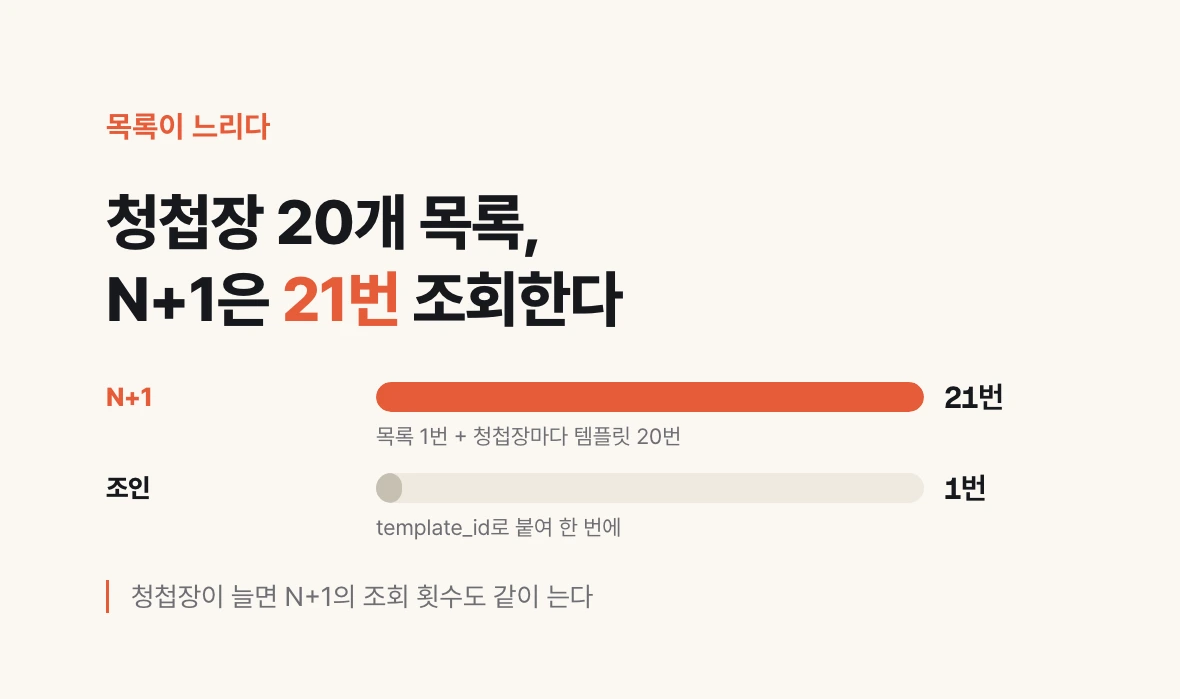
Picture the invitation list screen. Each invitation shows which template it uses, with a thumbnail and the template's address (URL). But the invitation table holds no template details, only the template's id (template_id). As in part 03, you find the row with that id in the template table and pull the address across. That is a join.
The list screen receives this data through an API. An API is the window the screen calls to ask for data. A well-built list API joins invitations and templates and fetches them in one go. The N+1 problem is skipping the join: fetching the invitation list once, then querying the template again for every row. One query for the list (1) plus one per row (N) gives N+1.
With only a few invitations you see no difference; as rows grow, the number of queries grows with them. So the lecture says to remember it by symptom. If calling a list API is very slow, suspect it. Then ask AI: check whether this list API has an N+1 problem.
Indexes show a similar symptom. An index is a table of contents built in advance for the database. Just as finding a passage in a book with no contents page means flipping from the start, searching on a column with no index means scanning the whole table. If search has become very slow, suspect indexes.
The point the lecture stresses is to suspect both together. If a list-style API call is very slow, ask about both: is it an N+1 problem, or is an index not set up properly? The symptoms are the same, so checking only one can miss the cause.
Drawing a list of 20 invitations

N+1 (the slow way)
① query 20 invitations                    → 1
② query each invitation's template        → 20
   21 in total, growing with every invitation

Join (the fast way)
① query invitations and templates joined on template_id at once → 1
Signed up, but no points — transactions
The lecture's example is sign-up. Say new members get 300 points. The database has a user table and a points table, separately. One sign-up must write a record to both.
If you sign up yourself, you may find the user created but the 300 points never added. Two things that should happen together, and only one happens because the tables are separate. A half-built account with no points is left behind.
A transaction handles several actions as one bundle. Bundled actions succeed together or fail together. It is like a bank transfer: money leaving your account and money arriving in the other account must not go their separate ways. If the point grant fails, the sign-up is rolled back as if it never happened.
The symptom is that only one of the things that should happen together has happened. You check it the way the lecture's example does: sign up yourself and see whether the points arrived. If not, ask AI: check whether sign-up and the 300-point grant are wrapped in one transaction; if either fails, both must be cancelled.
| Sign-up | Point grant | Without a transaction | With a transaction |
|---|---|---|---|
| Succeeds | Succeeds | Fine | Fine |
| Succeeds | Fails | A user with no points is left | Both are cancelled |
Moving templates into a table — migrations
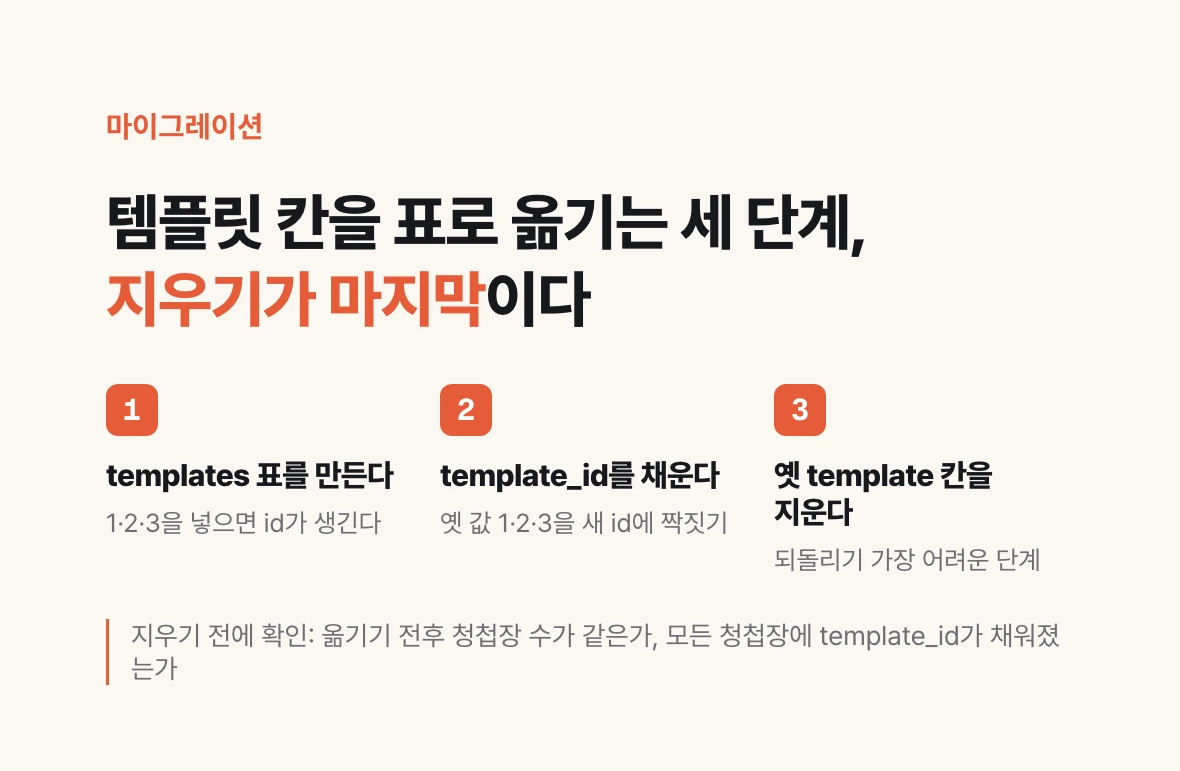
A migration is adding or changing entities in a database. According to the lecture, adding one new table is not much of a concern. What needs care is a change that has to move data already stored.
The standard case is the template promotion from part 02. At first, the template column on the invitation table was set to accept only 1, 2 or 3. That way of allowing only predefined values is called an enum. When templates needed managing, they were pulled out into their own table. On the blueprint that is one line redrawn, but if invitations already exist, it is a different story.
The order goes like this. First create the template table and put 1, 2 and 3 into it; each row gets an id that points at that row. Next, match each existing invitation's template value 1, 2 or 3 to the new id and fill in template_id. The two tables are already related, so these pairs must line up or errors follow. Finally delete the old template column, which is no longer needed.
The lecture's warning is that handing a large change like this to AI without looking produces a great many accidents. Stories of a database being mishandled and the data wiped out are mostly, it says, cases of leaving a migration to AI without paying attention. So it recommends a habit: do not leave this work to AI alone; check it yourself each time.
Checking does not have to mean reading code. Ask for a step-by-step plan before anything runs, confirm that the number of invitations is the same before and after the move and that every invitation has a template_id, and only then have the old column deleted. The deleting step is the hardest to undo.
Before: invitations
id  title          template
1   Invitation A   1
2   Invitation B   3

① create templates and insert 1, 2, 3
id    url  thumbnail
t-01  ...  ...
t-02  ...  ...
t-03  ...  ...

② fill invitations.template_id
   template 1 → templates.id t-01
   template 3 → templates.id t-03

③ delete the old invitations.template column ← hardest to undoI want to run a migration that moves the template column into a templates table.
Show me a step-by-step plan before running anything.
Also tell me how to check that the number of invitations is the same before and after,
and that every invitation has a template_id filled in.
I will delete the old template column myself after I check.What a finished ERD shows you
What the lecturer singled out as most important is not the four accidents but the finished ERD itself. Look at a finished ERD and you can see what you have built and what you have not.
When you need to add a feature, you can see where to add what, and from the current relationships you can quickly work out for yourself which features are possible and which are not. This is the map from part 01 for reconstructing, months later, what you actually built.
The four accidents have their places on that map too. The N+1 problem is about how data is fetched along the lines connecting tables; an index is a table of contents attached to a column you search often. A transaction is about the two tables one action touches; a migration is about the moment you redraw a line. If you can read the ERD, you can also see where to point AI when a symptom appears.
That completes the four parts based on the ERD lecture. Next we move to the HTML lecture and use a consultation request form to see why UI is a problem with right answers.