The rules were in a document, and only readers followed them
This is the second piece in the “AX Journey” series. At a development organization that builds services for pharmacies, I led AX and put five things in place between June and October 2026. This piece covers the first: shared AI rules.
At first we used the usual method. We wrote down what to follow and announced it. The result was also usual. The AI of people who read the document followed the rules, and the AI of those who didn't worked however it liked. The same request gave different results depending on the person.
One sentence written on August 27 changed the direction: “Minimize changes to how people behave, and cover it with AI.” Instead of making people memorize rules, have the AI read them itself every time it starts work.
CLAUDE.md — a note the AI reads first every time it starts
Claude Code is Anthropic's AI tool that reads and edits code through conversation in the terminal. If a file named CLAUDE.md sits at the top of the working folder, it reads that file first at the start of every session. It is like a note stuck on a new colleague's desk, except this colleague never skips the note.
So the rules moved from the notice board to CLAUDE.md. Without anyone having to remember, every Claude working in that folder reads the same rules.
The problem was that there was more than one folder. This organization's service code is split across seven repositories. A repository (repo) is a shared folder that holds one project's code and change history. Copy the same rules by hand to the pharmacy site, the admin site, the app front end and server, and the ad server, and someone will inevitably update one and forget the rest.
From one rules repository to 7 repos, and to every PC
So the original was gathered in one place. A separate rules repository holds only the rules, and the seven service repositories hold copies that nobody edits directly. There is always exactly one place to change.
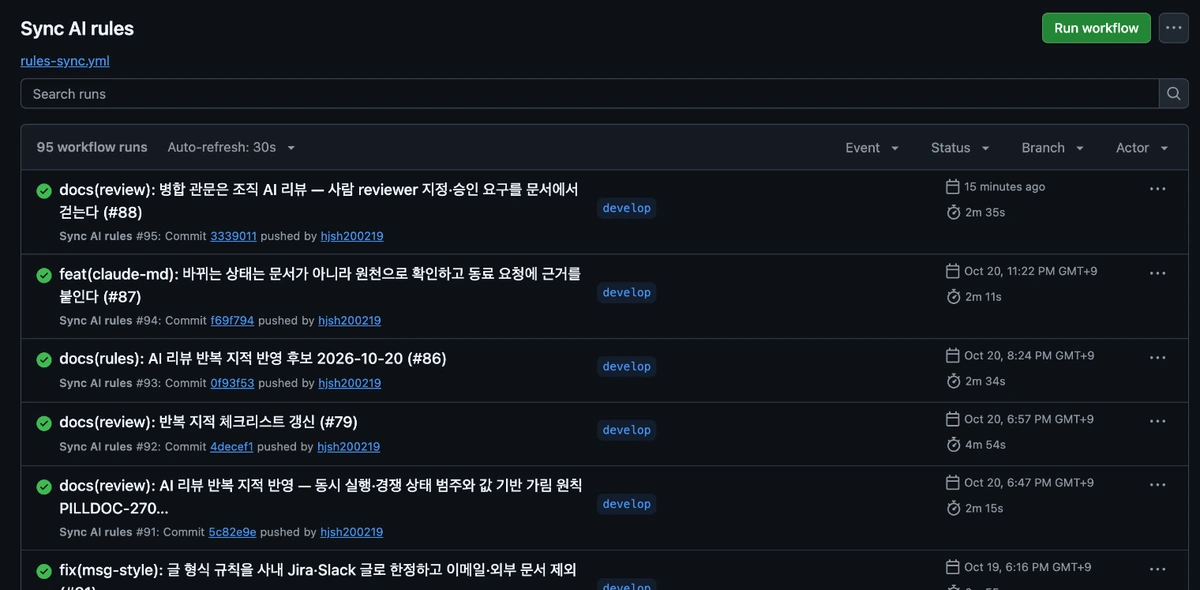
People don't do the copying. When a change lands on the rules repository's shared line of work (the develop branch), GitHub Actions runs a job called “Sync AI rules” that copies the rules into the seven repositories. GitHub Actions is GitHub's automation feature that runs predefined jobs when something changes in a repository. As the screen shows, each run takes a little over 2 to 5 minutes, and as of October 21 the last 95 runs all succeeded.
On team members' PCs, the new rules apply from the next session after one command that fetches the latest version (git pull). The person who changed a rule doesn't send an announcement; they submit one change.
In the two days shown on screen, from the evening of October 20 to October 21, the rules changed five times. Done by memo, that would have meant five announcements and five rounds of “did you read it?”
What goes into the 8 core rules
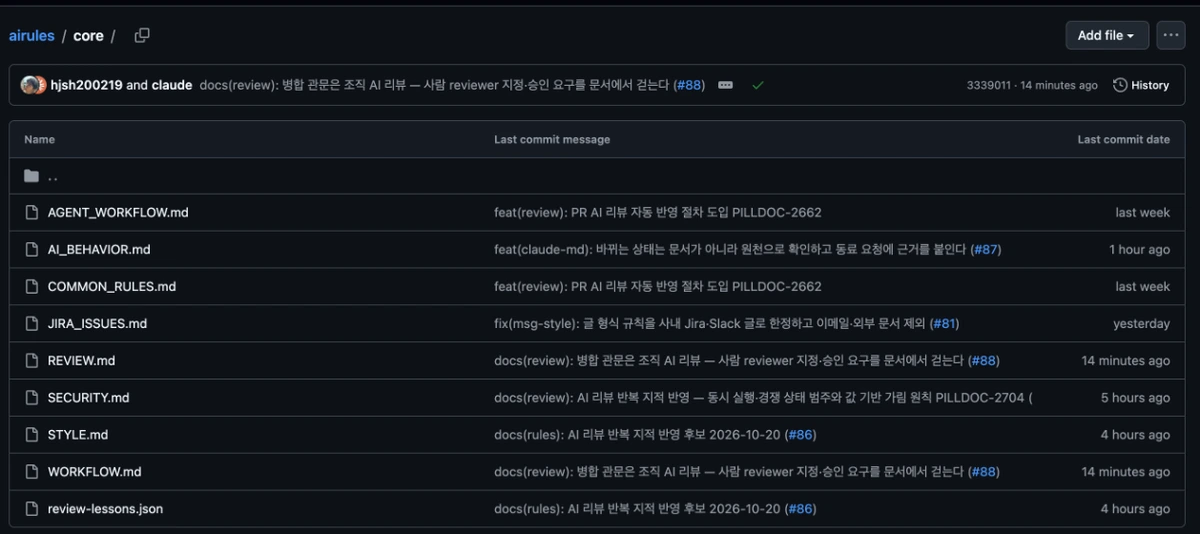
The rules repository has two layers. core holds eight shared rule documents that go identically into every repository, and below it are seven project rule sets with what differs per repository (the technology used, how it deploys). The shared rules cover the order of work, the AI's behavior, how to write issues, review, security, and code style.
Of the rules the AI reads every time, three had the biggest effect. The table gives their meaning and the reason. A commit is saving a change as one bundle, and a branch is a separate line split off so you can work without touching the original.
Rule sentences are short and checkable. “Work carefully” can't be checked, but “don't push without being asked” is clearly kept or broken. A rule has to be checkable before it can move into the automatic checks covered in the next piece.
| Rule | Meaning | Why |
|---|---|---|
| Don't push without being asked | Uploading changes from your PC to the shared repository (push) happens only when a person says so | A change in the shared repository immediately touches other people's work and the service |
| 1 issue = 1 branch = 1 commit = 1 push | One task, one line of work, one save, one upload | Any change can be traced back through a single work item number |
| Write the test first for every done condition | Before changing code, write a test that checks in code what “done” means | When the AI says “done,” the test checks that claim |
Rules are requests — so a next step was needed
What the rules repository changed was the shape of the work. Anyone who wants to change a rule submits a change proposal instead of a memo. That is why “reflect repeated AI review findings” appears several times in the change messages on screen. When AI review keeps raising the same point, it becomes a rule line the next day. Part 6, “Daily retrospective,” covers this loop.
The limit was clear too. CLAUDE.md is a request to the AI. It is mostly followed, but there is no guarantee, and if someone adds different settings on their own PC, results diverge again.
So we moved to the second step. Rules that must always hold were turned from requests into settings that can't be switched off. The next piece, “Claude Team managed settings,” tells that story.
One thing to try today — three lines in CLAUDE.md
If you use Claude Code, create a CLAUDE.md file at the top of your working folder and add the three lines below. Typing /init inside Claude Code reads the folder and drafts a CLAUDE.md, so you can also append them to that.
Save, open a new session, and ask “Tell me the rules of this project you just read.” If it repeats the three lines, they are in effect.
If you have several folders and want the same rules everywhere, put them in ~/.claude/CLAUDE.md, which applies to your whole PC. The moment you widen this to a team, you need the rules repository from this piece.
# Rules for this project
- Do not push until I tell you to.
- Before changing code, write the test that checks the done condition.
- Do not make up facts you do not know; write "unverified" instead.