What Bing Webmaster Tools is
It is the management console Microsoft gives site owners for free, at bing.com/webmasters. You can sign in with a Microsoft account, but also with a Google or Facebook account. Nothing to install.
The screens map almost one to one onto Google Search Console. Which pages are indexed, which queries showed and got clicked, whether sitemaps are healthy, who links to you, whether robots.txt has syntax errors. If you have used GSC, there is little new to learn.
Three things exist here that GSC does not have. First, the direct URL submission quota is large: 10,000 per day. Second, IndexNow keys are issued and managed on this screen. Third, the AI Performance report added in 2026. Those three are the practical reason to register today.
Judged on search share alone, the case looks weak. Few people in Korea search on Bing. But the value of the Bing index right now comes not from the search box a human types into, but from the place an AI answer stops by when it looks for sources.
The ChatGPT search bot is not a Bing bot — clearing up the premise
The most common sentence in GEO writing is this: ChatGPT uses Bing, so you must register with Bing. It is half right. The wrong half is what causes trouble in practice.
Start with crawling. OpenAI documents four of its own bots. OAI-SearchBot (user agent OAI-SearchBot/1.4) surfaces sites in ChatGPT's search features, GPTBot (GPTBot/1.4) collects content for model training, ChatGPT-User (ChatGPT-User/1.0) fetches pages when a user asks for a specific link, and OAI-AdsBot (OAI-AdsBot/1.0) validates ad landing pages. Each publishes its IP ranges at addresses such as openai.com/searchbot.json.
So the user agent that shows up in your server log because of ChatGPT is not bingbot; it is OAI-SearchBot. That is also what you allow or block in robots.txt. Registering a site with Bing has nothing to do with OpenAI's crawler.
What about the retrieval step? OpenAI's help center says only that ChatGPT search sometimes partners with other search providers, and names Bing as one of those partners. Sometimes, one of. That is not the same as everything going through Bing, and from the outside you cannot tell which question took which path.
Microsoft Copilot, by contrast, is unambiguous. Bing itself names Microsoft Copilot and AI-generated summaries in Bing as what the AI Performance report covers. The word ChatGPT never appears there.
The summary: the certain return on registering with Bing is Copilot and Bing's AI summaries; ChatGPT is indirect and unmeasured. Register anyway — because the cost is one account connection, not because ChatGPT is guaranteed. Blur that line and you will later read the report's numbers as ChatGPT performance.
Path A — import from Google Search Console (recommended)
If you already use GSC there is no reason to verify ownership twice. Bing accepts your GSC verification as is.
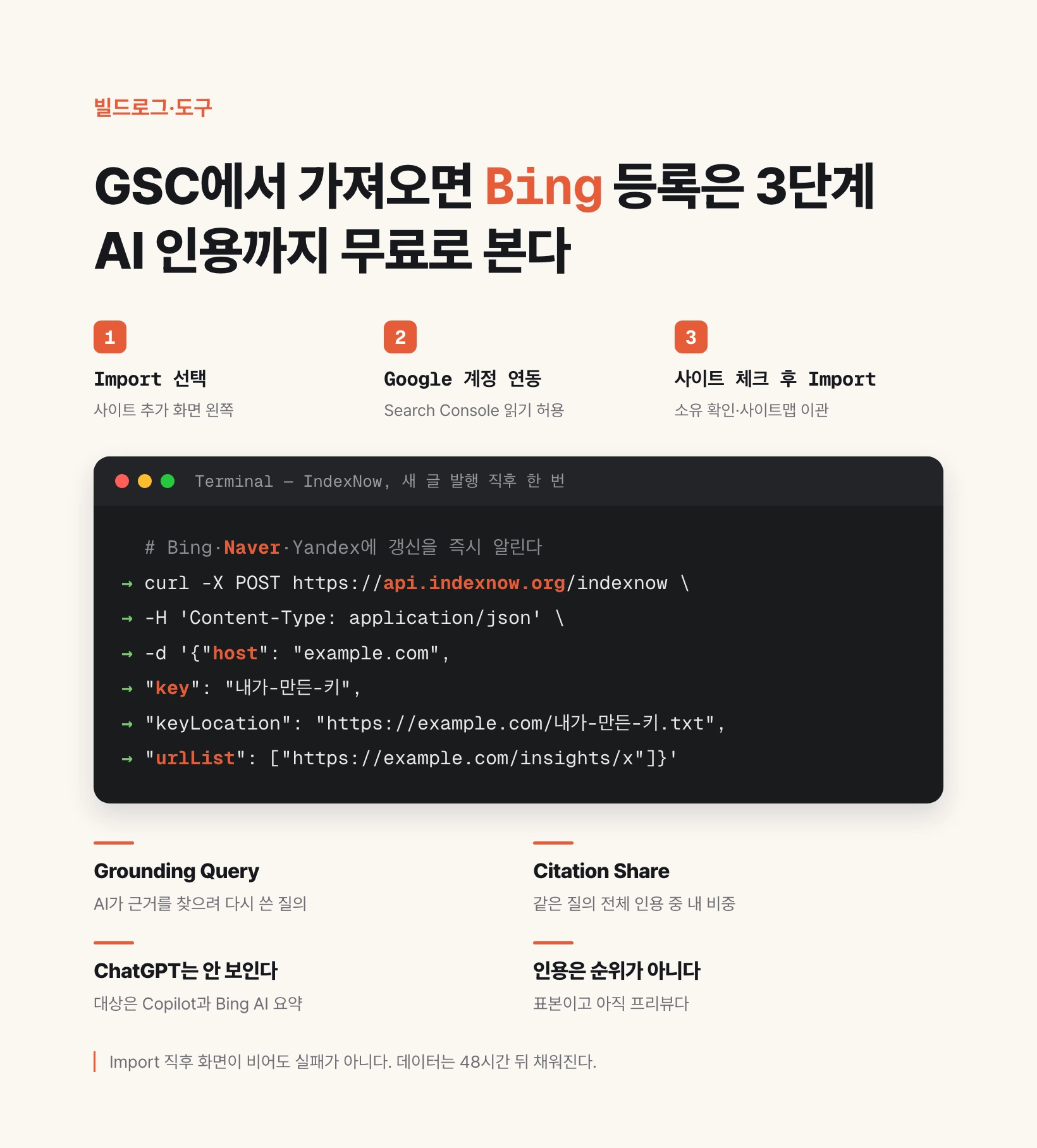
Step 1. Go to bing.com/webmasters and sign in. On the add-site screen a dialog offers two methods: on the left, import from Google Search Console; on the right, add your site manually. Click the Import button on the left.
Step 2. A panel explains what will be imported. Click Continue, sign in with your Google account, and grant Bing permission to read your Search Console data.
Step 3. Your GSC sites are listed, each with its sitemap count and your role. Check the ones you want and click Import.
That is the whole flow. Imported sites arrive already verified, and their sitemaps come with them. The upload-a-file or edit-your-DNS step disappears entirely.
Two limits apply: up to 100 sites per import, and up to 1,000 per Bing Webmaster Tools account. Past 100, repeat the process; you can also import from several Google accounts.
Data can take up to 48 hours to populate. An empty screen right after importing is not a failure. Look again tomorrow.
One caution. Import is delegated verification, not an exemption. Bing periodically re-checks ownership against your GSC account. If that access later disappears, you must reconnect or move verification to the meta tag or DNS method below.
Path B — the three ownership checks when you add a site manually
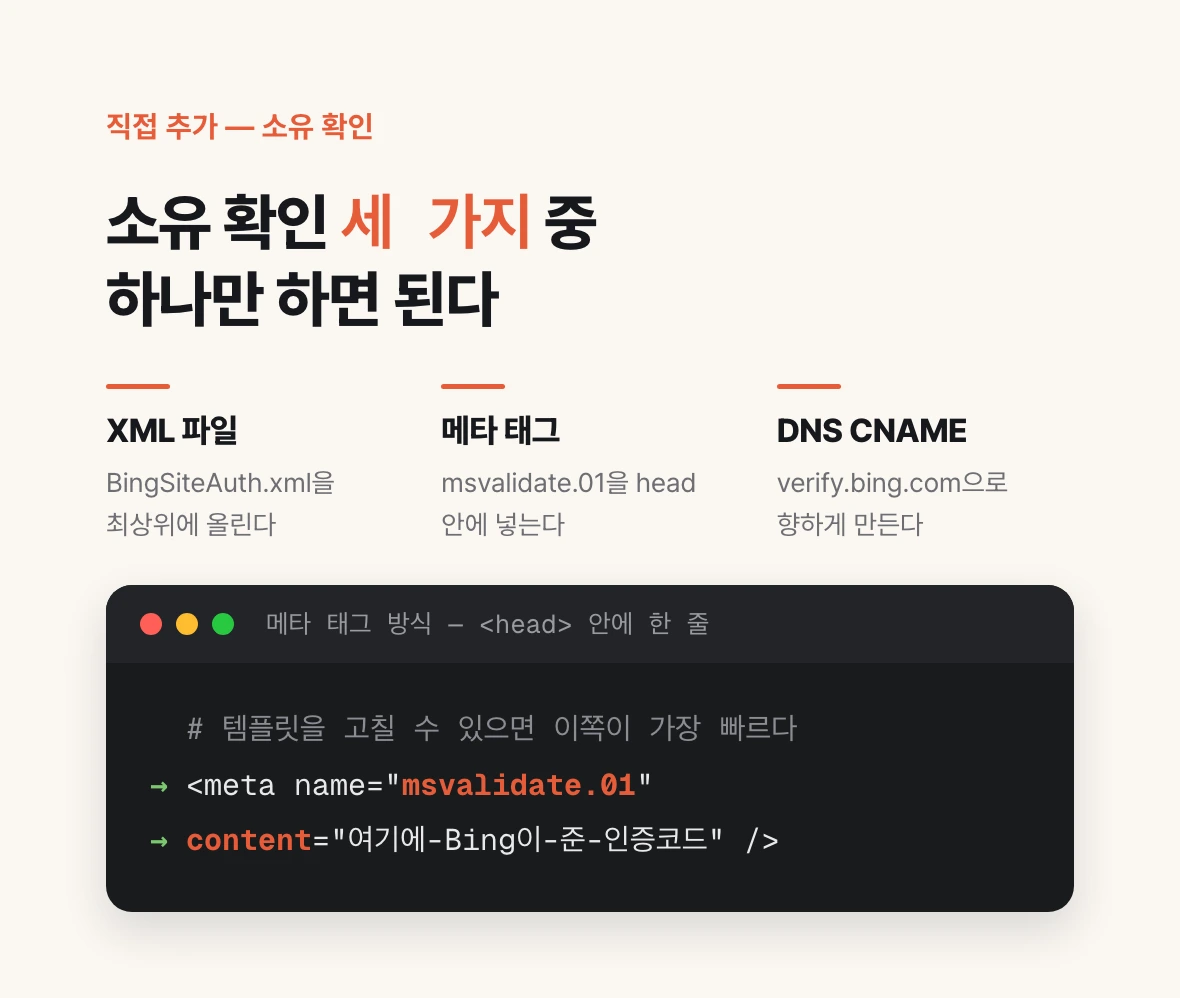
If you do not use GSC, or would rather not connect a Google account, add the site directly. Enter the address and Bing offers three ways to prove ownership.
First, an XML file. Download the BingSiteAuth.xml that Bing generates and upload it to the root of your site. Simplest if you can put files on the host over FTP or static hosting.
Second, a meta tag. Put a meta tag named msvalidate.01 in the head of your homepage. Fastest when adding one line to a template is easy, as in Next.js or WordPress.
Third, a DNS CNAME record. Point the CNAME name Bing gives you at verify.bing.com. This verifies at the domain level, so it covers subdomains at once and survives a full site rebuild. The most durable choice long term.
Choosing is simple: file if you can upload files, meta tag if you can edit templates, CNAME if you can edit DNS. One of the three is enough.
<meta name="msvalidate.01" content="YOUR-BING-VERIFICATION-CODE" />Three things to do right after registering — sitemap, URL submission, IndexNow
Register and close the tab and nothing happens. Three more steps get indexing actually moving.
One, the sitemap. If you imported from GSC it is already there; just confirm it on the Sitemaps screen. Otherwise submit your sitemap.xml address directly. Bing recommends refreshing sitemaps at least once a day. If you publish often, make sure your build regenerates the sitemap every time.
Two, URL submission. Most sites can push up to 10,000 URLs per day. Bing raised the quota from 10 a day back in 2019 and it has held since. When you publish, submit that URL immediately rather than waiting for a crawler.
Three, IndexNow. This is a protocol, not a Bing-only feature. Generate a key of 8 to 128 characters (letters, digits, hyphens), upload a text file named after that key to your site root, and ping the API whenever content is added, updated or deleted. A single POST carries up to 10,000 URLs.
IndexNow deserves its own emphasis because the participating engines are not only Bing: Naver, Yandex, Seznam, Yep and Amazon are on the list. For a Korean site, Naver being there is reason enough. Once wired, it is one extra request at the end of your publishing script.
Rate limits differ by engine and are not published. A 429 response means you exceeded one — read the Retry-After header and resend.
curl -X POST https://api.indexnow.org/indexnow \
  -H 'Content-Type: application/json' \
  -d '{
    "host": "example.com",
    "key": "YOUR-GENERATED-KEY",
    "keyLocation": "https://example.com/YOUR-GENERATED-KEY.txt",
    "urlList": [
      "https://example.com/insights/new-post"
    ]
  }'
The AI Performance report — what you can see
The screen opened in public preview on 10 February 2026. It shows how often your pages are cited as sources in AI-generated answers, across Microsoft Copilot, AI-generated summaries in Bing, and unnamed select partner integrations.
There are four base metrics. Total Citations is the number of citations displayed as sources during the selected period. Average Cited Pages is how many distinct pages of yours were used as sources per day. Grounding Queries are the key phrases the AI used when retrieving the content it cited. And there is page-level citation activity.
Grounding queries carry the most practical value. They are not what the user typed but the query the model rewrote internally to find supporting documents. People ask long questions; models turn them into short, search-shaped ones. Once you can see which rewritten queries your article matched, rewriting titles and subheadings to that vocabulary becomes the concrete work of GEO — observed rather than guessed.
On 16 June 2026 four more capabilities arrived in preview. Intents classifies grounding queries into categories such as Informational, Commercial, Navigational, Learn and Solve, Research, Creation and Local. Topics clusters individual queries into thematic groups. Citation Share is your site's percentage of all citations shown for the same grounding query. Compare overlays a previous period.
Citation Share is not a competitor tool. Bing states it is observational, does not expose competitor data, and does not represent traffic.
| Metric | What it counts | How to use it |
|---|---|---|
| Total Citations | Citations shown as sources in AI answers in the period | Overlay it on your publishing cadence to see which formats get cited |
| Average Cited Pages | Distinct pages cited per day | Tells you whether one post carries you or many share the load |
| Grounding Queries | Rewritten queries the AI used to retrieve sources | Rewrite titles and subheadings into that vocabulary |
| Citation Share | Your share of all citations for the same query | Separates you growing from the whole query growing |
What you cannot see — this report does not measure ChatGPT
Write down the limits before opening the report. Misread numbers become reported results that never happened.
First, ChatGPT is not covered. The word appears nowhere in Bing's announcement, which says only select partner integrations without naming them. Assume ChatGPT citations are invisible here.
Second, grounding queries are a sample, not the full set. Bing says so explicitly. Absence from the list does not mean absence of citations.
Third, citation counts are not rankings. Bing states the metrics reflect how often pages are cited, not importance, ranking or placement.
Fourth, citations are not traffic. Being listed as a source in an AI answer is separate from someone clicking. Rising citations with flat visitors is a normal state.
Fifth, it is a preview. Bing itself notes the June additions run on evolving systems whose precision will improve, particularly for specialised domains.
So measure the ChatGPT side by other means. One is direct query testing: put your topic's representative questions into ChatGPT regularly and check whether your page appears as a source. The other is your server log: count OAI-SearchBot and ChatGPT-User hits by user agent to see whether OpenAI is actually reading your site. Read the Bing report as a Copilot dashboard, and measure ChatGPT with those two.
The GEO habit — split training bots from search bots in robots.txt
To be cited you must first be crawled. Bing registration and IndexNow both assume robots.txt is open upstream. That is where the most common accident happens.
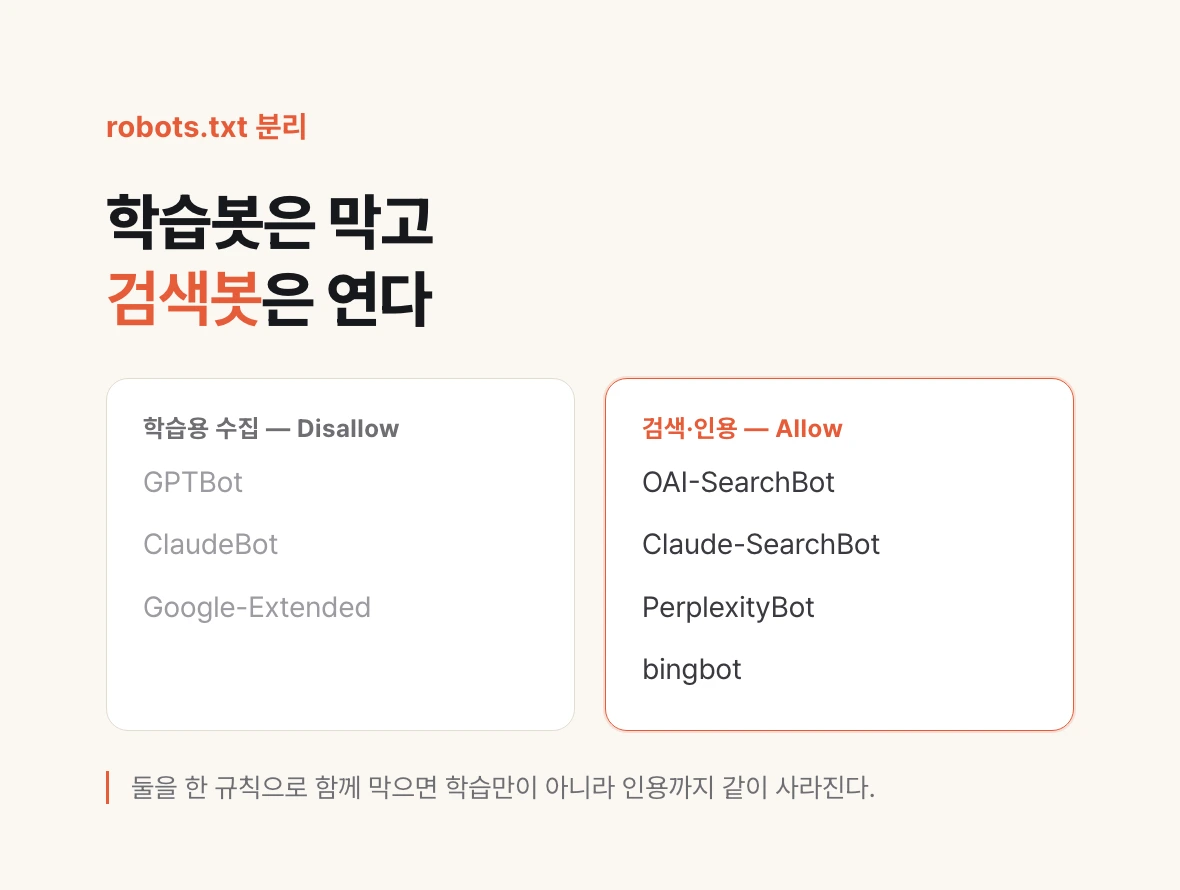
AI bots split into three kinds: training collection (GPTBot, ClaudeBot, Google-Extended), search and citation (OAI-SearchBot, Claude-SearchBot, PerplexityBot, bingbot), and user-initiated fetches (ChatGPT-User). OpenAI notes that the last one may not follow robots.txt, because a person asked for it.
The accident goes like this. You dislike your writing being used for training, so you block GPTBot — and the same rule blocks the search bots too. Now training is blocked and so is citation. You closed the very path by which your site appears as a source in AI answers.
One platform has actually split them. Brunch blocks training crawlers such as GPTBot, ClaudeBot and Google-Extended outright in robots.txt while allowing search bots such as OAI-SearchBot, Claude-SearchBot and PerplexityBot. It gives up the training asset and keeps the citation asset. Knowing that distinction changes where you decide to publish what.
For a personal or company site, allowing everything is usually the right default. This site's robots.txt is one blanket allow plus a sitemap line. If citation is the goal, there is little reason to narrow it.
The order, then: open search bots in robots.txt, register with Bing to create the indexing path, use IndexNow to announce updates instantly, and only then watch AI Performance for which queries you match. Content polish sits on top of that observation. Invert the order and you can write well and stay unread for a long time.
# Block training collection only
User-agent: GPTBot
Disallow: /

User-agent: ClaudeBot
Disallow: /

User-agent: Google-Extended
Disallow: /

# Allow search and citation bots
User-agent: OAI-SearchBot
Allow: /

User-agent: PerplexityBot
Allow: /

User-agent: bingbot
Allow: /

User-agent: *
Allow: /

Sitemap: https://example.com/sitemap.xml