What each of the five is responsible for
Install Claude Code and all you see is a chat box. That works, but after a few days you catch yourself typing the same things again: this is how you run the project, don't touch that folder, run the tests before committing.
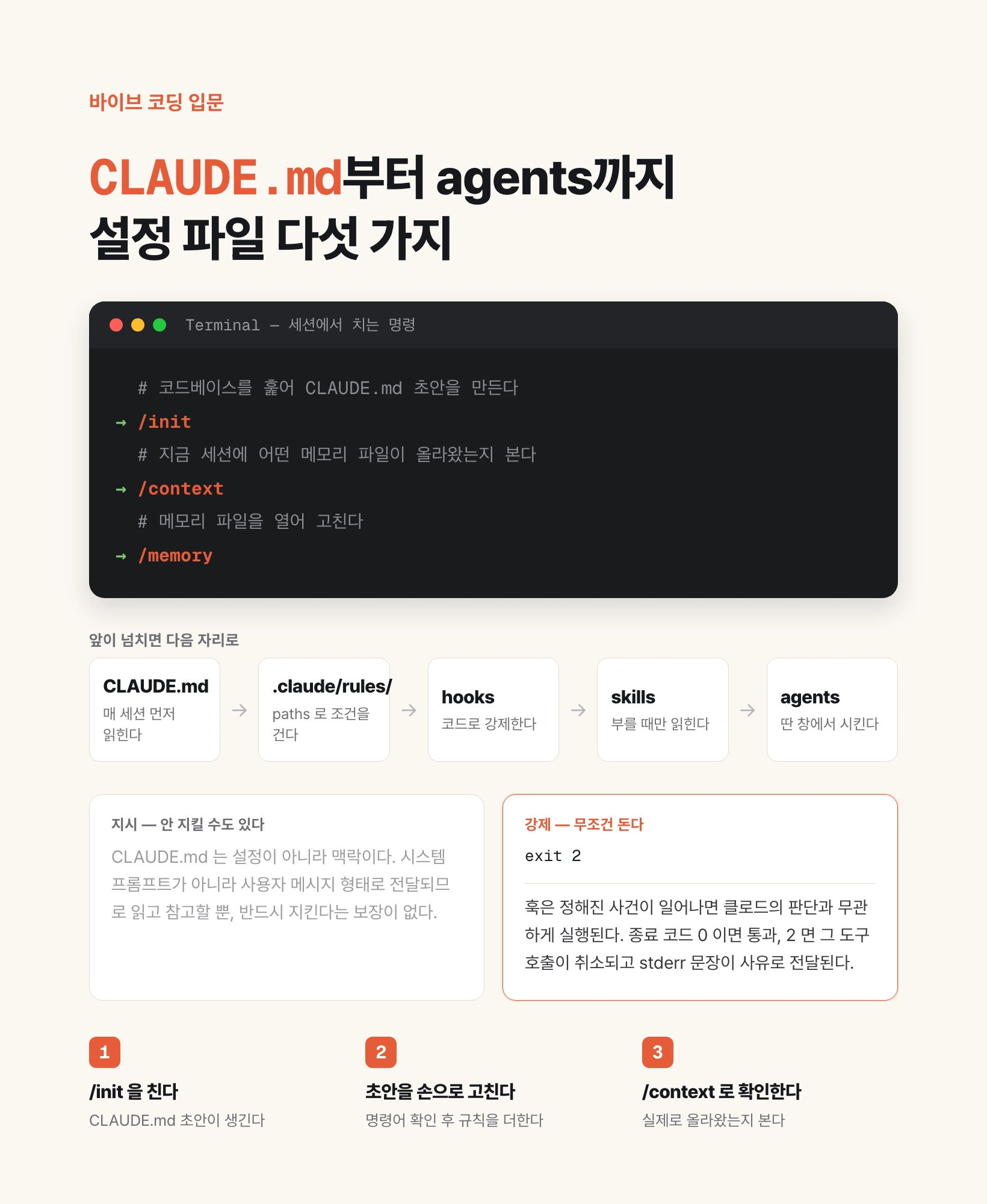
Five mechanisms remove that repetition. The names look similar but they behave very differently, and two axes separate them: when the content is read, and whether it is instruction or enforcement.
Start with the map. The table below is the whole article in summary.
| Name | Where you create it | When it is read | Character |
|---|---|---|---|
| CLAUDE.md | Project root or ~/.claude/ | Always, at session start | Instruction |
| Rules | .claude/rules/*.md | Always, or only for matching files | Instruction |
| Hooks | .claude/settings.json | Every time a given event fires | Enforcement |
| Skills | .claude/skills/<name>/SKILL.md | Only when invoked | Procedure |
| Agents | .claude/agents/<name>.md | Only when work is delegated | Division of labor |
my-project/
├── CLAUDE.md                  # read first, every session
└── .claude/
    ├── settings.json          # where hooks are declared
    ├── rules/
    │   ├── testing.md
    │   └── api.md             # can be scoped with paths
    ├── skills/
    │   └── deploy/SKILL.md    # invoked as /deploy
    └── agents/
        └── code-reviewer.md   # review runs in its own window
CLAUDE.md — the first file read when a session starts
It is exactly what the name says: one file. Put a file called CLAUDE.md in your project folder and Claude Code reads it before the conversation begins, every time it starts.
Why it is needed: a language model does not remember previous conversations. It appears to because saved content is sent along with each prompt, and this file is that saved content. If you don't want to explain yesterday's build command again today, write it here.
What goes in it: whatever you would otherwise re-explain. Signals include seeing the same mistake a second time, typing the same correction you typed last session, or content a new teammate would have asked about anyway. Concretely: what the project does, what it is built with, which commands run, test, and deploy it, and what must never be done.
The file can live in four places, and all of them are concatenated from broadest to narrowest scope: a managed policy file deployed across an organization, ~/.claude/CLAUDE.md for your whole account, the project's CLAUDE.md shared with the team, and CLAUDE.local.md for yourself. Put the last one in .gitignore so it is never committed.
If starting from a blank file is hard, type /init in the terminal. Claude scans the codebase and drafts a file with the build commands, test instructions, and conventions it finds. If a file already exists it proposes improvements rather than overwriting.
The most common beginner mistake here is length. People write an autobiography, while the documentation recommends staying under 200 lines per file. This file is loaded into context in full every session, so length costs tokens and reduces adherence. Phrasing should also be concrete enough to verify: "use 2-space indentation" holds where "format code properly" does not.
One fact you must know: CLAUDE.md is context, not configuration. It is delivered as a user message rather than as part of the system prompt, so Claude reads and tries to follow it with no guarantee. Anything that must be blocked belongs to hooks, covered further down.
To confirm a file actually loaded, run /context in a session and check the memory file list. To open and edit them, run /memory.
If you already keep an AGENTS.md for other tools, Claude Code does not read it. Create a CLAUDE.md whose first line is @AGENTS.md and both tools share one source.
| Scope | Location | Use for |
|---|---|---|
| Managed policy | macOS: /Library/Application Support/ClaudeCode/CLAUDE.md | Organization-wide standards |
| Your account | ~/.claude/CLAUDE.md | Personal preferences across all projects |
| Project | ./CLAUDE.md or ./.claude/CLAUDE.md | Rules shared with the team |
| Personal, per project | ./CLAUDE.local.md | Your own values. Add to .gitignore |
# my-shop

## Project
An online ordering page built with Next.js 15 and Supabase.

## Commands
- Dev server: `npm run dev`
- Tests: `npm test`
- Deploy: `vercel deploy --prod`

## Rules
- Price calculation happens only in `src/lib/price.ts`.
- Always run `npm test` before committing.
- Never open or commit the `.env` file.
Rules — where CLAUDE.md goes when it grows
Staying under 200 lines immediately raises the question of where the overflow goes. That place is .claude/rules/.
Setup is simple: create a .claude/rules/ folder in the project and put markdown files in it, one topic each. Name them so the filename alone tells you the topic, such as testing.md, api-design.md, or security.md. Subfolders are discovered too.
Stop there and you have merely split CLAUDE.md across files. The real difference is the next feature.
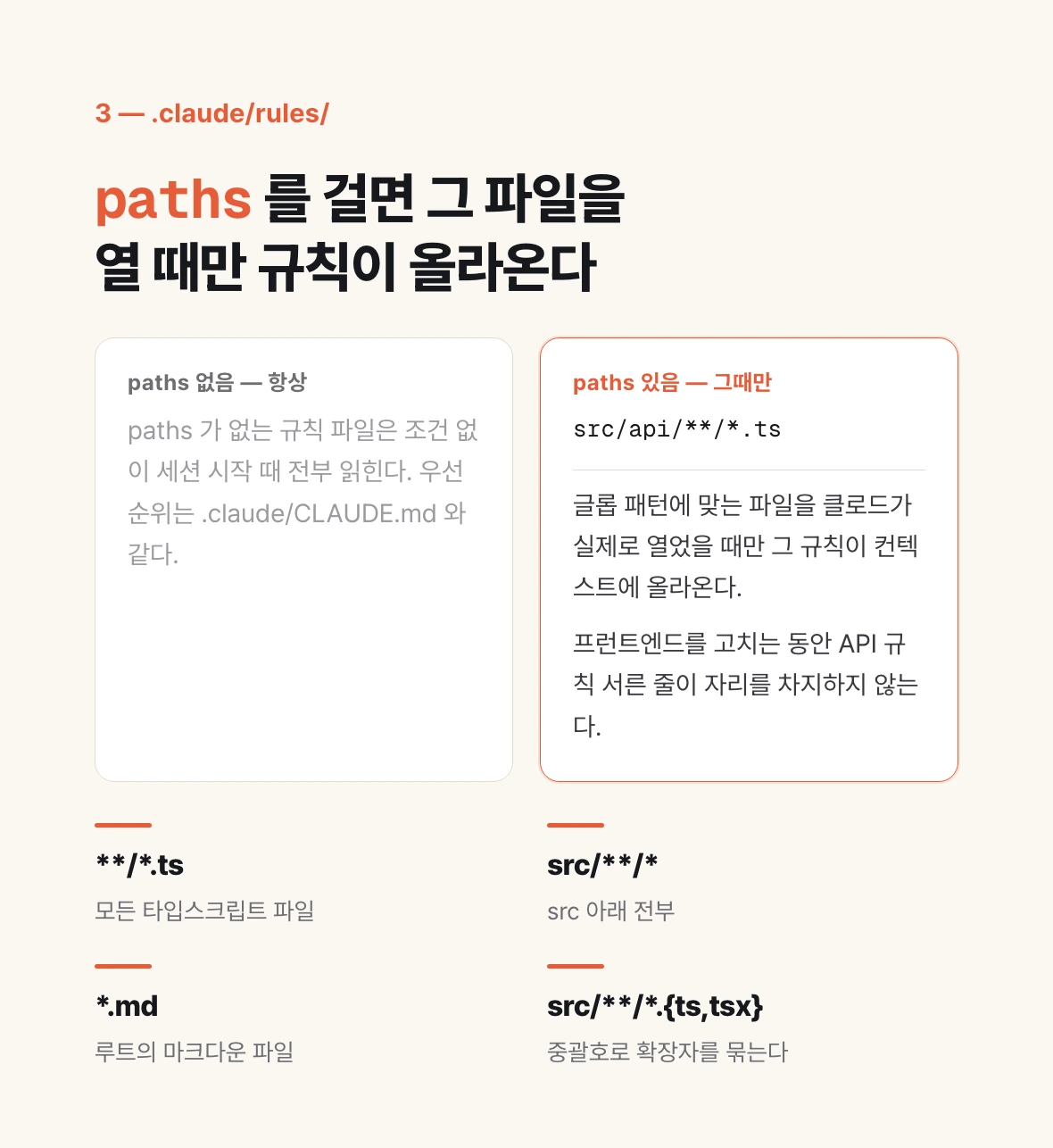
Add a paths field at the top of a rule file and it becomes conditional. Write glob patterns, as in the example below, and the rule enters context only when Claude actually opens a file matching them. Thirty lines of API rules take up no space while you work on the frontend.
Rule files without paths load unconditionally at session start, at the same priority as .claude/CLAUDE.md.
The patterns are ordinary globs. **/*.ts means every TypeScript file, src/**/* means everything under src, *.md means markdown at the root, and src/components/*.tsx means React components in that one folder. Braces group extensions, as in src/**/*.{ts,tsx}.
Rules can also attach to you rather than a project. Files in ~/.claude/rules/ apply to every project on your machine. Personal rules load before project rules, which gives project rules the stronger position.
Remember one distinction. Rules enter context automatically, always or when a matching file is touched. Skills, covered next, enter only when invoked. A sentence that must always hold is a rule; a procedure needed only for a specific task is a skill.
---
paths:
  - "src/api/**/*.ts"
---

# API Development Rules

- Every endpoint validates its input.
- Error responses use the one standard format.
- New endpoints carry OpenAPI comments.
Hooks — blocking in code instead of asking politely
The first two are instructions. Claude reads and considers them, and may still not comply. Anything that must hold needs a different kind of mechanism, and that is a hook.
A hook is a shell command that runs automatically whenever a given event fires. Claude does not decide to run it; it runs whenever the condition matches. That is why this is the only enforcement layer.
Hooks are declared in .claude/settings.json. The structure has three levels: which event to attach to, what to narrow to within that event, and which command to run.
There are many event names, but five are enough to start. SessionStart fires when a session begins, UserPromptSubmit when you send a prompt, PreToolUse right before a tool runs, PostToolUse right after, and Stop when Claude finishes a response.
The matcher narrows the target within an event. For tool events it filters on tool name: Bash matches only the Bash tool, Edit|Write matches both, and an empty value or * matches everything.
The command receives JSON on stdin describing which event fired, which tool is involved, and what arguments it was given. The example below reads those values to block a force push.
The exit code is the point. It is the hook's decision. Exit 0 and the call proceeds. Exit 2 and the tool call is cancelled, with whatever you wrote to stderr handed to Claude as the reason. Any other code is logged as an error while the work continues.
What it is actually used for: running a formatter after an edit, blocking changes to a specific folder, or sending a notification when work finishes. If CLAUDE.md says "run the tests before committing" and it keeps getting skipped, that sentence belongs in a hook.
| Exit code | Meaning | What happens |
|---|---|---|
| 0 | Success | Work proceeds. Stdout usually goes to the debug log |
| 2 | Blocking | The tool call is cancelled and stderr is handed to Claude as the reason |
| Anything else | Non-blocking error | Work proceeds and the error is logged |
{
  "hooks": {
    "PreToolUse": [
      {
        "matcher": "Bash",
        "hooks": [
          {
            "type": "command",
            "command": "$CLAUDE_PROJECT_DIR/.claude/hooks/no-force-push.sh"
          }
        ]
      }
    ]
  }
}
#!/bin/bash
# A hook receives JSON on stdin. tool_input.command holds the command about to run.
cmd=$(jq -r '.tool_input.command // ""')

if [[ "$cmd" == *"push --force"* || "$cmd" == *"push -f"* ]]; then
  # Exit code 2 blocks the call. Whatever you write to stderr is handed to Claude as the reason.
  echo "Force push is not allowed in this repository. Use --force-with-lease." >&2
  exit 2
fi

exit 0
Skills — turning a repeated procedure into a slash command
If you keep pasting the same block of instructions into chat, or a section of CLAUDE.md has grown from a fact into a procedure, that is the signal to move it into a skill.
Creating one takes a folder and a file. Make a folder under .claude/skills/ and put SKILL.md inside it. The folder name becomes the command, invoked as /name.
SKILL.md has two parts: YAML frontmatter between --- markers, and the body below it. Every frontmatter field is optional, but description is effectively required, because Claude reads it to decide when the skill applies. Write both what it does and when to use it.
The body holds the instructions Claude follows. This is where the real advantage appears: the body is read only when the skill runs, so length costs nothing the rest of the time. A long procedure in CLAUDE.md costs tokens every session; in a skill it costs zero.
There are two ways to invoke one. Type /name directly, or make a request matching the description and Claude loads it itself. To prevent automatic loading and keep it manual, set disable-model-invocation to true in the frontmatter.
Wrapping a command in an exclamation mark and backticks in the body inlines its output before Claude sees the content. That is the git diff in the example below: the diff is already inside by the time Claude reads the skill.
There are three places to store one. ~/.claude/skills/ applies across all your projects, a project's .claude/skills/ applies to that project, and a plugin's skills/ applies wherever the plugin is enabled. Note that the older .claude/commands/ has been merged into skills, and existing files keep working.
Edits are picked up within the session, with no restart.
| Location | Path | Applies to |
|---|---|---|
| Personal | ~/.claude/skills/<name>/SKILL.md | All your projects |
| Project | .claude/skills/<name>/SKILL.md | This project only |
| Plugin | <plugin>/skills/<name>/SKILL.md | Wherever the plugin is enabled |
---
description: Summarizes what changed and flags anything risky. Use when the user asks what changed or wants a commit message.
---

## Current changes

!`git diff HEAD`

## Instructions

Summarize the changes above in two or three lines, then list any missing error handling,
hardcoded values, or tests that need updating. If the diff is empty, say so.
Agents — running side work in a separate window
The first four tell Claude what to do and how. The last one divides who does it.
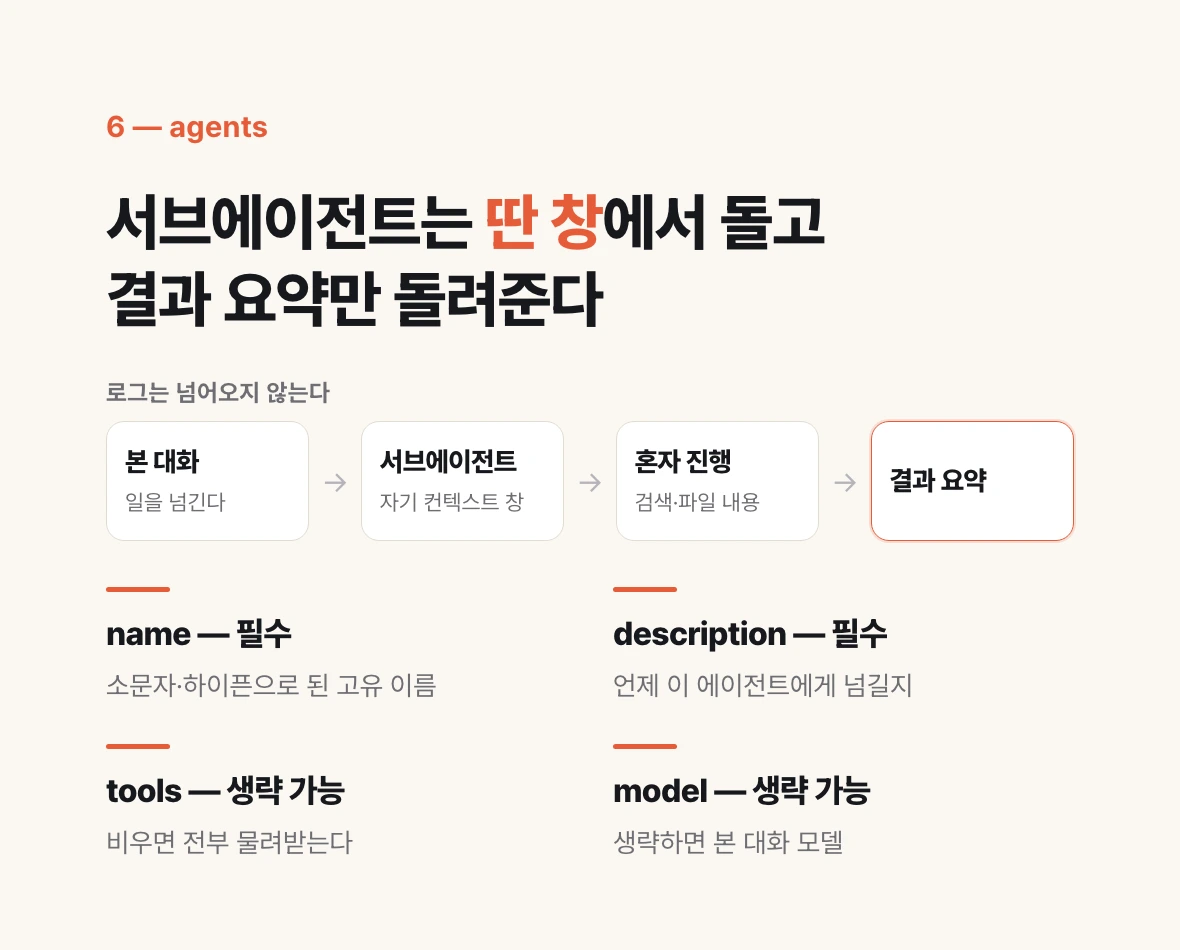
A subagent is a helper Claude with its own context window. Hand it work and it proceeds there alone, returning only a summary. The search results and file contents from digging through a codebase never pile up in your conversation. Given that answers degrade as the context window fills, that is the whole point.
Creating one takes a single markdown file. Put it under .claude/agents/ and give the frontmatter four fields: name, a unique identifier in lowercase and hyphens; description, when to delegate to it; tools, which tools it may use; and model, which model it runs on.
Only name and description are required. Omit tools and the subagent inherits every tool available to subagents. To keep it read-only, list Read, Grep, Glob and it cannot modify files. Set model to haiku and it runs on a cheaper model; omit it and it inherits the main conversation's model.
There are two locations. ~/.claude/agents/ applies across all your projects; a project's .claude/agents/ applies to that repository. Commit the latter and your team uses and improves it together.
Several come built in. Explore is a read-only agent for searching a codebase, Plan does research during plan mode, and General-purpose handles complex tasks needing both exploration and modification. Claude decides whether to delegate by reading each agent's description, so when writing your own, phrase it as a statement of when to use it.
If a newly created file does not show up, restart the session. That happens only when the agents folder itself did not exist when the session started.
---
name: code-improver
description: Scans files and suggests improvements for readability, performance, and best practices. Use after writing or modifying code.
tools: Read, Grep, Glob
model: sonnet
---

You are a code improvement specialist. For each issue you find, explain
the problem, show the current code, and provide an improved version.
Which of the five to choose
Knowing the names and formats still leaves the real question: where does the sentence in my hand go?
Three questions separate them. First, is it a fact that must always be known, or the procedure for a specific task? A fact goes in CLAUDE.md, a procedure in a skill. Second, is it needed only when touching certain files? Then it is a rule with paths. Third, is it advice that can be broken, or something that must be blocked? The latter is a hook.
A fourth question follows. Once this work is done, will you ever look at its log again? If not, hand it to an agent and keep your conversation clean.
The common mistakes are symmetrical. In one, a procedure goes into CLAUDE.md, the file swells to 300 lines, and nothing is followed at all. In the other, something that must be blocked is written as a sentence in CLAUDE.md and you are left frustrated that it is ignored. Move the first to a skill and the second to a hook.
| What you have | Where it goes |
|---|---|
| Build commands, folder layout, conventions that always hold | CLAUDE.md |
| Rules that apply only to certain folders or extensions | Rules (with paths) |
| Something to block without exception, or always run | Hooks |
| A repeated multi-step task | Skills |
| Research or review where only the result matters | Agents |
What to do now
You do not need all five at once. There is an order, and each step arrives when the previous one overflows.
Start by typing /init in the project you are working on. Claude scans the codebase and drafts a CLAUDE.md. Open the draft, check that the commands are right, and add by hand the few rules Claude could not have known. That is day one.
After that it is reactive. When the file approaches 200 lines, split it by topic into .claude/rules/, and add paths to anything that applies only to certain folders. When you paste the same block of instructions a third time, move it to .claude/skills/. When a written sentence keeps getting ignored, that sentence belongs in a hook. When research floods your conversation with logs, create an agent.
Check your work with /context. It shows which files actually loaded into this session and how full the context is. If something you wrote is not in the list, the problem is location, not content.