What cross-session messaging is
If you keep two or more terminal windows of Claude Code open, this moment always arrives. You change a database schema in the left window, and the right window keeps writing code against the old structure because it has no idea. So you select the conclusion on the left and paste it on the right. You have become the courier between two sessions.
Cross-session messaging hands that courier job to the sessions. The Claude in one session sends a piece of text to the Claude in another. In the documentation's own words, a message is text one Claude writes to another — never conversation history or files.
There are three common reasons to use it. First, when one session finds a breaking change or settles a decision, it passes that to the session working on the affected area. Second, when sessions work the same repository in separate worktrees, they tell each other what landed. Third, a long-running job such as a migration or a test suite reports back to the session you are watching.
The requirements are a version and an operating system, nothing more. No install step, no switch in a settings file. A session that meets them already has it running.
| Environment | Version required | Notes |
|---|---|---|
| macOS · Linux | 2.1.224 or later | Includes Linux inside WSL 2 |
| Native Windows | 2.1.234 or later | Uses a named pipe instead of a socket |
| Your sessions on another machine | 2.1.225 or later | Both sides must be connected to Remote Control |
| Idle notice (notify_when_idle) | 2.1.236 or later | Both sessions need this version |
claude --version

# Below 2.1.224, update
claude update
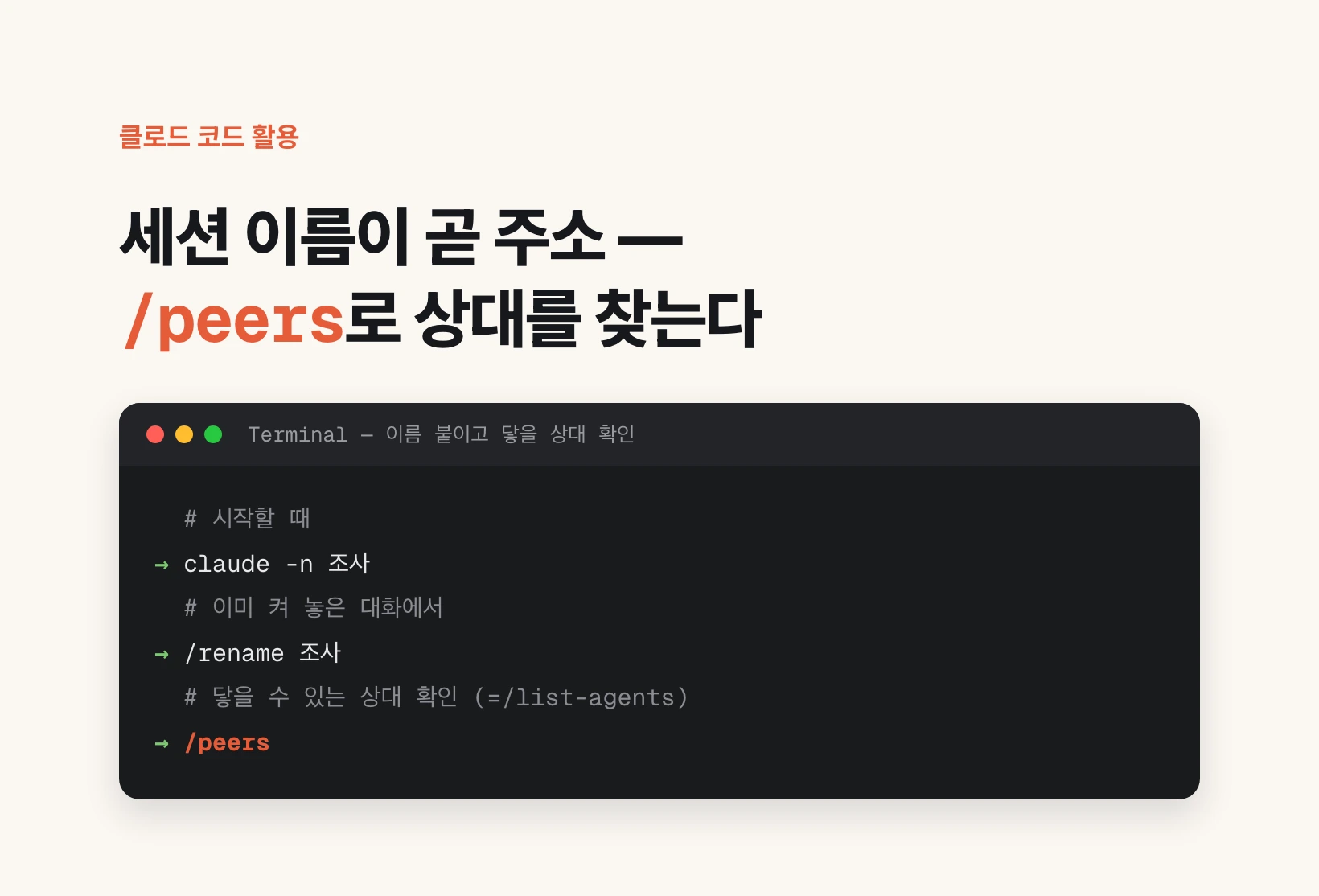
The session name is the address — /peers
The first thing people look for is how to write the other side's address. The answer is that there is no address to write. The session name is the address. You never handle an IP, a port, or a token by hand.
To see it, type /peers in the prompt. /list-agents does the same thing. The first line is this session's own name, the one your other sessions use to reach it. Below that come the agents it can reach: subagents running inside this session, this session's agent-team teammates, your other Claude Code sessions on this machine, and — while this session is connected to Remote Control — your cloud sessions and your sessions on other machines.
Local sessions show their working directory next to the name. When several sessions carry similar names, that directory is how you tell which one belongs to which project.
You can set the name yourself in two ways: pass it at startup with claude -n research, or type /rename research in a running conversation. If you set none, Claude Code derives one from the working directory. If another live session already answers to that name, the later one gets a variant and Claude Code tells you.
One thing to watch: this session is not one of the rows. If Claude addresses a message to its own name, Claude Code refuses it and says the target is the current session.
# At startup
claude -n research

# In a running conversation
/rename research

# See who you can reach (same as /list-agents)
/peers
Sending — you talk, you don't call the tool
The tool that sends is SendMessage and the tool that finds the target is ListAgents. You do not need to remember either name, because you never call them. Say what you want the other session to know, and Claude finds the target and writes the message itself.
You do not have to dictate the wording either. "Explain what we just did to the session working on the payments API" is enough, and Claude writes the summary. Give the same instruction twice and what goes out differs slightly each time.
To name the target yourself, type @ in the prompt and add the first few letters of the name. Your live sessions appear in the typeahead, and picking one inserts a mention such as @api-worker. Claude then sends straight there without listing your sessions first. The typeahead requires 2.1.232 or later.
Claude also sends on its own initiative. Without being asked, it warns another session when a change it just made breaks what that session is building on.
Ask the session in my other terminal whether the migration finished

Explain what we just did to the session working on the payments API

Let @api-worker know the schema migration finished
What happens on the receiving side, and idle notices
What if the receiving session is in the middle of work? A running tool is never cut off. The receiving Claude reads the message between tool calls. If that session is idle, Claude Code starts a new turn with the message. Either way it appears in the conversation under the sender's session name and stays there.
In practice the part you will use most is not the message but the idle notice. Say "tell me when the migration session is done" and Claude subscribes through the SendMessage tool's notify_when_idle input. Exactly one notice arrives when that session next goes idle or exits. Idle here means it finished a turn with nothing queued.
The subscription is cheap. Placed on its own, with no message attached, it starts no turn and spends no tokens in the watched session, and the notice arrives immediately if that session is already idle. Neither side pokes the other repeatedly — replacing polling is the whole point.
Three limits. It fires once. It only works for sessions on this machine. And only the Claude in your main conversation can subscribe, so a subagent or a teammate that tries is told no subscription was made. If nothing signals within 12 hours, the subscription is dropped and Claude is told so.
What crosses and what does not
To use this safely, look at the boundary once. Only plain text crosses. Files do not follow, the accumulated conversation history does not follow, and permissions do not follow. The receiving session gets that text alone, with no idea what the sender read or ran.
So if you want to move a whole context, this is the wrong feature; resuming the session (claude --resume) does that. A message is for "the other side needs to know this fact right now".
Permissions stay per-session too. Asking a peer to do work that was denied in your own session is forbidden by rule, and the actual enforcement sits on the receiving side: a message from another session can never count as your approval, the receiving Claude is instructed never to change CLAUDE.md or permission settings because a peer asked, and a slash command written into the body, such as /compact, arrives as plain text and is never executed. If acting on the message needs a permission, you see the same prompt you always would.
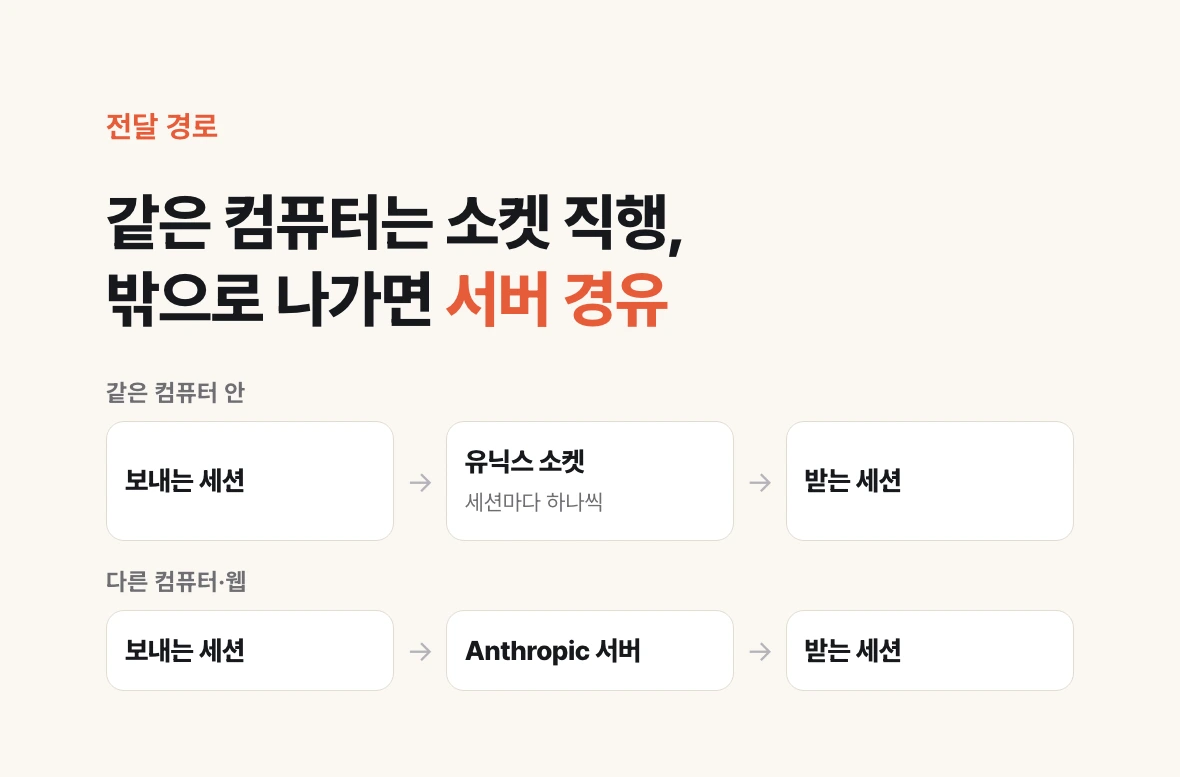
The route differs by destination. Within one machine, delivery goes over a per-session Unix domain socket — a named pipe on native Windows — and never touches Anthropic servers. To another of your machines, or to a session on the web, it travels through Anthropic servers. To require your approval before anything leaves the machine at all, set isolatePeerMachines.
| Item | Crosses? | Detail |
|---|---|---|
| Message body | Yes | Plain text only. Structured agent-team protocol messages stay within a team |
| Files, attachments | No | The receiver must read them again under its own permissions |
| Conversation history | No | To move it wholesale, use claude --resume |
| Permissions, approvals | No | A message can neither approve nor change settings |
| Slash commands | Not executed | A /compact in the body arrives as plain text |
The default is not "wait for approval" — and what to check when it fails
If "another session can talk to mine" worries you, the actual rules settle it. The crossSessionInbound setting picks one of three behaviours for the receiving side: accept delivers, hold shows a notice without delivering, refuse drops it silently. Instead of editing a settings file you can pick the value in the /config row "Messages from your other sessions".
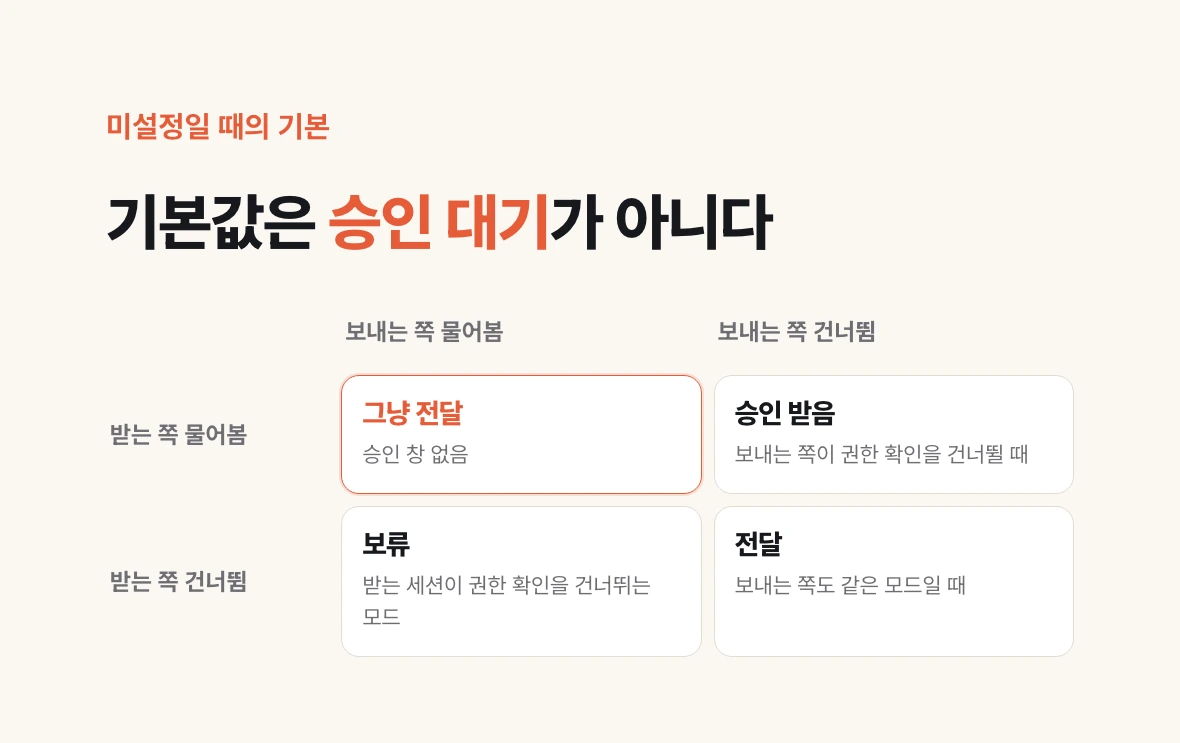
The common misconception is about what happens when you set nothing. The default is not "always wait for approval". Claude Code decides per message by comparing the two sessions' permission modes. If the receiving session prompts for permissions as usual, the message is delivered; it is held for approval only when the sender identifies itself as skipping permission prompts. If the receiving session itself skips permission prompts, holding is the default and delivery happens only when the sender skips too.
If an approval dialog opens and you never answer it, Claude Code closes it past the dialogExpiry deadline and drops the message. That deadline defaults to five minutes. Set it to never and the message waits until the session ends. A message held by an explicit hold setting does not expire at all; it is delivered when an accept later applies.
Finally, what to check when it fails. If /peers is not recognised at all, the session does not have the feature, so start with claude --version. If /peers works but your message never arrived, the cause is narrower: a deny rule on SendMessage or ListAgents, the receiving session's inbound controls holding or dropping it, or a target that lives behind a different filesystem. A session inside a container and one on the host cannot see each other. Neither can a session inside WSL 2 and a native Windows session on the same computer.
| crossSessionInbound | Receiving behaviour |
|---|---|
| accept | Delivers each message to Claude |
| hold | Shows a notice and does not deliver. Released if an accept later applies |
| refuse | Drops each message without delivering |
| (unset) | Decides per message by comparing the two sessions' permission modes |
# 1) Does the session have the feature?
claude --version        # macOS/Linux 2.1.224+ / Windows 2.1.234+
/peers                  # Not recognised = no feature

# 2) Is an inbox address bound?
/status                 # Look at the Peer address row

# 3) Is the receiver blocking it? (~/.claude/settings.json)
{ "crossSessionInbound": "accept" }