Why a person and a bot receive different documents
When you open a web address, the server sends back one HTML document. The browser does more work after receiving it. It downloads the JavaScript that came with the document, runs it, and fills the screen with text and images. The moment we call the site loaded is after all of that has finished.
The programs that search engines and AI companies send out open the same address. These programs are called bots, or crawlers. But a bot is not a browser. Its default behavior is to take the HTML the server sent, pull the text out of it, and move on to the next address. Running JavaScript on top of that is a separate capability that has to be added.
So the same page can put a different document in a person's hands than in a bot's. Where that gap opens up is the next section.
What is the difference between CSR and SSR
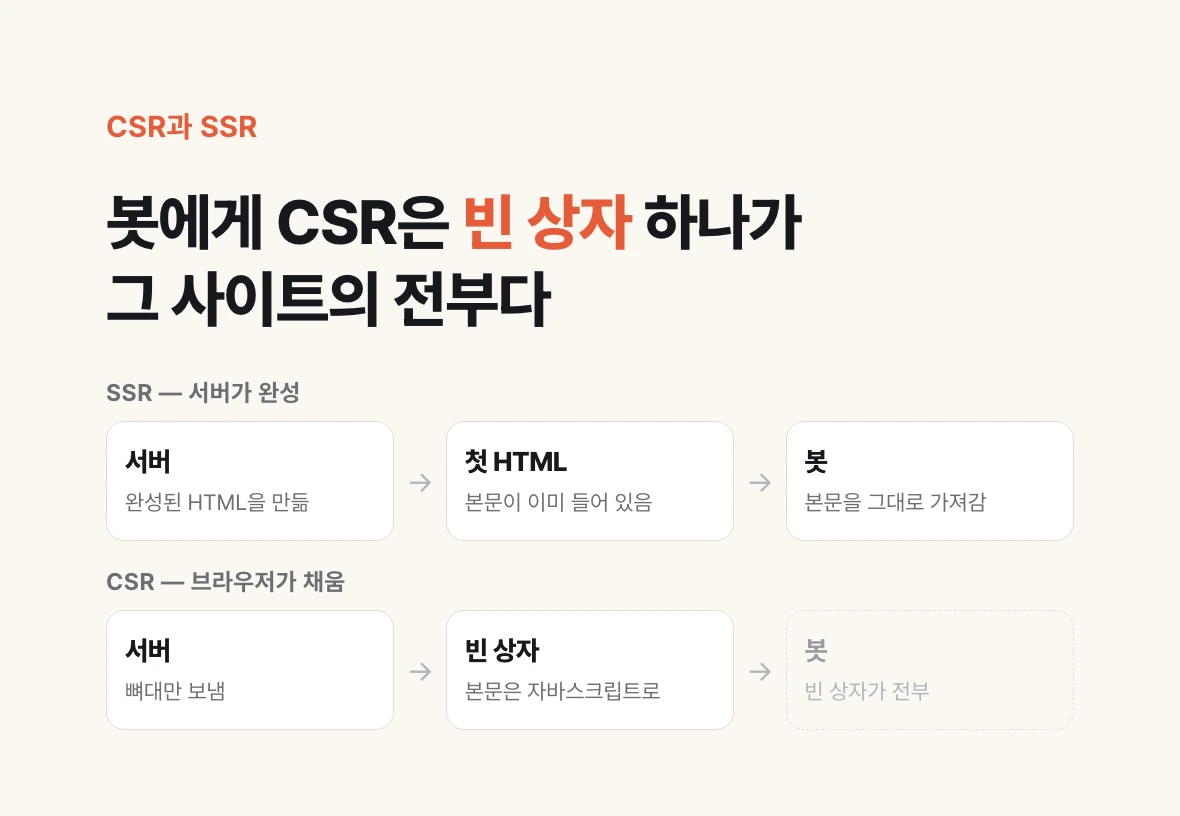
There are broadly two ways to get text onto the screen. If the server builds the finished HTML and sends it, that is server-side rendering (SSR). If the server sends only the frame and the browser runs JavaScript to fill in the content, that is client-side rendering (CSR). The client here means your browser.
A person cannot tell them apart, because the result on screen is the same. On the building side, CSR is convenient in enough ways that it often gets picked as the default.
From a bot's point of view they are entirely different documents. With SSR, the body copy is already inside the first HTML the server sent. With CSR, there is only an empty box in that spot, and the body copy appears only once JavaScript runs. If the bot does not run JavaScript, that empty box is the whole site.
In the interview the host puts this into one sentence and the guest confirms it: if the site is CSR, GPT's bot can walk in and see no information at all. The information a person can see plainly exists; it simply never crosses over to the bot.
How to check which side your site is on
You do not need to install a tool or ask whoever built it. Chrome is enough.
1. Open the page you care about in Chrome. Pick the one you want AI to read, whether that is the company page or a service description.
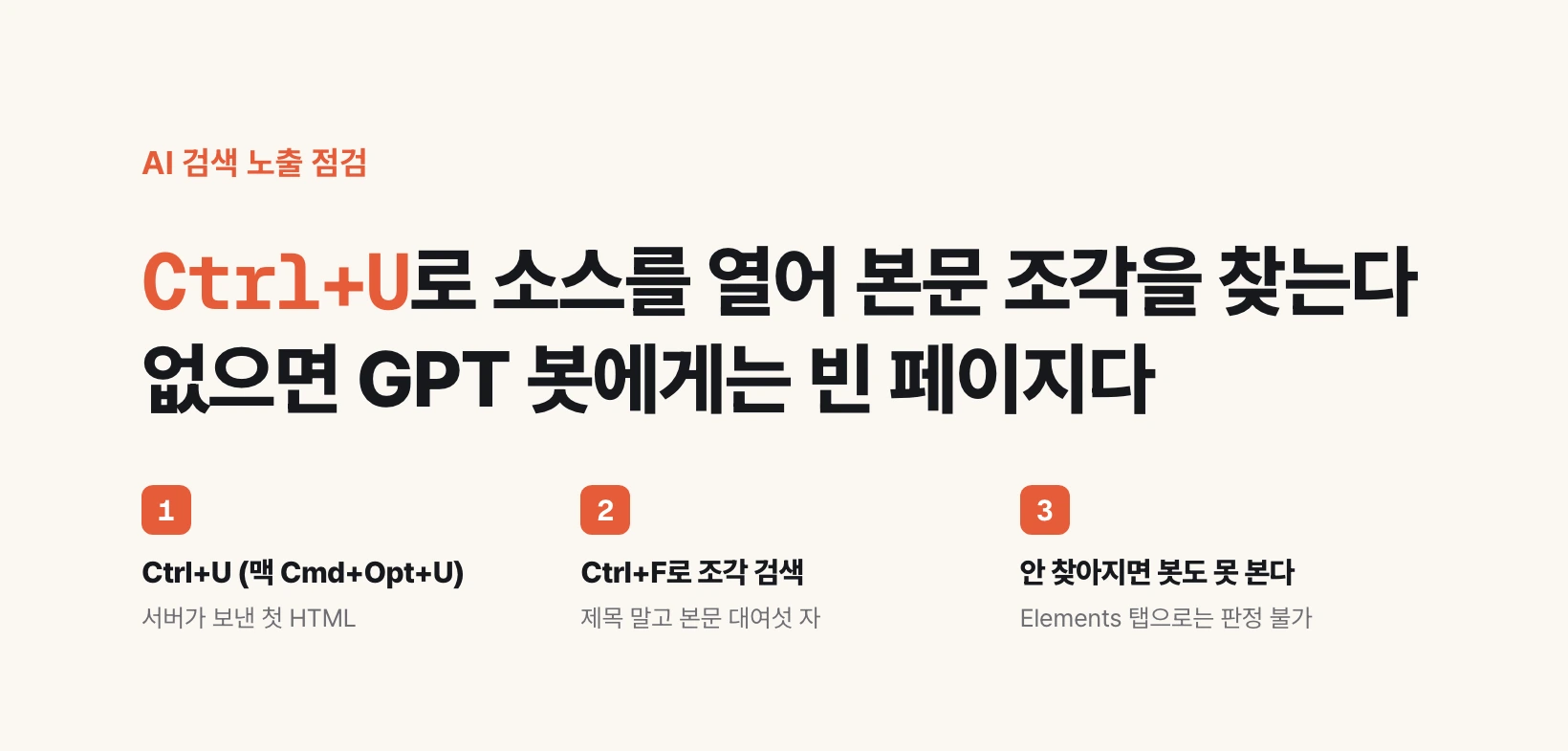
2. Press Ctrl+U on Windows, or Cmd+Option+U on a Mac. With a mouse, right-click an empty spot on the page and choose View page source. Typing view-source: in front of the address opens the same screen, but Chrome strips that prefix when it is pasted, so it has to be typed. The shortcut is the reliable route.
3. A new tab fills with dense text and symbols. You do not have to try to read it. This is the HTML the server sent first, which is the entire document the bot holds.
4. On that screen, press Ctrl+F (Cmd+F on a Mac) and search for a short fragment of your body copy, five or six characters' worth. Do not paste in a whole sentence. HTML puts tags for bold text and links in the middle of sentences, so a site that ships its body copy perfectly well often fails a whole-sentence search. Take the fragment from the body, not the title. The title is carried separately, which muddies the test.
5. If it is found, the server shipped that passage from the start, and a bot that does not run JavaScript still sees it. If it is not found, that sentence does not exist for that bot. If you are unsure, pick two more fragments from elsewhere in the body and repeat the same search.
The verdict is certain in one direction only. If it is not in the source, a bot that does not run JavaScript definitely cannot see it. The reverse does not hold: being in the source does not guarantee a citation. If you have blocked that bot in robots.txt it never arrives at all, and that is a different axis than this article covers.
Why the developer tools are the wrong place to check
This is where people go wrong most often. The Elements tab of the developer tools you get with F12 also shows HTML. But on that screen the body sentence is always found, whether the site is CSR or SSR.
The two screens show different moments. View page source is the original document the server sent. Elements in the developer tools is the state after all the JavaScript has run, the thing currently producing the screen. What the bot receives is the former.
Do the check with View page source, always. Seeing the body copy in the developer tools tells you nothing about this question.
Has anyone actually measured whether bots run JavaScript
The companies do not document it. OpenAI's crawler page lists only names and purposes: OAI-SearchBot for surfacing sites in ChatGPT search, GPTBot for training foundation models, ChatGPT-User for pages opened at a user's request. Nothing on that page addresses JavaScript rendering.
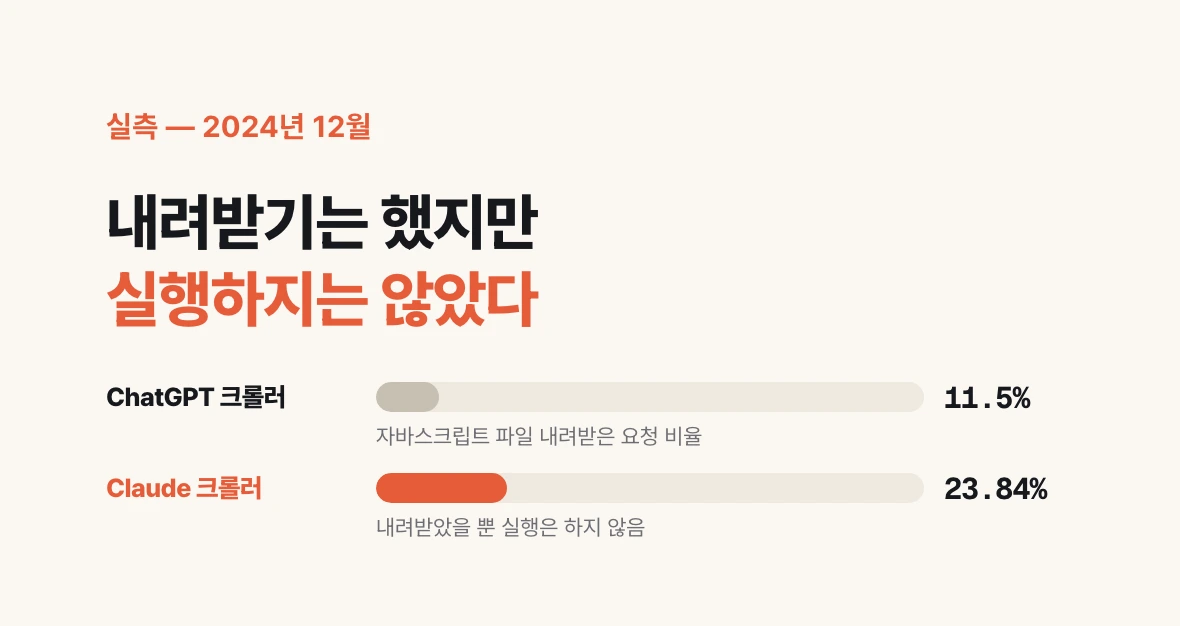
The measurement came from the hosting side. The rise of the AI crawler, published by Vercel and Merj on 2024-12-17, aggregated live crawler traffic and reported that none of the major AI crawlers render JavaScript. The ChatGPT crawler fetched JavaScript files on 11.50% of its requests and Claude's on 23.84%, and neither executed them.
Google is an exception. Googlebot runs JavaScript, and Gemini rides on that infrastructure. That is how a page that ranks perfectly well on Google never once appears in a ChatGPT answer, and why a healthy search ranking is no evidence of AI citation.
These figures are as of December 2024. Crawler behavior can change whenever a company decides to change it, so holding on to the checking method outlasts holding on to the numbers. The source check in the previous section shows you today's state.
What you can do today when the body copy is missing from the source
Changing the rendering mode is the direct fix. If the tool you use has a static generation or server rendering option in its settings, switch to it. That said, this usually needs help from whoever built the site or from the tool itself, and it may not finish in a day.
There is something you can do before that today. The title and meta description ride in the first HTML the server sends, so they usually survive even under CSR. Search the source screen with Ctrl+F for title and for description and you will see what they currently say, right there.
Put one sentence into those two lines saying what your company is and what it sells. The same sentence is often stamped on every page; splitting it per page increases what a bot has to take.
Pages whose information lives only inside an image have the same problem. If a product detail or company introduction is a single image, the bot cannot take the text inside it. The interview mentions an approach where only the background stays an image and the content is embedded as text. It looks like an image to a person and stays as words for the bot.
If it is SSR, is the job done
No. The interview notes that even with SSR there are cases where GPT does not receive the content. If parts of the screen are sent later and separately, the order and timing of the information arriving changes.
So the verdict comes from the actual source screen, not from the name of the structure. Not we are SSR so we are fine, but is this sentence in the source of this page right now.
Results can differ page by page. It is common for the home page to pass while a service detail page does not. Pick three or four pages you want AI to read and check each of them.
What to look at before stacking more content
Conversations about AI search visibility usually start with what else to write. But if the bot cannot receive the body copy at all, adding a few more pieces changes nothing.
Checking comes first. View the source once, search for one short fragment of body copy. Thirty seconds tells you which side you are on.