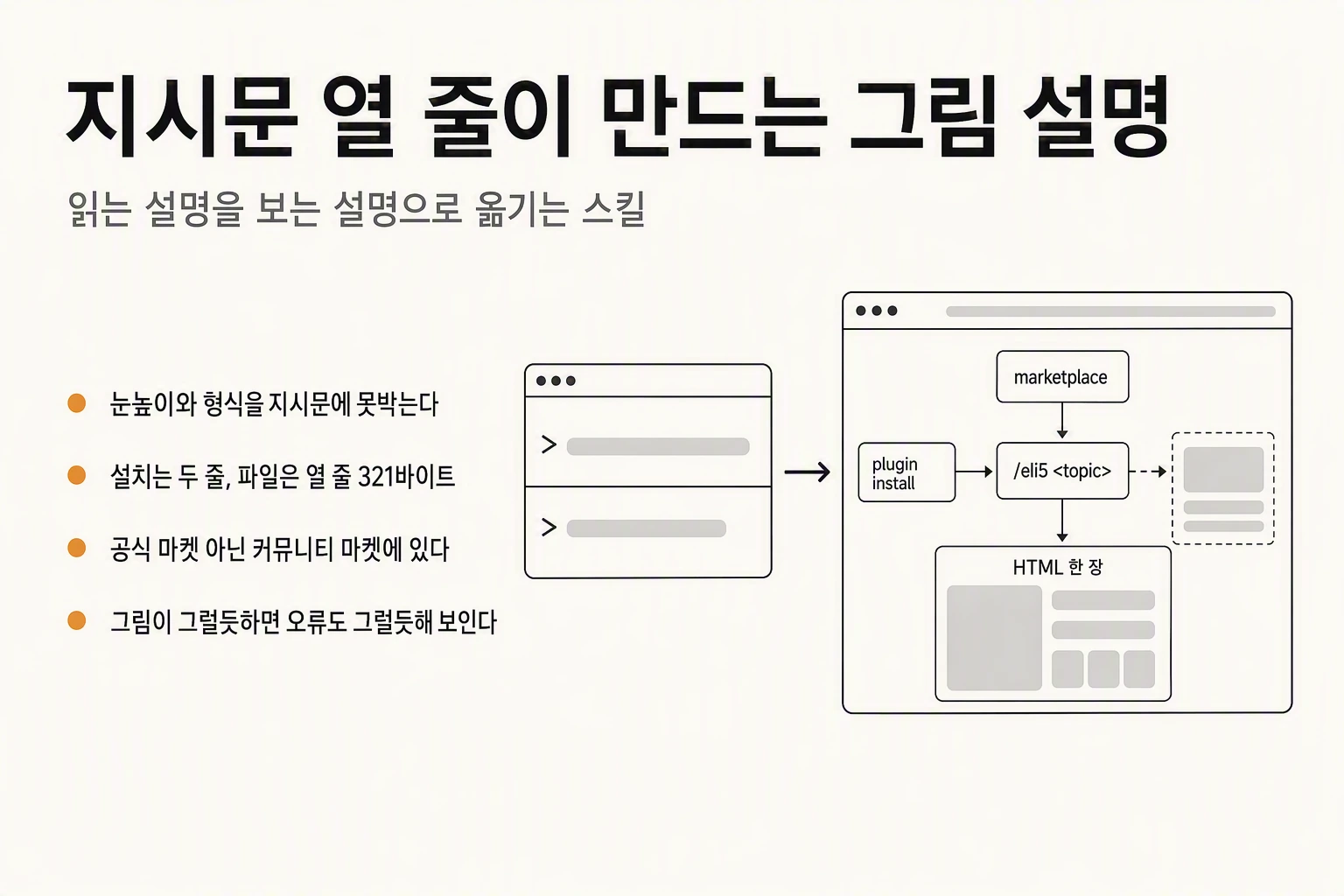
What eli5 is
eli5 is a plugin you add to Claude Code. It contains a single skill, also named eli5.
The name is short for Explain Like I am 5, a phrase long used online to ask someone to explain something as simply as you would to a five-year-old. It came from question prefixes on forums such as Reddit and ended up as the skill's name.
What it does fits in one line. Type /eli5 in the prompt, add a space and a topic, and instead of the usual wall of text the answer arrives as a single HTML page made mostly of pictures.
The word skill may be unfamiliar. In Claude Code a skill is a file holding the instructions the model should follow in a particular situation. It is prose, not a program. Calling it with a slash command loads those instructions into the conversation, and the model follows them.
A plugin is the package that ships the skill. Some plugins bundle many skills; eli5 is a very small one containing exactly one.
The problem it goes after
Ask an AI about a topic you do not know and the answer usually comes back as long paragraphs and bullets. Nothing in it is false. The problem is the level it is pitched at.
The model assumes you already know the vocabulary of the field. So the answer contains more words you do not know, and you start asking what that means, over and over. After two or three rounds the original question has blurred and you are tired of reading.
The format shifts too. Even if you type explain it simply by hand every time, one day you get a table and the next day ten paragraphs. The same phrasing gives you a coin flip.
eli5 pins both of those down inside the instruction. The level is fixed to someone who knows nothing, and the format is fixed to HTML with big pictures and few words. You stop typing it by hand and the variance drops.
Put differently, the skill moves an explanation you have to read into one you can look at. And it does that with a page of instruction and no code at all.
Installing it takes two lines
Run those two lines in order. The first registers the community marketplace; the second installs the eli5 plugin from it.
You can run them inside Claude Code or from a terminal with the claude command. Once installed, /eli5 appears in the autocomplete list as you start typing it in the prompt. Press tab to insert it.
The one thing that trips people up is the marketplace. Claude Code ships with the official marketplace already registered, and eli5 is not in it. It lives in the community marketplace, which is why the first line is needed.
claude plugin marketplace add anthropics/claude-plugins-community
claude plugin install eli5@claude-community
Official marketplace versus community marketplace

Both sit under the anthropics account, which makes them easy to confuse. They are different things.
The official one is a directory of plugins Anthropic maintains itself, registered in Claude Code out of the box, so you can install from it without adding anything.
The community one collects plugins submitted from outside. Its README describes the repository as a read-only mirror whose listing is synced nightly from Anthropic's internal review pipeline. Everything listed there was submitted, passed automated security scanning, and was approved for distribution. Pull requests opened directly against the repository are closed automatically.
So: eli5 lives in a repository under the Anthropic account and was written by someone at Anthropic, but it is not part of the officially registered marketplace. Two identifiers are all you need to remember when installing — eli5 and claude-community.
The star counts show the same split. As of 29 August 2026 the official repository sits near 35,000 and the community one near 2,500. The smaller number does not mean the community listing is unofficial leakage; the route by which a plugin gets listed is simply different.
| Type | Repository | Registered by default | Install identifier |
|---|---|---|---|
| Official | anthropics/claude-plugins-official | Yes | name alone |
| Community | anthropics/claude-plugins-community | No, add it yourself | name@claude-community |
What using it looks like
Type the slash command, add a space, then write your question the way you normally would. Whatever you write is passed through as the topic.
For comparison, ask the same question without the skill and you get a list of items in paragraphs: the agent loop, models, permissions, context management. The explanation is thorough, but it contains more unfamiliar terms inside it. Names like Bedrock or Vertex stop anyone who does not already know that corner of cloud infrastructure.
With eli5 the response goes toward producing one HTML file instead. A short five-year-old summary appears in the conversation, and an HTML file is created alongside it. Open the file and the text has shrunk to a minimum while pictures fill the screen.
The agent loop, for instance, becomes four drawings that show the flow rather than a paragraph, and tools and permissions each get their own block. For someone who does not know the structure yet, this is the faster way to get the overall shape.
The difference in one sentence: the left-hand version has to be read through to be understood, the right-hand one gives you the outline at a glance.
/eli5 how does Claude Code actually workThe ten lines, in full
That is the whole file, not an excerpt. Ten lines, 321 bytes.
The part between the triple dashes is the front matter. name is the skill's name; description tells the model when this skill should be used. You can call it explicitly with the slash command, or the model can pick it up on its own when someone asks for a simple picture explainer.
The body is two sentences. First, explain this as if to someone who knows nothing about it. Second, do the explaining in an HTML artifact with big pictures and few words. The first fixes the level, the second fixes the format.
The $ARGUMENTS on the last line is a placeholder. Whatever you wrote after the slash command is substituted there and handed to the model. Write how does Claude Code actually work and that sentence lands after Topic.
The file was committed on 21 August 2026 by Thariq Shihipar of Anthropic's Claude Code team. The history shows the plugin being added, the wording revised to say HTML artifact, and the license field tidied up. The license is MIT.
---
name: eli5
description: Explain a topic like I'm a 5 year old. Use when the user types /eli5 <topic> or asks for a dead-simple picture explainer of how something works.
---

# eli5

Explain like I'm someone who knows nothing about this topic, using a HTML artifact with big pictures and few words.

Topic: $ARGUMENTS
Where it earns its keep
Three situations cover most of it.
First, explaining something to non-engineering colleagues. The question of what this newly adopted tool actually is arrives from product, from marketing, and from operations, each with a different amount of background. Matching the level by talking, every time, is work. Handing over one picture costs almost no preparation.
Second, a new hire's first day. The usual move is to pass over fifty pages of architecture docs and say read this, but volume does not produce understanding. Every company uses its own vocabulary, so the first week is harder, not easier. Show the same content as a single diagram first and let the documents come after.
Third, the morning after an incident. A write-up is due, the timeline is tangled, and non-engineering people are in the room. Drawing what happened in what order, and where things stand now, shortens the meeting.
All three share one thing: the explanation has to meet the listener where they are. Sometimes a single picture beats an hour of careful terminology.
Two things to know before you rely on it
First, the skill does not check whether the content is correct. It fixes the level and the format, not the facts.
There is a trap in that. The more convincing the picture, the more convincing a wrong claim looks. An error written in prose tends to snag you as you read; an error rendered as a diagram reads as though it has already been verified. Make comparing against the source a step in your process before passing anything on, especially for internal architecture or incident timelines where the facts matter.
Second, the output is an HTML file. Good for opening in a browser, but it does not paste cleanly into Slack or Notion. Sharing it means one more step: a screenshot, or sending the file.
So calibrate the expectation. This is not a tool that produces a finished shareable document. It gets you as far as a picture being better than an explanation in words, and that is already worth having.
The part worth keeping
What lasts here is less eli5 itself than the method it demonstrates.
A skill is not a special technical mechanism. It is an instruction, and instructions work more reliably the clearer and shorter they are. eli5 does a lot, and the file is ten lines. Length is not what makes an instruction land.
That is why most of the skills circulating now are short. Say what to do and what shape the result should take, and the model fills in the rest.
Start the same way when writing your own. Find the instruction you keep typing by hand, cut it to two or three sentences, and put it in a file. Pinning down the level and the format is by itself enough to shrink the variance in what comes back.