Why These Two Files Come First
When you build something for the first time with vibe coding (making software by directing an AI instead of writing the code yourself), the sequence is usually the same. You have the AI build a screen, you wire in Claude's or ChatGPT's API for the feature, it works, so you push it to GitHub - the place where code is stored and shared. The accident happens at that last step.
Code written by an AI often has the API key sitting right in it: that long string starting with sk-ant- or sk-. It runs fine on screen, so you leave it. But a public GitHub repository is exactly that - public - and automated scanners run around the clock looking for key-shaped strings in newly pushed code. Machines sweep it, not people, so exposure is measured in minutes.
Once a key is in someone else's hands, the calls they make are billed to its owner. If it was a cloud account key, it can be used to spin up servers on your bill. That is why these two files are not something you add later when you get around to security; they are what you create the day the project starts.
What .env Is - the File That Moves Values Out of Code
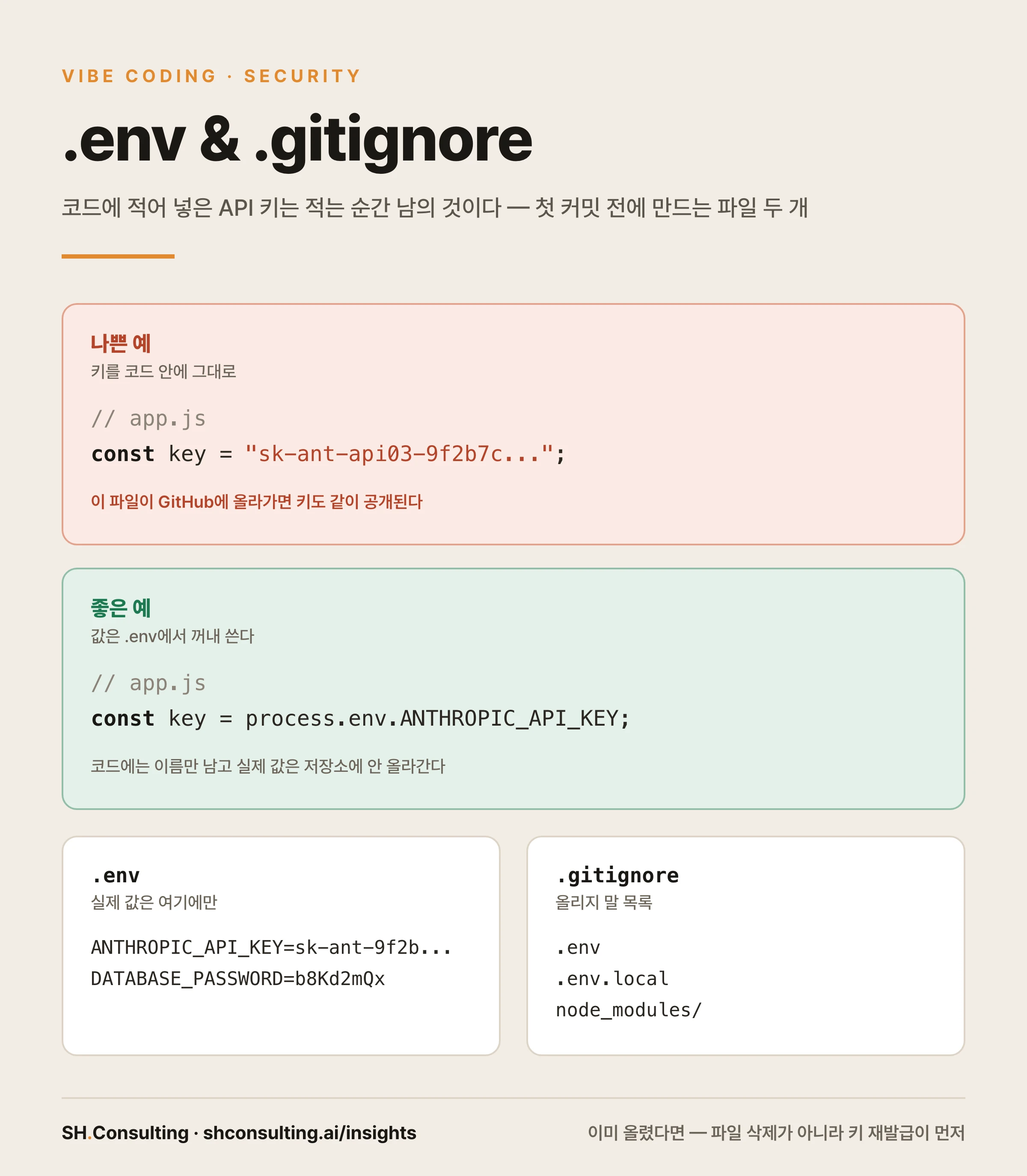
.env is short for environment. It is a plain text file at the top of your project folder, and inside you write one NAME=value pair per line. What goes here are the things that must never sit in code: API keys, database passwords, tokens for outside services.
The code no longer holds the value; it fetches it by name. In JavaScript that is process.env.NAME, in Python it is os.environ with the name. What remains in the code is the name, not the secret. Here is the actual difference.
// Bad - the key is baked straight into the code
const key = "sk-ant-api03-9f2b7c...";

fetch(url, {
  headers: { "x-api-key": key },
});
// Push this file to GitHub and the key goes public with it


// Good - the value comes from .env
const key = process.env.ANTHROPIC_API_KEY;

fetch(url, {
  headers: { "x-api-key": key },
});
// Only the name stays in the code; the value never reaches the repository# NAME=value, one per line. Quotes are usually unnecessary
ANTHROPIC_API_KEY=sk-ant-api03-9f2b7c...
DATABASE_PASSWORD=b8Kd2mQxWhat .gitignore Is - the Do-Not-Upload List
Git is the tool that records how files in a folder change, and GitHub is where that record is published. By default git treats every file in the folder as something to record. So if you do nothing, .env goes up with everything else.
.gitignore is the exception list. It sits at the top of the project folder and names, one per line, the files and folders that must never be uploaded. Anything listed there is treated by git as if it did not exist.
# Files holding secrets - never uploaded
.env
.env.local
.env.*.local

# Things you can always download again - no reason to upload
node_modules/
.next/
dist/
build/

# Leftovers from the OS and editors
.DS_Store
*.log
.env.example - Hand Over the Labels, Not the Contents
Working alone, one .env is enough. The moment someone joins you, or you continue on another machine, a gap appears: .env never reaches the repository, so the other side has no such file and no way to know which values are needed.
That is what .env.example is for. It is a template with the names filled in and the values left empty. It holds no secret, so this one does get committed. Whoever receives it copies the file, renames it to .env, and fills in their own values.
Put real values in it and you have undone the whole point of ignoring .env. A template keeps empty values and formats only.
# Leave values empty. It only tells you which names are required
ANTHROPIC_API_KEY=
DATABASE_PASSWORD=
Already Pushed? Replace, Don't Delete
Here is the most common misunderstanding. Someone notices the key went up, adds .env to .gitignore, and feels safe. It does nothing. .gitignore only means 'do not start tracking files that aren't tracked yet' - a file already committed stays tracked. And because git carries its entire history, deleting the file now still leaves the key visible in older commits.
So the order is fixed. First, revoke that key in the provider's console (Anthropic, OpenAI, AWS, and so on) and issue a new one. Assume an exposed key is already in someone else's hands. Second, stop tracking the file. Third, put the new key only in .env.
# 1) Revoke the key in the provider console and issue a new one - first, always

# 2) Stop tracking it (the file on your machine stays)
git rm --cached .env

# 3) Confirm .env is in .gitignore, then commit
git commit -m "chore: stop tracking .env"

# Old commits still contain the old key - which is why step 1 comes first
What Not to Do in Vibe Coding
Beginners step on a short, repeatable list of mines. Avoid these six and most accidents simply never happen.
| Don't | Why it is dangerous | Do this instead |
|---|---|---|
| Write the key directly in code | Public the moment it reaches the repository | Keep it in .env and read it by name |
| Hardcode now, clean up later | One commit in between makes it permanent | Start with .env from the first line |
| Commit .env | The single most common leak path | List it in .gitignore first |
| Paste keys into chats, issues, screenshots | It stays in the transcript and the image | Say the name; type the value into the file |
| Put real values in .env.example | The template becomes the leak | Keep empty values and formats only |
| Delete the file after a leak | The old key in history still works | Issue a new key first |
How to Manage It Through Vibe Coding
Instead of repeating the instruction in every conversation, write the rule into a file and it applies automatically. Put these lines in CLAUDE.md at the top of your project folder (or AGENTS.md if you mix several tools).
## Handling secrets
- Never write API keys, passwords, or tokens directly into code. Keep them in .env and read them by name.
- When a new secret appears, add its empty name to .env.example and confirm .env is in .gitignore.
- Before committing, check whether .env or any key-shaped string entered the tracked list.
- Do not ask me to paste key values into the chat. I will type them into the file myself.
How to Verify It Actually Worked
Writing the rule down is not proof. Three commands confirm it. You can also just tell the AI 'check whether anything that shouldn't be uploaded is currently tracked' and it runs the same checks.
# What this commit will upload - .env must not appear here
git status --short

# Confirm .env is genuinely ignored (a printed rule line means yes)
git check-ignore -v .env

# Any already-tracked file with env in its name
git ls-files | grep env
Once You Deploy - Values Live in Two Places
To let other people use what you built, you push it through a deployment service, and one more gap appears there: since .env never reaches the repository, the deployed server does not have that file.
The fix is simple. Services like Vercel and Railway have an Environment Variables panel in their settings. Enter the same names and values you put in .env, and the deployed server reads them from there. Local machine: .env. Server: the dashboard. Values live in two places - and you never upload the .env file itself to the server.
Starting Right Now
Five steps. (1) Create .gitignore at the top of the project folder and write .env in it. (2) Create the .env file and move your keys there. (3) Remove the key from the code and read it by name - you can simply tell the AI to move the key in the code into .env. (4) Leave only names in .env.example. (5) Run git status, confirm .env is not listed, then commit.
Two files, ten minutes. Those ten minutes remove an entire category of leaks and surprise bills.