What you can hand over
Hiworks is Gabia's mail, approval and attendance service for companies. Claude Code is Anthropic's AI tool that you direct by conversation in the terminal (the window where you control the computer by typing commands), and a plugin is a bundle that adds new abilities to it. With the hiworks plugin, Claude Code calls the same channels the Hiworks web pages use behind the scenes and brings back results without opening a browser.
What it can do is in the table below. Lookups run right away; anything that affects other people shows a preview first.
| Task | Ask like this | How it runs |
|---|---|---|
| Find and read mail | Find mail in my inbox that mentions 'quote' | Looked up right away |
| Send mail | Send this file to X / reply to this mail | Preview, then sends after you confirm; replies and forwards quote the original |
| Delete mail | Delete this mail | Preview, then moves to trash after you confirm |
| My remaining leave | How many days of leave do I have left | Looked up right away |
| Colleagues' leave dates | Who on my team is off this month | Looked up right away, consecutive days grouped |
| Request or cancel leave | Request annual leave on December 21 | Hiworks pre-check, preview, then submits after you confirm; saved approval line added automatically |
| Calendar | What's on tomorrow / book a meeting Friday at 3 | Lookups right away, new events after a preview |
| E-approval documents and status | Show documents still in approval | Looked up right away, each with a link to the Hiworks page |
| Org chart and people | Give me team lead X's contact | Looked up right away, only contacts the person made public |
| Morning summary | Summarize today | Unread mail, documents to approve, today's events and teammates off today in one view |
Two lines to install, one password dialog to register
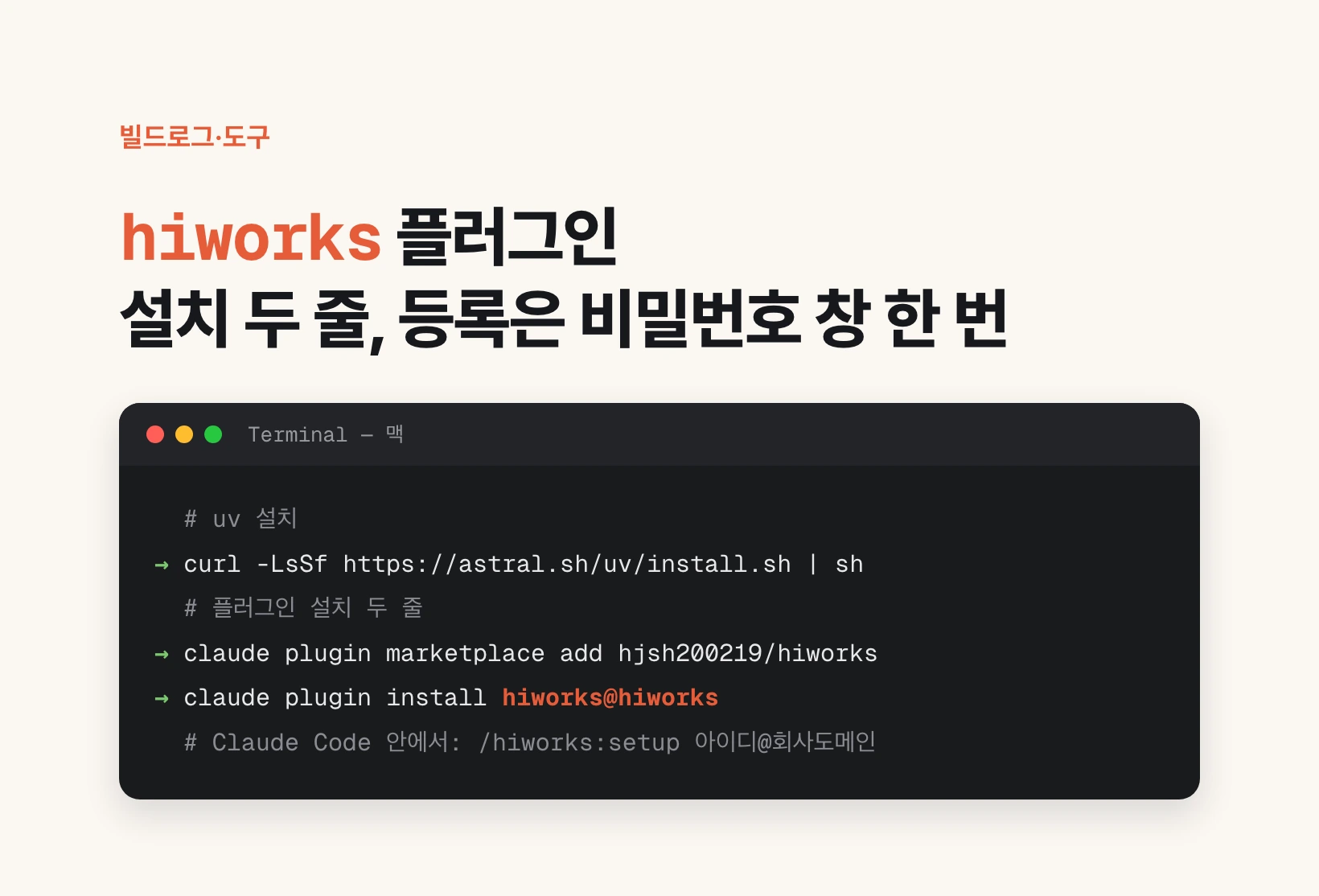
You need uv first. uv is a tool that fetches a Python program and the parts it needs, then runs it. On a Mac the first line below installs it. Then add the plugin with two terminal lines.
Reopen Claude Code and type /hiworks:setup followed by your Hiworks email, and a 'Hiworks' password dialog appears. Type the password there and you're done. If you're already registered, it finishes without a dialog.
The dialog only shows dots. If your keyboard is in Korean input mode, the password goes in as Korean characters and you can hardly notice. My own first attempt was rejected that way, so the dialog now reminds you to check that you're typing in English mode.
If you always use the same approval line, say it once. For example, 'my leave approval line is Kim approves, Lee is CC' gets saved and is added automatically to future leave requests and cancellations.
curl -LsSf https://astral.sh/uv/install.sh | sh
claude plugin marketplace add hjsh200219/hiworks
claude plugin install hiworks@hiworks/hiworks:setup id@company-domainThe password stays out of the chat and out of files
Handing a company password to an AI tool is the part people hesitate over most, so I settled storage first. The password goes only into the OS keychain, the encrypted password vault the operating system keeps, like Keychain Access on a Mac or Credential Manager on Windows. Only the email address and the login state (session) are saved in a hidden folder on your computer that only you can read.
There are only three ways in: a hidden prompt in a terminal, the OS password dialog inside Claude Code, and standard input for automation. It never takes the password through the chat, and I deliberately did not add a way to put the password after a command, because anything typed after a command shows up in the list of running programs.
When you register, it tries one login and saves the password only if it works. It doesn't retry on failure, because repeated wrong passwords lock the account.
Three places I got stuck
First, the saved login kept dropping. Hiworks spreads work across several servers, and each service hands out its own cookie (a small tag the browser remembers per site) that says which server you're on. At first I saved only the login cookie, so when the next run landed on a different server, a perfectly good login looked missing. Now a run that has confirmed the login saves all of those tags when it ends.
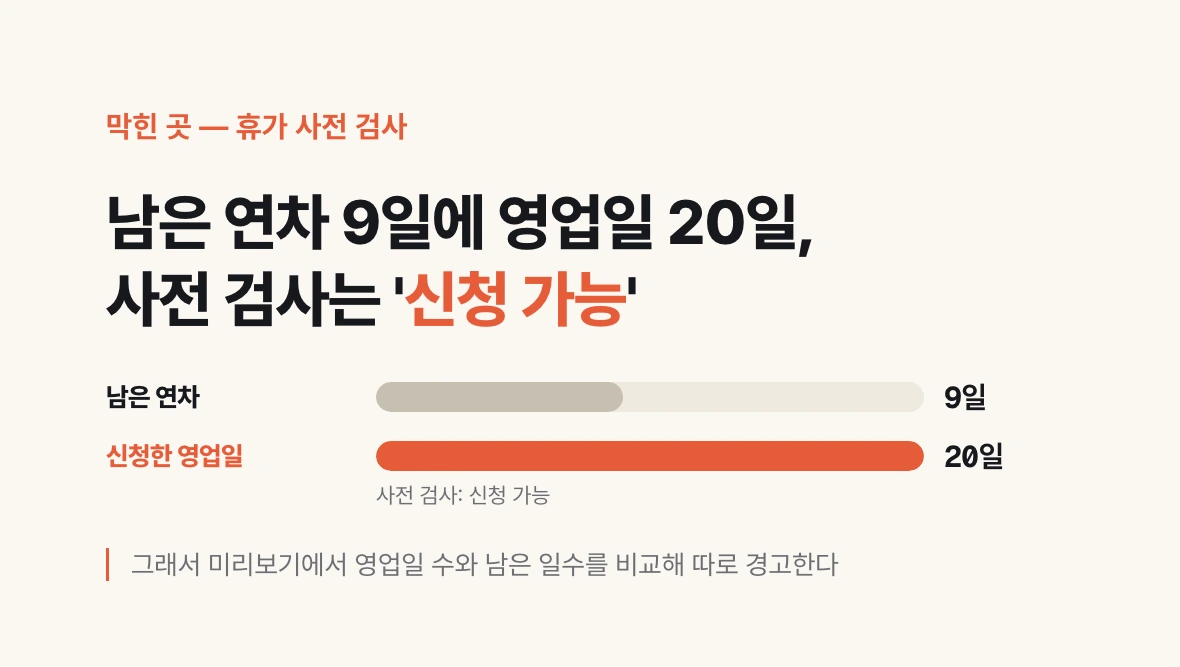
Second, the leave pre-check didn't stop requests larger than the remaining balance. With 9 days left on my account, a 20-business-day request still came back 'can request'. So the preview compares business days with the remaining days and warns separately. The pre-check did correctly block requests overlapping days already taken.
Third, the Korean input problem above. Every automated test passed, yet the first real use got stuck right away. Automated tests can't reproduce the state of a person's keyboard.
Sending and deleting get a second confirmation
Sending and deleting mail, requesting and cancelling leave, and adding and deleting calendar events follow the same rule. It first shows a preview of the recipients, subject and body, or the dates, remaining days and approval line, and runs only after you confirm. Deleting mail moves it to trash by default; permanent deletion needs an explicit instruction. A failed send is not retried, because if the server had already accepted it, the same mail would go out twice.
Testing was kept from affecting anyone else. Mail was sent only to my own Hiworks address and my own Gmail to check that attachments, replies and forwards arrived, and the Hiworks test mails were deleted. A test event was created on my personal calendar and then deleted. Leave requests and cancellations were run only through the pre-check and preview, never submitted. There are 68 automated tests.
Information about colleagues is limited to what my account can see in Hiworks. Phone numbers, email and join dates are included only when that person has made them public.
What I haven't verified yet
Windows has the password dialog code but hasn't been run on a real Windows PC. Accounts with two-step verification (typing a six-digit code at login) have code too but weren't checked with a real account.
E-approval stops at viewing documents and their status. To approve or reject, open the Hiworks page from the link in the result and click there. It doesn't know public holidays, so leave spanning a holiday shows up as two periods.
This plugin is not an official Hiworks feature. It calls the channels the Hiworks web pages use, so it may stop working if Hiworks changes its pages. If you get stuck, leave a note in the code repository.