What gets awkward when you have many repositories
A repository is a folder that holds code and documents together with the history of every change. A company usually keeps a separate repository per job, such as the storefront, the payments API and the admin dashboard, and having more than 20 or 30 is common.
An AI agent is an AI such as Claude Code that reads files and runs commands to carry a task through to the end. An agent can move between several folders at once, so if you are fixing the storefront and realise the payments API needs a change too, you can change both repositories in the same conversation. That part is fine.
The awkward part is everything the agent needs to know every time. Skills (instruction files the agent pulls out when needed), AGENTS.md (the rule file the agent reads first when a conversation starts), custom tools and wiki links end up copied into every repository. You get the same tools wherever you start, but every rule change means updating 30 or 40 copies.
You could put them in your user folder, the personal settings area on your own computer. But that spot is out of sight, so over time it drifts from the team's shared setup and goes stale. Matt Pocock thinks that spot is better left for each person to tweak in their own way, not for the way the team wants to work.
Home Repo — gather everything in one place and link by path
Home Repo makes one repository the home for skills, rule files, a wiki and custom tools. The agent always starts in this home repository. Because the home repository is an ordinary repository, an agent started inside it can move between the storefront and payments API repositories and bring back the context it needs.
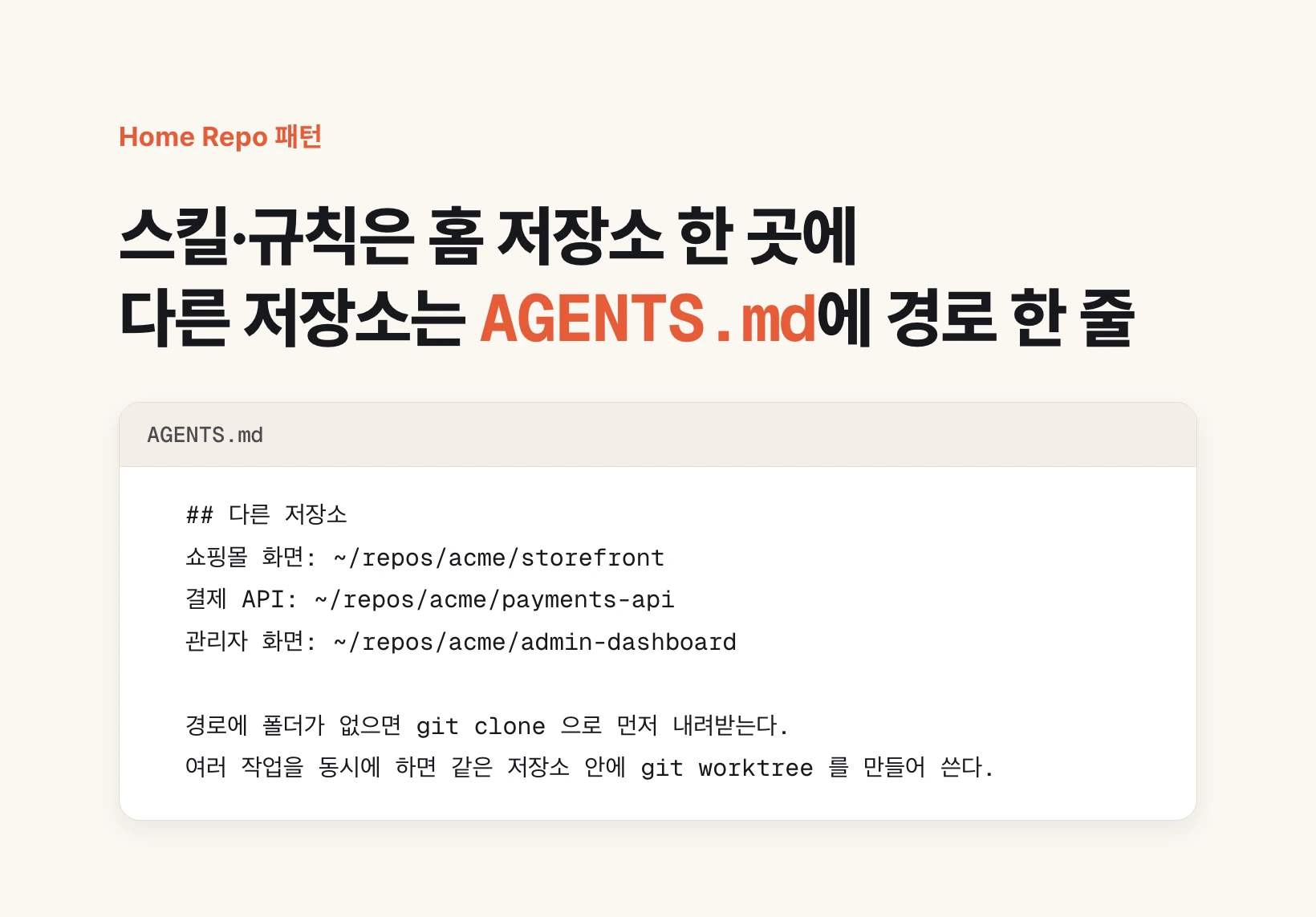
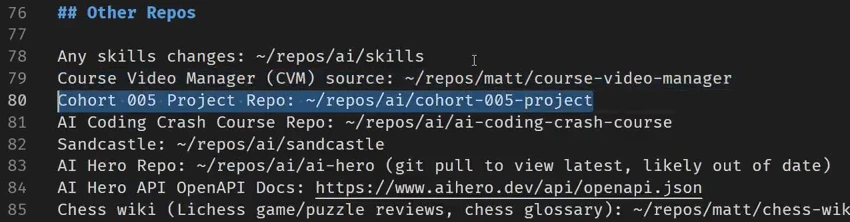
Linking to other repositories takes nothing more than one path per line in AGENTS.md (CLAUDE.md in Claude Code). Matt Pocock's real file has an “Other Repos” section with lines such as “Any skills changes: ~/repos/ai/skills” and “Sandcastle: ~/repos/ai/sandcastle”, a job name next to a path. To handle one more repository, you add one more line.
Skills placed in the home repository's .claude/skills folder are available in every conversation, even private in-house ones you do not want to publish. The settings file (settings.json) is also kept with its change history in this repository, so one edit spreads to everyone on the team who uses it.
## Other repositories
Storefront: ~/repos/acme/storefront
Payments API: ~/repos/acme/payments-api
Admin dashboard: ~/repos/acme/admin-dashboard

If a path has no folder, download it first with git clone.
For parallel work, create a git worktree inside the same repository.
What about a new computer and parallel work
On a new computer, if a listed path has no repository, the agent downloads it itself (git clone). There is nothing extra to install, which is why Matt Pocock calls it essentially a zero-setup arrangement.
When several agents work in the same repository at once, they use worktrees. A worktree is an extra copy of the same repository laid out in its own folder for each task, so two tasks never overwrite each other's files. Finished worktrees need tidying up now and then.
With hundreds of repositories, and how it relates to monorepos
This setup works as is up to about 20 to 40 repositories. At around 400, a single list gets too long. Then, instead of listing repositories directly in AGENTS.md, put groups first, such as frontend repositories, backend repositories and internal tool repositories, and write the paths under each group. The agent finds the right repository from the group names and folder structure alone. Revealing only as much as is needed, step by step, is called progressive disclosure.
A monorepo puts several projects together in one repository. Matt Pocock likes monorepos enough to have promoted the monorepo tool Turborepo at Vercel, and he says that if everything can live in one repository, that is better. But often some parts must be public and others private, or company policy rules out merging. That is when Home Repo is the answer.
| Situation | Fitting approach |
|---|---|
| A job that only touches one repository | Start the agent in that repository |
| 20 to 40 repositories that cannot be merged | Home Repo + one list of paths |
| Hundreds of repositories | Home Repo + paths by group (progressive disclosure) |
| Everything can be merged into one repository | Monorepo |
Putting a wiki and tools in the home repository too
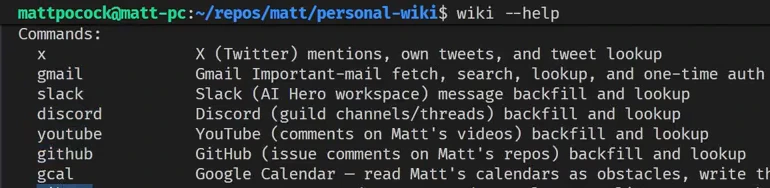
Matt Pocock named his home repository personal-wiki. It is a huge wiki of Markdown files holding sensitive material about his business, and, in the style Andrej Karpathy proposed, it is a wiki that an LLM (large language model, the basis of AIs such as ChatGPT and Claude) reads and writes. He queries it to pull material when creating courses and content.
The more important part is the tools. Typing wiki --help in this repository lists subcommands that connect to Gmail, Slack, Discord, YouTube, GitHub, Google Calendar, the site blocker Cold Turkey and more. There is also a command that publishes one-off HTML reports and one that schedules posts through Buffer.
Because everything runs in one place, tasks can be chained. An instruction like “find this message in Discord, go to the course repository and fix it, then use the course video manager to fix the course itself” works in one go. The home repository becomes the junction that connects not only code but also work material and tools to the agent.
Steps to build one today
1. Make an empty folder to use as the home repository. Call it home or workspace; the name does not matter.
2. Create AGENTS.md in that folder (CLAUDE.md if you only use Claude Code) and write the name and path of three repositories you open often, one per line, as in the example above.
3. If you have common skill files scattered across repositories, move them to the home folder's .claude/skills.
4. Open Claude Code in that folder and give it a job that points at another repository, such as “read the payments API repository's README and summarise it”. If the agent follows the path in AGENTS.md and reads that repository, it works.
At the end of Matt Pocock's article “The Home Repo Pattern” (aihero.dev/the-home-repo-pattern) there is a setup prompt that has an agent look over the repositories you use and move things into a home repository.
It does not always fit. For a job that only touches one repository, start the agent in that repository; if everything can be merged into one repository, a monorepo is better. Personal preferences tuned only to your own hands belong in your user folder, not the home repository.