Why screens built by AI keep looking alike
Models largely learned from the same material: the SaaS landing pages and dashboard templates strewn across the public web. So when you ask for a screen with no further direction, different models on different projects converge on the same choices. Inter for body text, a hero background flowing purple to blue, another gradient on the heading, a card inside a card, a thick colored stripe down the left edge, a small uppercase label above the title.
Correcting that by prompt means repeating yourself forever. "Make it more refined" or "less AI-looking" carries no standard, so the result drifts from conversation to conversation. Impeccable takes the opposite route: name each problem, turn it into a rule, and put those rules as files where the agent will read them.
The starting point is the frontend-design skill Anthropic published. Impeccable grew from there, expanding the command vocabulary to 23, adding 60 detector rules that run without an LLM, and a hook that intervenes at edit time. The repository states that lineage directly.
How to install it
The easiest path is the CLI installer. Run one line at the project root. npx ships with Node.js and runs a package on the spot without a separate install; if you do not have Node.js, install the LTS build from nodejs.org first.
On launch it finds the AI coding tools present on the machine and lists them — Claude Code, Codex CLI, Cursor, Gemini CLI and others. It asks whether to keep the detected set or customize, then whether to install into this project or globally. Once you answer, it downloads the skills into that tool's config folder, installs the hook as well on supported tools, and tells you what to do next.
To run it without prompts, pass the answers ahead of time with flags such as --providers=claude,codex,cursor and --scope=project. That form belongs in scripts and team onboarding docs. To refresh an existing install later, use npx impeccable update.
Other install paths exist. In Claude Code you can register the plugin marketplace with /plugin marketplace add pbakaus/impeccable. A team that wants the version pinned in the repository can add it as a git submodule and wire it into each tool folder with npx impeccable link. Downloading a per-tool ZIP from the website and copying the repository's dist folder are documented too. For a first run, the first path is all you need.
npx impeccable install

# without prompts
npx impeccable install --providers=claude,cursor --scope=project

# refresh later
npx impeccable update
What /impeccable init produces
Once installed, run /impeccable init once inside the AI tool. This is not a command that edits files; it is a conversation that fixes context. It first asks whether the surface is brand or product. Brand covers marketing pages, landings and portfolios — screens that leave an impression. Product covers app UI, dashboards and tools — screens used every day. Applying the same rules to both leaves one flat and the other noisy, so this fork is settled first.
When the conversation ends, PRODUCT.md and DESIGN.md are written. PRODUCT.md holds who the screen is for, what impression it should leave, and which references to avoid. DESIGN.md holds the visual rules: color, type, components. Every command you run afterwards reads those two files first, so you stop re-explaining the brand each time.
If screens already exist, /impeccable document can derive DESIGN.md back out of the existing code. Fixing the colors and spacing you are already using into a document is often faster than starting from blank.
Which of the 23 commands to use when
Every command is called by name after /impeccable. Add a target and the scope narrows: /impeccable audit blog looks only at blog screens, /impeccable polish settings only at settings. Typing /impeccable alone lists everything, and you can simply append a description instead.
The frequently used ones come down to the table below. Once a command becomes daily, pin it with /impeccable pin audit to get /audit as a shortcut.
An order emerges with use. Before building, shape plans the layout and flow. After building, critique checks what a person sees and audit checks what a machine sees, then polish closes it out. If the result is flat, bolder; if it is too much, quieter; if there are too many elements, distill.
| Command | When to use it |
|---|---|
| shape | Plan the screen and flow before writing code |
| craft | Go from layout to implementation in one pass |
| critique | Review hierarchy, readability and impression as a person would |
| audit | Check technical items: accessibility, performance, responsive |
| polish | Final pass and design-system alignment before shipping |
| bolder / quieter | Adjust intensity when the result is flat or overdone |
| distill | Strip down when too many elements blur the focus |
| harden | Fill in fragile cases: error states, long strings, other languages |
| clarify | Fix confusing copy such as button labels and error messages |
| adapt | Fit other screen sizes, mobile included |
Running only the checker, without an agent
Impeccable ships a checker that runs without AI. Give npx impeccable detect a file, a folder or a URL and it reports what hit a rule, by name. It never calls an LLM, so no API key is required and the result is the same every run.
How it inspects depends on the target. HTML gets static analysis including linked CSS, other files such as JSX and CSS get pattern matching, and a URL is opened in a real browser so the rendered screen is what gets read. So a clean source scan can still miss items a URL scan catches.
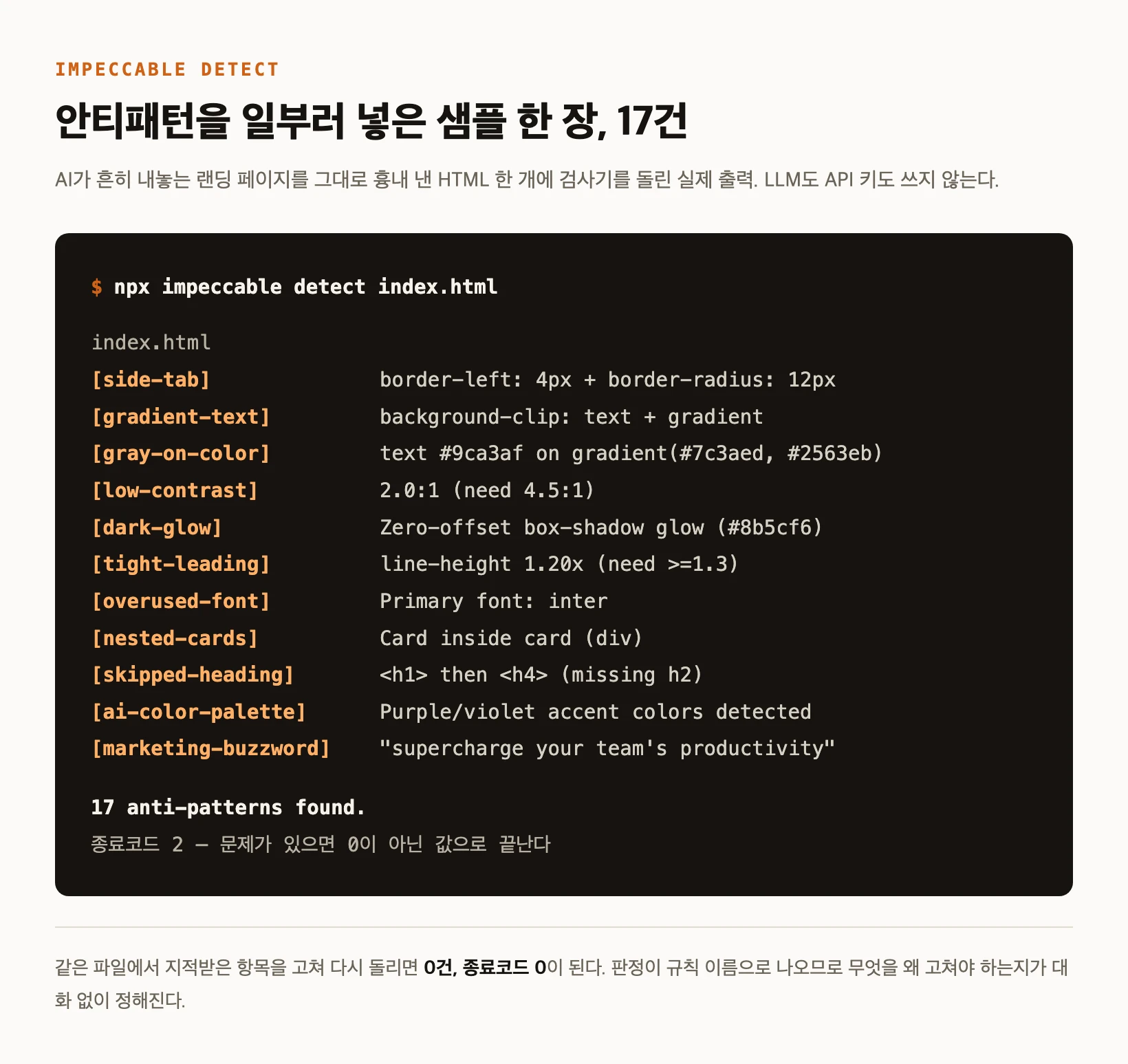
As a check, a single HTML page written to mimic what AI usually produces was run through it. The result was 17 findings and exit code 2. Fixing only the flagged items, leaving the layout structure alone, brought it to 0 findings and exit code 0. The non-zero exit is the important part: on its own it is enough to fail a CI build.
To turn an item off, put an impeccable-disable comment in the file to waive it where it lives, or record an exception in the repository config with npx impeccable ignores add-value. Either way you write down a reason, so the judgment survives as a record.
npx impeccable detect src/                   # scan a folder
npx impeccable detect index.html             # scan a file
npx impeccable detect https://example.com    # scan a URL (real browser)
npx impeccable detect --json .               # output for CI

# exit code 2 when findings exist, 0 when clean
One cleanup to do after installing
Once you start running commands, an .impeccable folder appears in the project and working files pile up inside: review screenshots, run state, caches, per-developer settings. Most of it does not belong in the repository. The README ships a .gitignore block you can copy in verbatim, so paste it once at the start.
Do not ignore all of it, though. A few files are meant to be shared — the project config, the design spec, and the review reports — and those stay in the repository so the team works from the same standard. If a screenshot was committed before you added the ignore rules, adding rules will not untrack it; run git rm --cached to stop tracking without deleting your copy.
On supported tools a hook is installed too. It runs the detector the moment a UI file is edited and feeds findings back into the agent flow. Cursor blocks a bad proposed write before it lands; the others report after the edit. The installer asks whether to add the hook, so decline there if you do not want it.