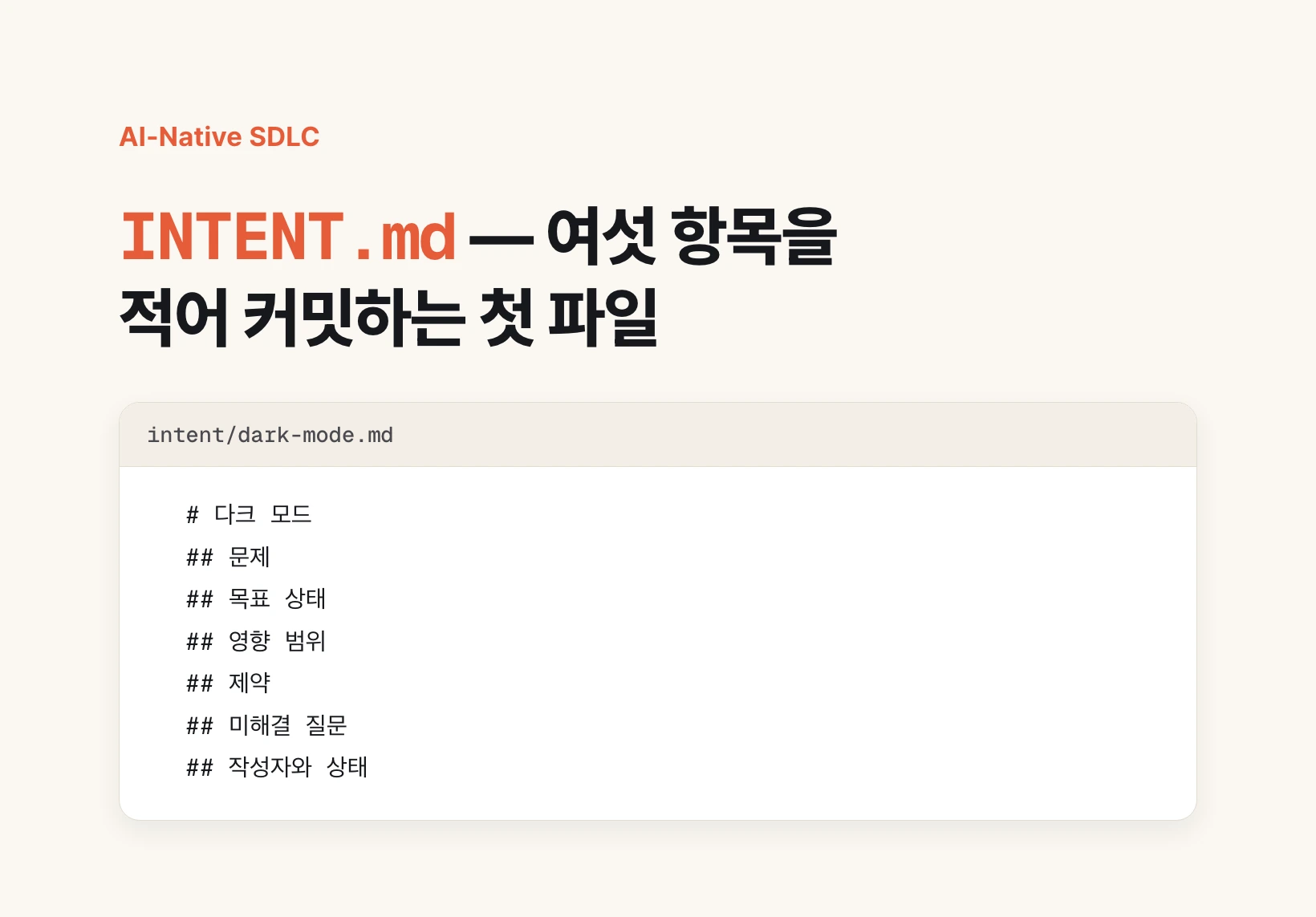
What goes into INTENT.md
INTENT.md is a markdown file that records what you want built in the words of the person who had the idea. Markdown is a lightweight plain-text format with little more than headings and lists, saved with an .md extension. The point is that it lives in the same repository as the code, not in a word processor or a wiki.
In the AI-Native SDLC playbook published on 21 August 2026, Anthropic lists six things the file holds. What the problem is, what the outcome looks like once solved, which users and systems are affected, what the constraints are, which questions are still open, and who wrote it along with its current status.
Those six are not there to satisfy a template. They are precisely the material the next stage needs in order to produce a design document. Drop the constraints and you get a design nobody can build; drop the open questions and you get a design that states guesses as settled facts.
| Field | What you write | What breaks without it |
|---|---|---|
| Problem | What is not working today | A solution is recorded first, and other options disappear |
| Outcome | What changes once it is solved | There is no test for being done |
| Affected scope | Which users and systems are involved | Connected systems surface late |
| Constraints | Budget, deadline, technical and regulatory limits | The design cannot actually be built |
| Open questions | What is still unknown | Unknowns harden into decisions |
| Author and status | Who wrote it and where it stands | Ownership and progress blur |
Why intent comes before code
SDLC stands for software development life cycle: the loop of planning, designing, building, testing, deploying and maintaining. It is the circuit a team runs every time it ships a feature.
Of those six stages, the long and expensive one was the build stage, which is why tooling and hiring concentrated there. Coding agents changed that. As build time shrank, the other five stages became the larger share of the calendar.
The requirements meetings, the wait for someone to write the ticket up, the days queued behind a tester, the backlog of pull requests waiting on review — none of that moved. Code got faster; the time it takes a feature to reach a user did not fall by the same amount. The bottleneck moved from code to process.
That is the concern the playbook starts from. Use agents across the whole cycle rather than in the build stage alone, and for that to work each stage has to hand the next one a file rather than a conversation. INTENT.md is that first file.
How to write one right now
All you need is a folder. Create one called intent at the top of your repository. The playbook notes that for a team with a single product, an intent folder inside that product's repository is the simplest home.
Then have the agent interview you. The order matters here. You are not handing over tidy requirements; you are letting the agent keep asking until what is in your head comes out. Anything you drop while tidying up never comes back.
Say you want dark mode. Let it press you on why it is needed, which screens are involved, where the user's choice is stored, what happens to images and logos, when it has to ship, and what you are willing to give up. Go until you have nothing left to answer, then have it save the file.
If you are using a tool that can write files directly, such as Claude Code or Cursor, have it save the result at the end of the conversation. In a web chat, copy the output into a file yourself. Name the file after the feature, as in intent/dark-mode.md, or prefix a date so the folder sorts chronologically.
Interview me about a feature I want to build.
Ask one question at a time, and keep going until I say I have nothing left to add.

Cover: why this is needed, what is painful today,
affected users and screens, connected systems, budget, deadline and technical limits,
and anything I have not decided yet.

When I say we are done, write the conversation up and save it as intent/<feature>.md
Format: Problem / Outcome / Affected scope / Constraints / Open questions / Author and status# Dark mode
## Problem
Users on the app at night have written in repeatedly over the past three months that the screen is too bright.
## Outcome
A user can choose a light or dark screen in settings, with a third option that follows the device setting.
## Affected scope
Every screen in the app. One new row in settings. The logo and illustrations assume a light background and have to be revisited.
## Constraints
Has to land in next quarter's scheduled release. There is no capacity to build new design system color tokens, so it must be solved by reusing the existing ones.
## Open questions
Undecided whether the user's choice is stored on the device only or on the account so it syncs across devices.
Undecided whether email templates are in scope.
## Author and status
Written by Shin Seungho, 2026-09-05, awaiting reviewDo not skip the read-back
The agent producing the file is not the end. The playbook says the person who had the idea reads it back and corrects it before it is committed. This is the step most easily skipped, and the one that costs the most when it is.
The reason lies in what comes after. This file becomes the design document, the design document becomes the work plan, and the plan becomes code. Each stage reads only the file from the stage before it. One sentence recorded wrongly at the start travels quietly through three stages and into the code.
Two failure modes recur. The agent tends to write down as a firm requirement something you said in passing, and it tends to omit entirely a constraint you considered so obvious that you never said it. Look for those two first.
When correcting, check facts rather than polish prose. Anything recorded as decided that you have not decided moves down into open questions; anything in the affected scope that you consider out of scope comes out. Once review is done, commit it. The playbook records that approval as the merge of the artifact or the closed review.
The author does not have to be an engineer
The playbook calls the person who writes this file the originator. The point of the term is that anyone in the organization with an idea can be one.
A customer who hit a bug can be an originator. So can a product manager with a feature idea, or an operations lead who wants a repetitive manual task gone. Until now a request like that arrived as a one-line ticket that somebody had to chase and write up; the agent does that write-up instead, so the person who lived it can leave it in their own words.
That does not mean everything goes straight into development. A product owner reviews what accumulates and sets priority. The list of markdown files in the folder is itself the backlog, and some teams move that list into a tool such as Notion or Linear. You can also have an agent draft the tagging and priority and have a person confirm it.
What follows INTENT.md — the artifact chain
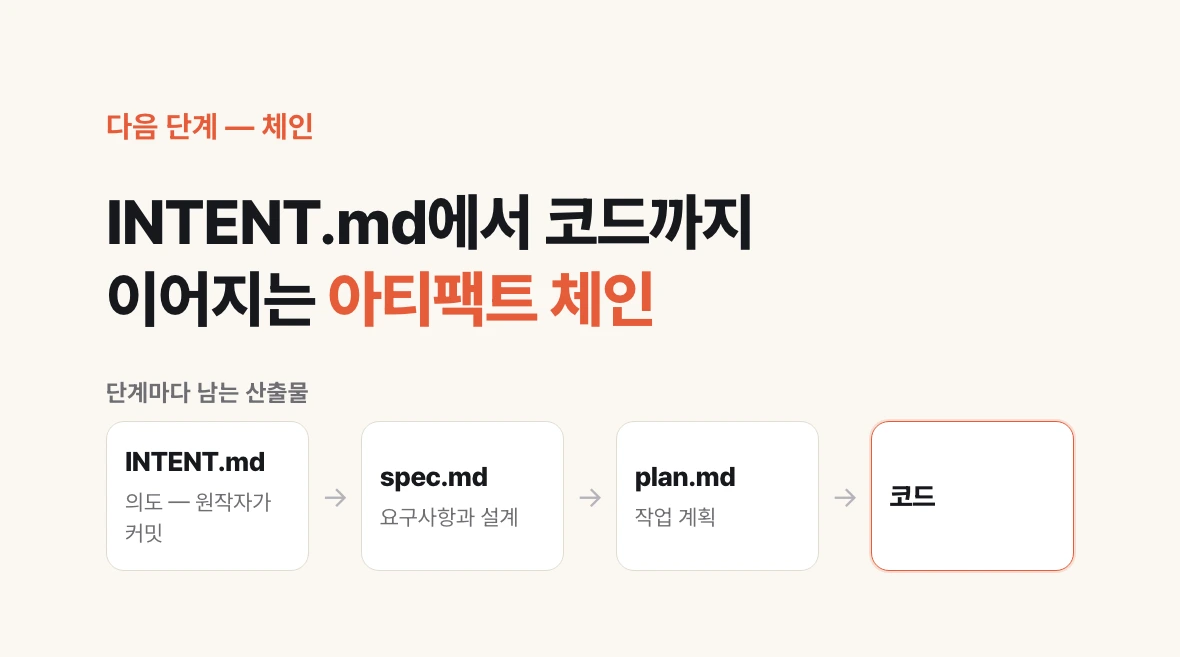
The file does not stand alone. The playbook lays out a chain of artifacts, one per stage, and INTENT.md is its first link.
Once intent is committed, it becomes the input for spec.md, which carries the requirements and the design. The playbook offers a sample instruction for this stage: read the attached intent.md and produce a requirements and design spec, applying the skills available so the result conforms to brand guidelines, security policies and UX standards.
With the design settled, an engineer feeds intent and spec together to produce plan.md, the work plan. Which files change, in what order, what the risks are, and how completion will be verified all go there. One test of a good plan is whether someone handed only that document could do the work without reading the two before it.
That test sounds strict, and there is a reason for it. No single agent carries all six stages end to end. Each stage brings a different conversation, a different agent, different subagents, and none of them know what was said earlier. This is where handing over a file rather than a conversation becomes a practical requirement rather than a preference.
| Stage | Artifact | Who mainly produces it |
|---|---|---|
| Plan | intent.md | Originator with an agent |
| Design | spec.md | Agent, reviewed by the product owner |
| Build | plan.md | Engineer with an agent |
| Build and test | PR and code diff | Agent, reviewed by a person |
| Deploy | Merged PR | After review passes |
| Maintain | Incident record | Triggered by an alert or a schedule |
Decide these before rolling it out
You can start with one folder, but a few decisions up front make it stick. Where the files live, how they are named, who reviews them and what marks approval. Change those often and both people and agents meet a different rule every time, which is where the benefit goes.
The rules can be executable rather than written down. A hook can generate the design document once intent is merged, and your team's document format can be packaged as a skill so nobody rewrites the instruction each time. This is what the playbook means by governance as code.
If something already works for you, there is no reason to throw it out. Every team already has its own planning documents and review steps, and this playbook is one approach among several. Align names where they overlap and fill the one slot that is currently empty.
The smallest way to start is to pick one feature shipping this week and write a single file into the intent folder. Ask whether the next person could begin the design from that file alone, and you will know at once whether your team needs this.