The pipeline has four stages
Start with the shape. Every morning, conversations from KakaoTalk open chat rooms are summarized, posted into a Slack channel, and from that Slack thread an AI writes a ticket body that gets filed in Jira. Four stages: read the conversations out of KakaoTalk, summarize them per room, send them to Slack, and turn Slack threads into Jira issues.
Stages two, three, and four are not hard. Summarizing means handing text to an LLM. Slack accepts a post through a single webhook URL. Jira has a documented REST API. All three are sanctioned paths.
The first stage is the problem. KakaoTalk has no official channel where another program can ask for the contents of a room. The developer APIs Kakao publishes point outward, for login, sending messages, and sharing, not inward toward reading your own history. So that one stage costs more effort than the other three combined.
The only way in
Is there really no alternative? There is a manual one. Inside a chat room you can export the conversation to a txt or csv file, and I do keep files pulled that way. But it cannot drive a pipeline that runs unattended every morning, because a human has to click it for each room.
That leaves one option: open the data KakaoTalk has already stored on my own machine. KakaoTalk for Mac accumulates received messages in a database inside its app container, the private folder macOS gives each application. In principle an app stays inside its own container.
One clarification is worth making. This is not about reading someone else's data. It is my own conversations, received on my own Mac under my own login, read by the owner of that Mac. Even so, the route is a back door rather than a door Kakao opened, so it should be used with the assumption that it breaks whenever Kakao changes how it stores things.
Where the key to the encrypted database comes from

Opening the container folder does not immediately show you conversations. Two walls stand in the way.
The first is the filename. The database is not called something readable like kakaotalk.db. It is a 78-character hexadecimal string, and that string differs per machine because it is computed from the account number and a device identifier. Looking at the folder tells you nothing about which file holds the messages.
The second is encryption. The file itself is encrypted with SQLCipher, an extension that encrypts a SQLite database at the file level. Open it with the ordinary sqlite3 command and you get an error saying this is not a database file. You need the passphrase and the sqlcipher command.
So where does that passphrase come from? Not from anything the user typed. The program computes it from two ingredients: the Mac's hardware UUID and the internal number of the Kakao account. Those are combined and run through PBKDF2, a standard key derivation function, a hundred thousand times. PBKDF2 exists to stretch short inputs through repeated computation so brute force becomes expensive.
One detail is genuinely interesting. The account number is not written into the preferences file in the clear. Only a hash of it survives, the value put through a one-way function. So you recover it by trying integers from zero upward until one produces the same hash. The account number is a small enough integer that this finishes in practical time.
None of this is my discovery. A developer known as blluv published a gist and the kakaocli project documented it, and my own code cites both in its header comments. That is why this article explains the structure and the constraints but does not ship copy-paste key derivation code. The original sources are there if you need them.
Why it only works on a Mac
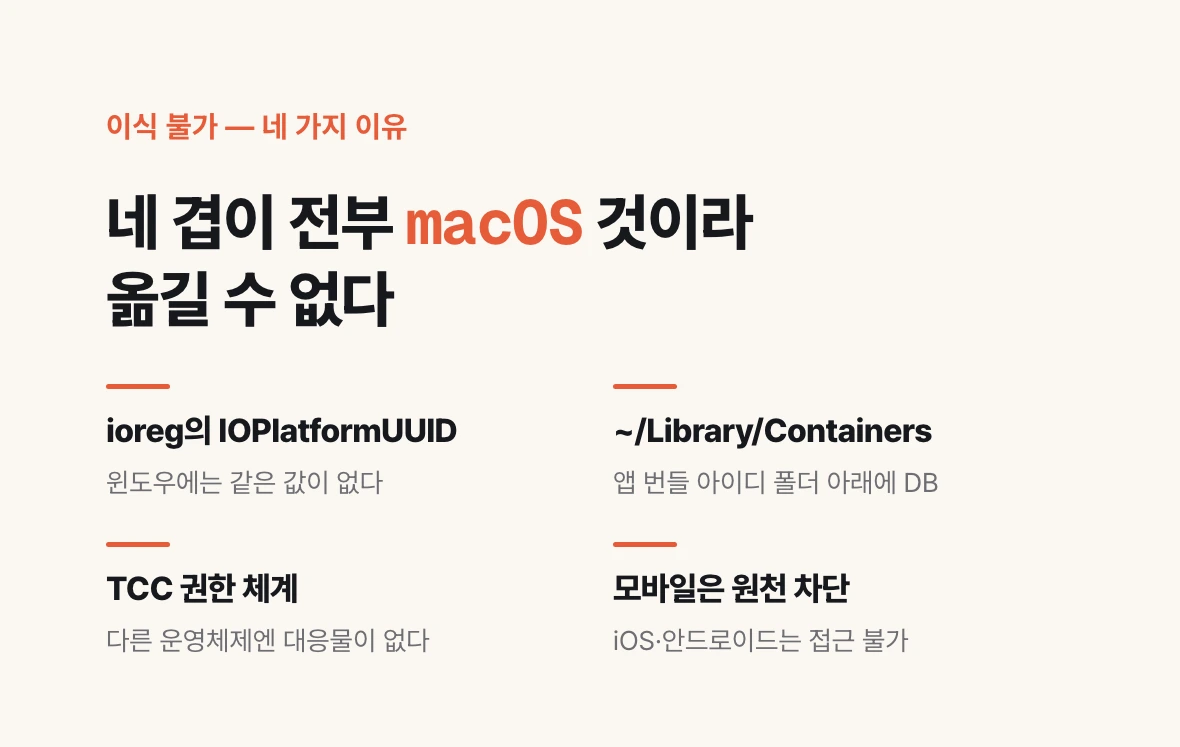
People often ask whether this can be moved to Windows or Linux. This code cannot run there, and there are four places where the implementation is tied to macOS.
First, the hardware identifier feeding the key is macOS specific. It is the IOPlatformUUID read through the macOS ioreg command, and Windows has no equivalent value.
Second, the file location is a macOS sandbox construct. Under ~/Library/Containers there is a folder named after the app bundle id, with the database inside. KakaoTalk on Windows stores things elsewhere in a different shape.
Third, the access control is macOS TCC, the privacy layer that asks the user for consent when one program reaches into another app's data. Other operating systems have no counterpart.
Fourth, mobile was never in scope. iOS and Android block one app from reaching another app's data at the OS level. The condition this implementation needs is KakaoTalk for Mac.
One misreading is worth correcting. This does not mean conversations are unreadable on Windows. KakaoTalk for Windows keeps messages as .edb files under %LocalAppData% and encrypts them with AES, and the key derivation for that format has already been published in Korean forensics research (blog.system32.kr among others). Porting to Windows is therefore not a blocked problem but the work of rewriting the key derivation to that platform's rules. This article covers only the Mac because my pipeline runs on a Mac, not because Windows is closed.
The one practical constraint that remains is that a Mac has to stay awake to run the pipeline.
Not cron — why it has to be a LaunchAgent
It is a daily job, so cron looks like the obvious home. That is what I tried first, and it failed. The failure mode is nasty enough to write down.
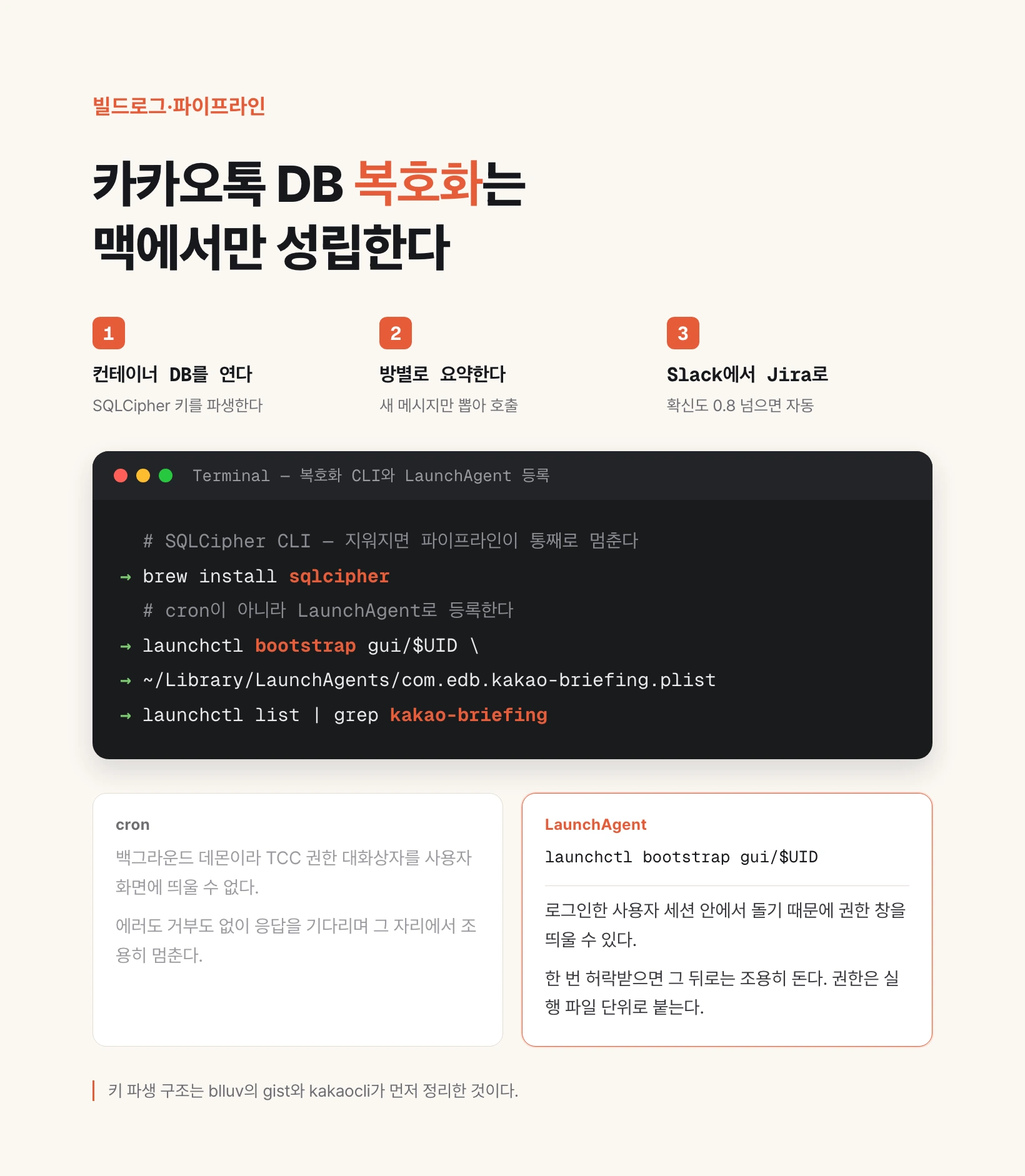
There is no error. There is no denial message. It simply stops. TCC is the cause. Reading the KakaoTalk container requires Full Disk Access, and macOS asks for that permission by drawing a dialog on screen. cron runs as a background daemon with no way to put a window in front of the user. So it never asks, is never denied, and hangs waiting for an answer that cannot come.
The fix is to change what runs the job. Use a LaunchAgent instead of cron. A LaunchAgent is the macOS scheduler that runs inside a logged-in user session, so it can raise the prompt, and once approved it runs quietly.
A second trap follows from this. Permissions attach to executables. If the sqlcipher binary reads the KakaoTalk container directly, sqlcipher needs its own grant, and the prompt comes back every time Homebrew updates it. So Python copies the file out of the container into /tmp first, and sqlcipher only ever touches the copy. That narrows the set of binaries needing permission to one.
The decrypted plaintext database needs care too. Left in /tmp with default permissions, other processes on the same machine can read it. It holds the full conversation history, so it is locked down to owner-only the moment it is written.
# SQLCipher CLI — brew autoremove로 지워지면 파이프라인이 통째로 멈춘다
brew install sqlcipher

# cron이 아니라 LaunchAgent로 등록한다
launchctl bootstrap gui/$UID ~/Library/LaunchAgents/com.edb.kakao-briefing.plist
launchctl list | grep kakao-briefing
After the read — pull only what is new, summarize per room
At this point you hold one plaintext SQLite file. From here it is ordinary data work.
Summarizing everything on every run is unaffordable in both cost and time, so each room records the id of the last message it processed and only newer ones are pulled. This is the high-water-mark pattern. The lookback window is generous so a skipped weekend run does not lose messages, and the message id prevents duplicates.
Not all messages are alike. The database mixes text, images, ads, and system notices into the same table, each tagged with a type number. Only text plus replies and link shares are ingested and the rest is dropped. Skip this filter and your summarization prompt fills up with ad copy.
Summarization calls one room at a time. It started as a single batched call for all rooms, and when one flooded room hit a timeout the summaries for every other room in that call vanished with it. A per-room loop with individual exception handling means one dead room does not take the others down. Each room also has a cap on how many recent messages go in.
Cost is split as well. General open chat rooms are summarized by a small model running locally, and only the business-critical room and the schedule extraction go to a stronger model. On failure it falls back upward automatically.
Slack to Jira — the AI writes a ticket body, not a PRD
Once a summary exists it goes to the channel through a Slack webhook, the simplest possible integration: Slack issues a URL, and posting text to it puts a message in the channel.
One implementation trap here. The first version found the heading line in the summary markdown with a regular expression and sliced out each room's body. When the Telegram output was switched to plain text the heading markers disappeared and that parsing broke silently. Now the summarization step drops a separate JSON file keyed by room name, and the Slack sender reads that JSON. Changing the display format no longer disturbs the data path.
From Slack onward a second bot takes over, connected through Socket Mode. It opens a connection outward to Slack rather than exposing a public URL, so it needs no hole in a firewall to run on an internal network or a personal server.
Mention the bot and the message goes to an LLM that returns structured JSON: whether to create an issue at all, which project, the issue type and priority, and a title and body. The body is required to cover symptom, reproduction, and expected result.
A naming point matters here. People describe this step as the AI writing a PRD, but the actual output is a ticket body, not a separate planning document. It is not producing a product requirements document; it is filling in one ticket a developer can pick up. Blurring that distinction misaligns expectations.
Confidence draws the line. Above 0.8 it files the issue and replies in the thread with a link. Between 0.5 and 0.8 it asks a human whether to create it. Below 0.5 it logs and ignores. Message timestamps prevent the same message being processed twice.
That is exactly where the human remains. The machine does the repetitive collecting, tidying, and drafting; the person rules on the ambiguous cases and decides what gets made.
When Kanana reaches B2B, this layer disappears
The first stage of this pipeline is a detour built because there is no official route. A detour lasts exactly until the front door opens.
Kakao has already shown that direction. On 23 April 2026, at World IT Show in Seoul, Kakao presented 'Today's Briefing' under its Kanana AI brand, a feature that analyzes a user's past conversations to surface important schedules, anniversaries, and to-dos. Context-aware behavior was shown alongside it, recommending restaurants when a conversation is settling on a meeting place, or detecting a birthday and linking to the gift feature. It serves the same purpose as the thing I built by decrypting a database.
What was announced, though, is consumer-facing. There was no mention of B2B or enterprise use. And what is actually needed is not a personal daily briefing but a layer where a team channel's conversation becomes a work ticket.
There is room for that layer to open. In July 2026 Kakao released four Kanana-2 lightweight models as open source and emphasized tool calling, where a model invokes external system functions on its own. Reading a conversation, deciding, and filing it into another system is precisely what that capability is for.
When that day comes my decryption code is dead. That is the correct outcome. A detour has value only while the front door is missing, and once it exists you drop the detour without sentiment. It is better to build automation with that in mind from the start, marking which layers are temporary workarounds and which are durable assets, so you know exactly what has to be rebuilt when the platform moves.
In this pipeline the durable part is not the decryption but everything behind it. Splitting summarization per room, gating automatic action on confidence, and the key design that prevents duplicates all survive unchanged whether the input is KakaoTalk or an official API.