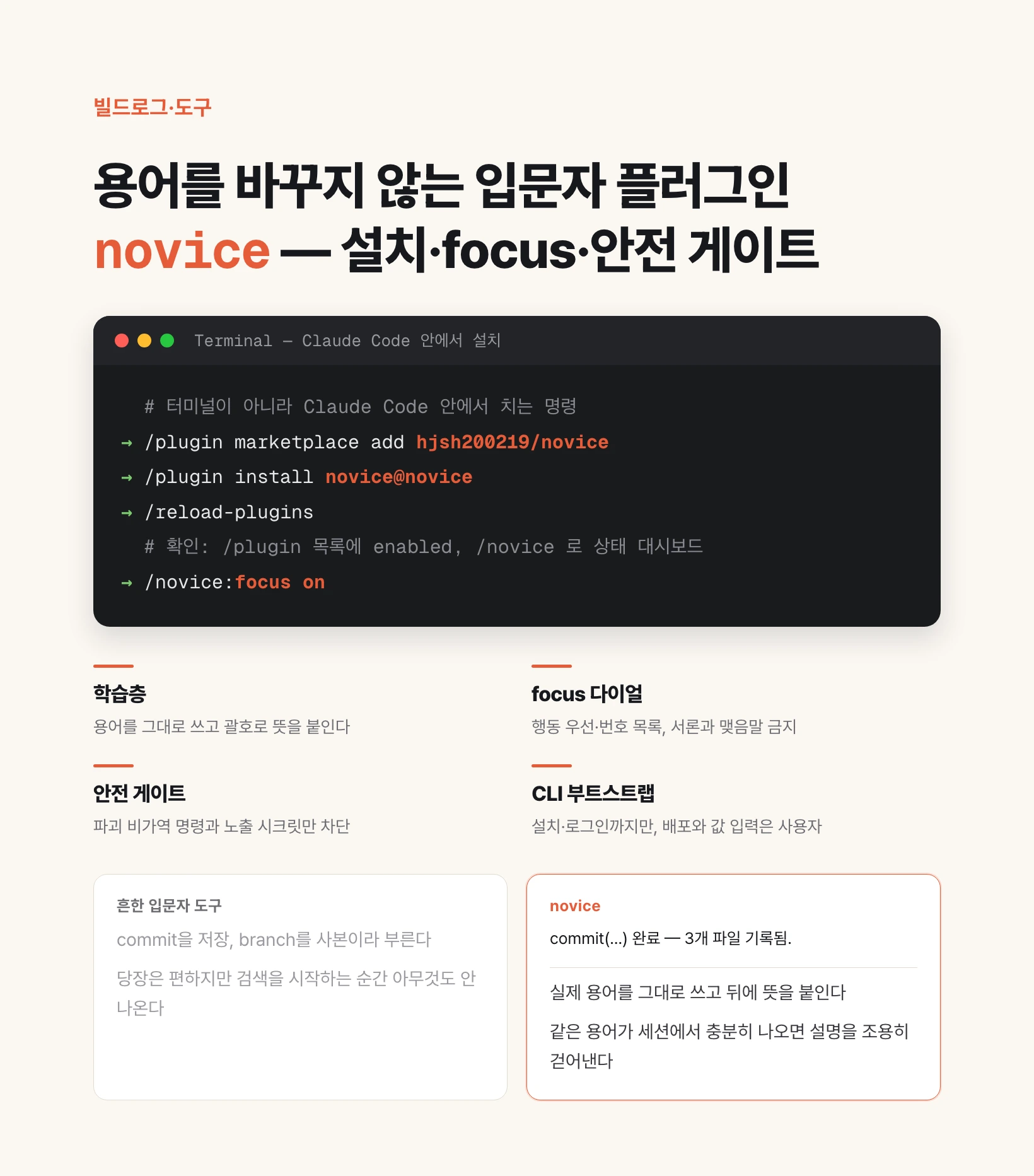
Three things it actually does
A non-developer opening Claude Code for the first time gets stuck in three places. The terms in the answer are unfamiliar. The answer is too long to know what to do first. And the moment a command has to be pasted into a terminal, the hand stops, because something might become irreversible. novice handles each of those in a separate layer.
The learning layer handles terms. Words like commit or branch are written as they are, with the meaning appended in parentheses, and the gloss is quietly dropped once the same term has appeared enough times in that session. The parentheses that followed every mention at first are simply gone at some point.
focus handles the shape of the answer. Turn it on and the first line becomes a command or a path you can run, anything over one step becomes a numbered list, and preambles and closings are forbidden. It is a separate switch from the level, so focus keeps working with novice set to off.
The safety gate handles commands, but in the opposite direction from what you would expect. It blocks only what is positively destructive and irreversible, and declines to have an opinion about the rest. Why it was built that way is spelled out below.
On top of that sits the external service CLI bootstrap. It walks the install-and-login process for tools like Vercel or the GitHub CLI, taking approval at each step. The boundary is explicit: creating accounts, entering values, and deploying are done by the user.
Install — marketplace and npm are two separate paths
The recommended path is the marketplace. With Claude Code running, enter the three lines below in order. These are typed inside Claude Code, not in a terminal.
/plugin marketplace add hjsh200219/novice
/plugin install novice@novice
/reload-plugins
Confirming the install, and updating it later
Confirmation has two steps. Check that novice shows as enabled in the `/plugin` list, then run `/novice`; a status dashboard means it works. The dashboard shows the current level, the learning layer state, whether the safety gate is active, and the mute list.
There is one trap everybody hits once. What gets installed is a cached copy, not the original, and it does not auto-update. A new version can ship while the old one quietly keeps running. Update the novice marketplace from the `/plugin` menu, then reinstall the plugin.
Removal is `/plugin uninstall novice`. Removing it takes away the safety gate along with the learning layer. "Always-on" only means anything while the plugin is enabled.
A git URL or a local clone path registers the same way as the GitHub shorthand: `/plugin marketplace add https://github.com/hjsh200219/novice.git`.
Installing via npm — same plugin, different delivery
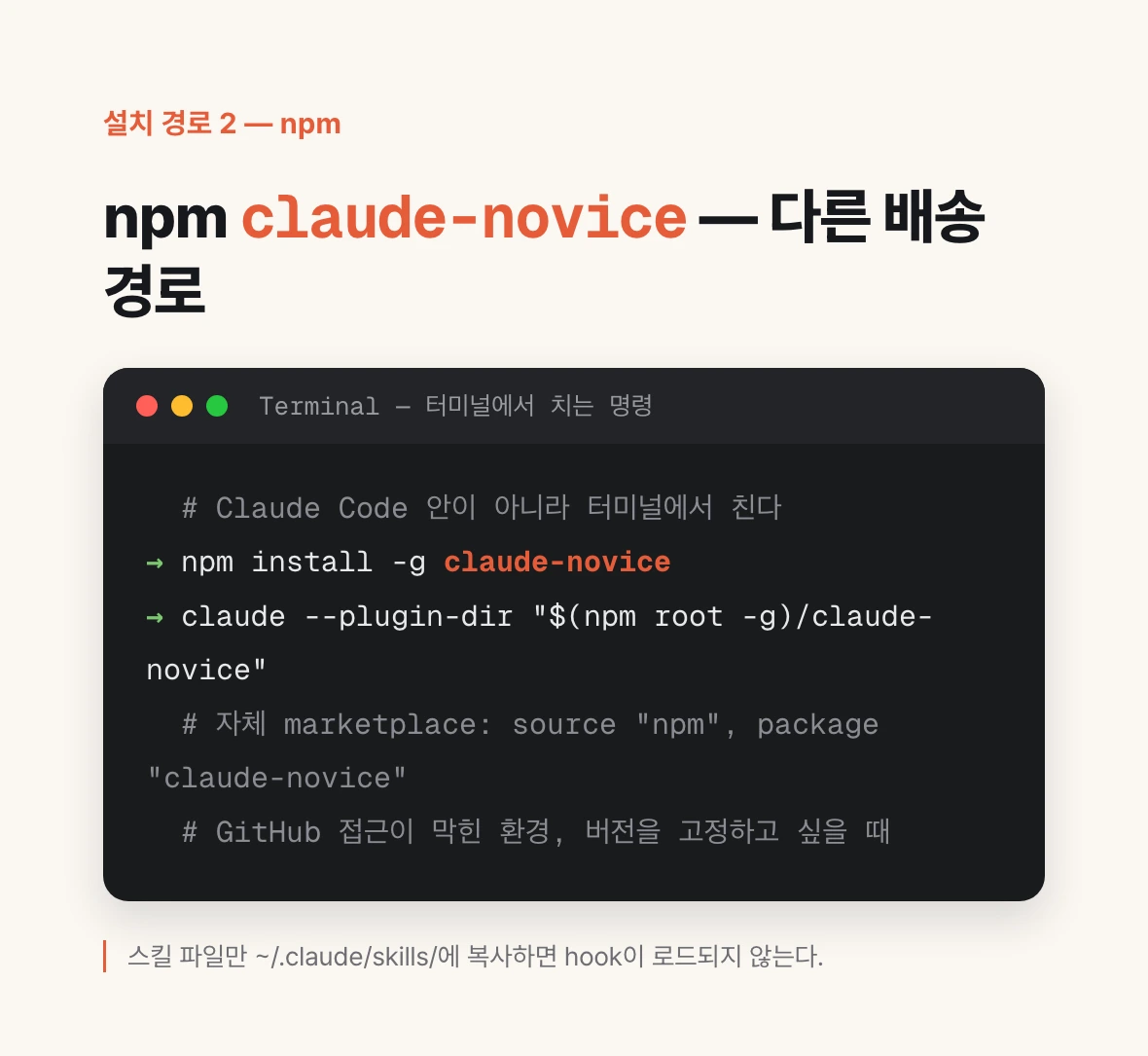
novice is also published to npm as `claude-novice`, a separate channel whose version moves together with the marketplace one. The marketplace install pulls from the GitHub repository tree; this one pulls from the npm registry. Use it where GitHub access is blocked by a proxy or firewall, or where npm is already the standard delivery mechanism, as in a CI image.
The simplest form is a global install followed by loading it into the session directly. These commands go in a terminal, not inside Claude Code.
npm install -g claude-novice
claude --plugin-dir "$(npm root -g)/claude-novice"{
"name": "novice",
"source": { "source": "npm", "package": "claude-novice" }
}Which path to pick
For a personal setup, the three marketplace lines are the shortest thing there is. You never leave Claude Code and you never think about npm or a Node version.
The npm path is for two cases: an environment where direct GitHub access is blocked, and wanting to pin a version. Put a `version` in your own marketplace entry's source and it stays on that release instead of following latest. If it has to be pre-seeded into a container or CI, `CLAUDE_CODE_PLUGIN_SEED_DIR` can plant the plugin cache at image build time.
To try it for the current session without installing, there is `claude --plugin-dir <clone path>`; it disappears when the session ends. For a one-shot test of a hosted ZIP, `claude --plugin-url <ZIP URL>`.
One thing not to do: copying only the skill files into `~/.claude/skills/` by hand is not supported. The skills load but the hooks do not, so neither the safety gate nor the learning layer runs. It looks installed and protects nothing.
Deploying to a team — teammates learn no commands
Teaching a non-developer teammate the `/plugin` commands is already a barrier. So there is a separate path: commit the following into the working repo's `.claude/settings.json`, and Claude Code offers to install novice for anyone who trusts that repo.
{
  "extraKnownMarketplaces": {
    "novice": { "source": { "source": "github", "repo": "hjsh200219/novice" } }
  },
  "enabledPlugins": { "novice@novice": true }
}
Why the real terms are never simplified away
The usual move for a beginner tool is to remove the hard words. Call commit a save, call a branch a copy, and it feels easier right away. The problem arrives the moment that person starts searching. Nothing comes back for save.
novice goes the other way. It writes the real term and appends the meaning after it. This is the actual output shape.
commit (recording the current changes as one save point) done — 3 files recorded.Levels 1, 2, 3, off — how long the explanation follows you
The level does not set how much is explained; it sets when the explanation goes away. The default is 1, and you change it with `/novice:mode 2`. The same thing happens when the entire prompt is exactly `novice 2`.
off turns off only the learning layer. Tone, explanations, and visualization go away; the safety gate keeps running. That part cannot be switched off by configuration either — the gate stays active even with the plugin setting `novice_enabled` turned off.
| Level | Where explanation attaches | When to use it |
|---|---|---|
| 1 (default) | Every term glossed, before/after narration. The gloss drops after a term appears 3 times in a session | The day you turn it on |
| 2 | Explains up to 3 times, narrates key decisions only | Terms look familiar but the flow does not |
| 3 | Explains on request only, architecture and user-flow focused | When you want to focus on what to build |
| off | Learning layer fully removed (safety gate stays) | Already comfortable, or sharing your screen |
mute and reset — what is per session and what is per project
An explanation attached to a term you already know is just noise. So there are per-term commands. They act only when the entire prompt matches exactly, tolerating leading and trailing whitespace and a single trailing period. A general sentence like "explain it more simply" affects the current answer only and changes no setting.
reset and mute point in opposite directions. reset returns the counter to zero so the term gets explained N more times; mute stops the explanation right now and keeps it stopped.
Their storage differs too. mute is stored per project and survives across sessions; reset and the term counters are session-scoped. Terms can be named by their Korean alias, so `novice mute 커밋` means the same thing. Unknown terms are simply ignored.
| Command | Behavior | Scope |
|---|---|---|
| `novice mute commit` | Stop explaining that term from now on, permanently | Project (survives sessions) |
| `novice unmute commit` | Undo the mute — back to the fade rule | Project |
| `novice reset commit` | Counter back to zero — explain N more times | Session |
| `novice reset all` | Reset every term counter | Session |
focus — the shape rules you turn on when answers run long
This dial arrived in 0.4.0. Turn it on with `/novice:focus on`. It targets the situation where the answer is long and accurate and you still cannot tell what to do first.
Ten rules are enforced. The first line has to be an action, command, or path you can run, with context after it. More than one step becomes a numbered list with one action per item. If anything is left open, one next action doable in under two minutes goes at the end. Tangents are suppressed, so a second issue surfaces only after the first is finished. And the current state is restated every turn — "step 3 of 5 done".
The other five: give time estimates in concrete units, show finished work as what now works, state errors plainly with cause and fix only, cap lists at five, and forbid preambles, recaps, and closings. Answers that open with "Great question" or end with "Hope this helps" disappear.
Six exceptions are written into the rules. Requests to explain get as much length as they need. Destructive work gets confirmed first. Three turns of "still broken" stops the code edits and names the assumption that might be wrong. And when a rule would delete the answer itself, the answer wins — giving one path in response to "what are my options" is not following the rule, it is not answering.
focus is a dial separate from the level. It keeps working under `novice off`, and turning it off leaves the level rules in place. On conflict focus wins, except that term glossing survives, because `commit(…)` is inline rather than preamble. To have it on by default everywhere, set the plugin config `focus_default` to true; a per-project `/novice:focus off` still wins.
The rule set itself is not original. It was adapted from ayghri/i-have-adhd (MIT) and translated into Korean. The original was written for readers with ADHD, and those conditions overlap with what a beginner faces in front of a long answer: small working memory, work dying in the gap between knowing and doing, and starting being the hardest step.
The safety gate writes down what it blocks and what it does not
This is the most carefully written part of the plugin. Safety features are easy to overstate, and an overstated safety feature is worse than none. So the README carries an explicit non-guarantees section, and the same content is repeated here.
The gate is a minimal, deny-only core. It blocks only positively identified irreversible destructive work and exposed secret values; anything it cannot parse or is unsure about gets no opinion and is handed to Claude Code's own permission prompt.
| Threat | Blocked | Not blocked (delegated) |
|---|---|---|
| Local destructive commands | `rm -rf ~`, `/`, project root, `dd`/`mkfs`/`shred`, PowerShell `Format-Volume`/`Clear-Disk` | Complex wrapper options, obfuscation, piped/chained/substituted commands, deleting an ordinary folder |
| Git history destruction | `push --force` against a protected branch | Force-push to an unprotected branch, `reset --hard`, `clean`, work in another Git client |
| Remote resource deletion | Destructive operations on production or unknown targets (CLI, MCP) | staging and dev targets, work done directly in an external console |
| Secret exposure | Secret values found in the commit candidate tree, deploy arguments, or the command line | Unsupported formats, encrypted or obfuscated values, unscannable oversize files |
| Cost loops | At most one intervention per batch | Exact billing math, a hard spend cap |
Why the confirmation tier was removed
The first version had a confirmation step: an ambiguous command triggered a prompt asking whether to really run it. That sounds safe.
It went the other way in practice. The gate does not interpret syntax like pipes or `&&`, so a confirmation appeared for perfectly harmless commands such as `find . | sort` or `npm run build && npm test`. When a confirmation keeps appearing, people click it without reading. And then they click without reading at the moment that actually matters. Once alerts are frequent enough to be ignored, the safety device is subtracting safety.
So 0.2.0 removed the confirmation tier entirely. It now blocks only what is certain and declines to have an opinion when unsure, with Claude Code's own permission rules taking that space. The choice has a stated cost: a piped destructive command is not caught by novice. Writing down that it is not caught seemed better than pretending it is.
The other non-guarantees are written down too. It is not a general shell parser, not a full DLP, not a secret manager, not a defense against malicious MCP; detection runs on known patterns only. In `bypassPermissions` mode, where the user has assumed the full risk, the gate stands down completely. Git protects tracked local files only, so untracked files, external databases, and deployed resources are not recoverable that way.
How far it goes on external services
What actually blocks a beginner longest is not code but accounts and CLIs. Deploying to Vercel means installing a CLI, which means knowing a package manager, and logging in means going back and forth between a browser and a terminal. novice walks that stretch as a state machine.
The automation boundary is fixed in one line: detect, install, run login, verify auth status. Nothing past that. Creating and connecting resources, entering env or secret values, deploying, paying, and accepting terms are guided step by step — what, why, and with which command — and executed by the user.
CLIs split into two tiers. Tier 1 is the reviewed manifests shipped with the repository: Vercel, the GitHub CLI, and Supabase. Install and login are each approved once and run against fixed package coordinates. Tier 2 is every other CLI: the official documentation URL, the package coordinate, and the exact argv are shown on screen, and the same engine proceeds only after the user has checked that evidence and approved. If no official provenance can be confirmed, it falls back to a guided manual path.
If a CLI install is refused or preflight fails, the path steps down one level at a time: CLI, then official or consented MCP, then visible Chrome, then a guided manual. MCP is used in exactly two cases — a pre-reviewed allowlist entry, or a server the user already registered with Claude plus explicit consent for this task. The default allowlist is empty and MCP servers are never installed automatically.
Credential values are never requested, stored, forwarded, or auto-filled on any path. Where a CLI that supports secure storage falls back to plaintext, auto-login is aborted outright; where file storage is a CLI's documented default, the storage location and the logout path are disclosed before the login is approved.
What is stored where, and what never leaves
State is stored only under `CLAUDE_PLUGIN_DATA`. Nothing is written into the folder the plugin is installed in. What gets stored is the per-project setting and the per-session term counters.
State files use atomic writes, mode 0600, symlink refusal, and a size cap. Session state is deleted on `/clear` and expires after 30 days.
The secret scanner inspects candidate bytes in memory only and never leaves the original in logs, state, or metrics. The bootstrap audit keeps only the service ID, manifest revision, step, and exit status.
No remote telemetry is sent. This plugin has no server, no cron, and no deployment platform.
Where it stands, and what is still unverified
It is at 0.4.0. Zero external runtime dependencies, Node 18 or later, and 195 tests passing. The minimum supported runtime is Claude Code 2.1.215.
The safety gate is not left to tests alone; a mutation harness turns 35 dangerous commands into 106 mutants and confirms there is no path around the detector. Latency is a regression test too — because these hooks block user input, the p95 budget is enforced at 300 ms for UserPromptSubmit and 250 ms for PreToolUse. focus has its own eval harness with 16 cases and 13 deterministic shape checks.
What cannot be verified in code is written down as well. Real CLI install and login end to end needs the user's environment and accounts, a destructive MCP payload cannot be reproduced headlessly, and above all, whether people actually get stuck less is measured only with participants. Right now it is being used inside the team first, collecting where it snags.
So this post is less a launch than a share. If you have reason to put Claude Code in a non-developer's hands, trying it and reporting where you got stuck is the most useful thing at this stage.
Source (MIT): github.com/hjsh200219/novice · npm: claude-novice