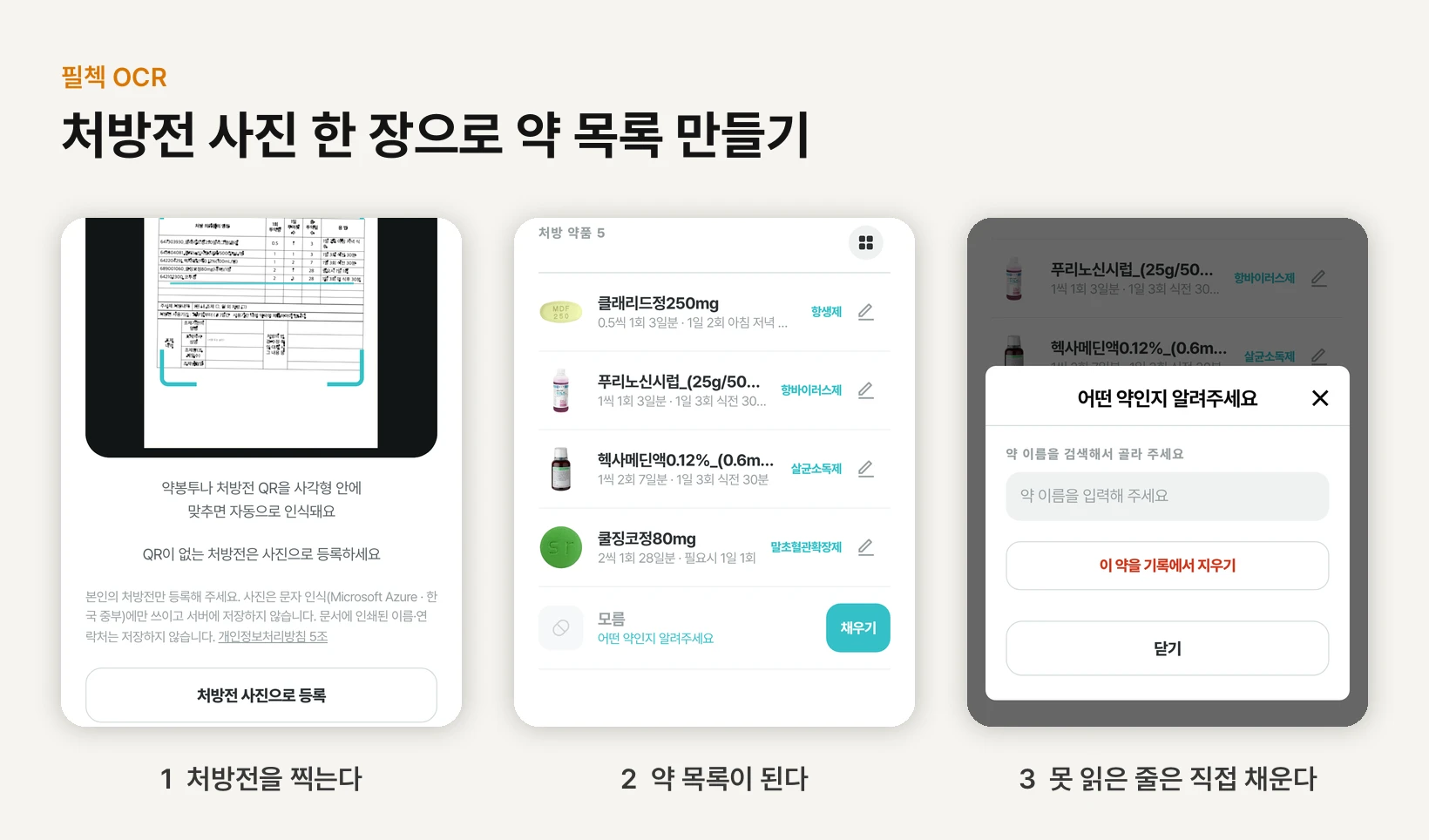
What PillCheck OCR does
PillCheck is a service for seeing the effects, side effects and interactions of the medicines you take, along with your dispensing history, in one place. The fastest way to record a medicine is to scan the QR code on a medication envelope or prescription, but many prescriptions carry no QR code, and envelopes from other pharmacies come in every format. Photo registration fills that gap.
OCR (optical character recognition) is the technology that reads the characters in a photo and turns them into text a computer can work with. PillCheck OCR uses it to read the drug table on a prescription or envelope and build a medication list. The registration screen has three tabs, Prescription, Envelope and Pill, and photo registration lives in the first two. The Pill tab is a separate feature that identifies a medicine from a photo of the pill itself.
The grey text at the bottom of the Prescription tab is this feature's promise. Translated, it reads: “Please register only your own prescription. The photo is used only for text recognition (Microsoft Azure · Korea Central) and is not stored on the server. Names and contact details printed on the document are not stored.” The rest of this piece explains how the code keeps that promise.
How to use it on pillcheck.co.kr
There is no app to install. Open www.pillcheck.co.kr in your phone's browser and follow four steps.
First, sign in. Reading a photo is available only to signed-in users. Second, tap Scan (스캔) in the bottom menu to open the registration screen. Third, pick the Prescription (처방전) or Envelope (약봉투) tab to match the document in your hand. Fourth, tap “Register with a prescription photo” (처방전 사진으로 등록) and take the picture. On the Envelope tab, the button in the same place reads “Register with an envelope photo” (약봉투 사진으로 등록).
For envelopes, lay the paper flat so the table of drug names and dosing is clearly visible. If the document has a QR code, the QR code is faster than a photo. Line it up inside the square on the same screen and it is recognized automatically.
The whole flow is also in a how-to video of just over a minute (in Korean). https://youtu.be/q5hYerY6ZO0
What happens after you take the photo
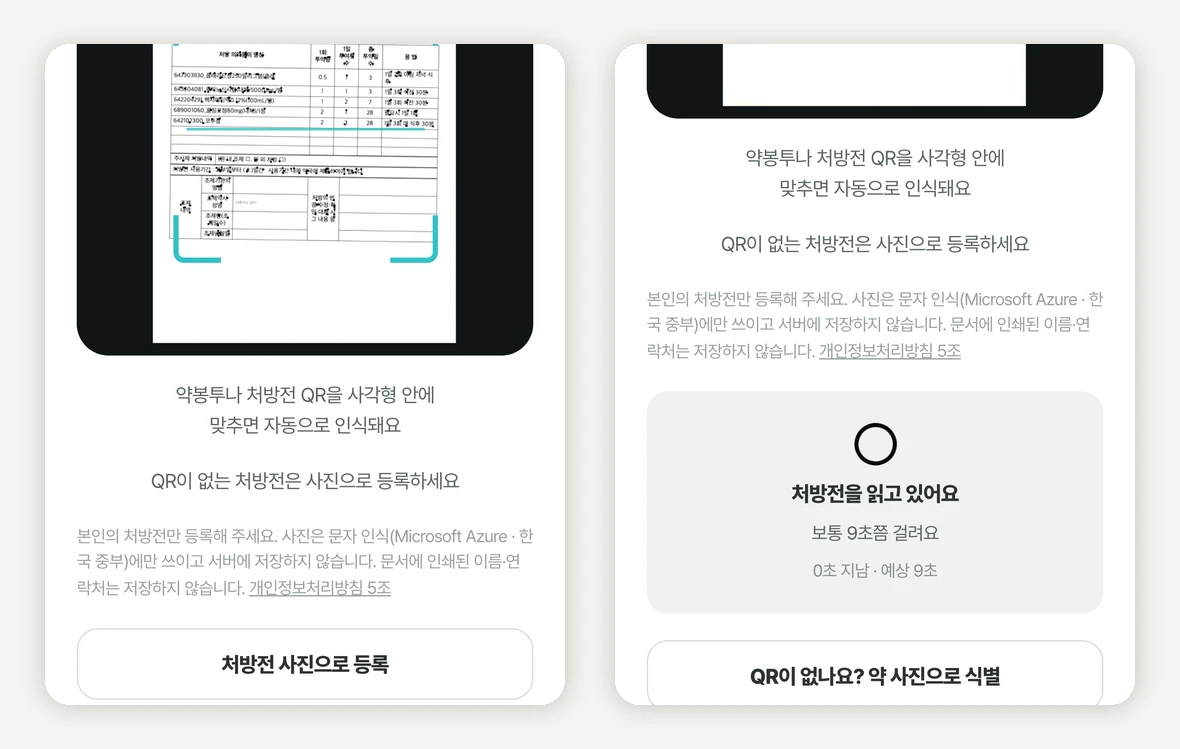
The photo does not go straight to the server. The phone checks it first. If it is too small, too dark or too bright, or blurred by shaking, the phone asks for a retake on the spot, because an unreadable photo only comes back as a wrong or empty result.
A prescription photo that passes is downsized and sent to the server, which hands it to Azure Document Intelligence, Microsoft's text-recognition AI. It reads not just the characters but the grid of the table, so it can tell which number is the dose of which drug. If the reading's confidence is low, the server returns no values at all and simply asks for a retake. The point is that a wrong value should never look like a value that was read.
Drug names are not copied from the photo. Every drug on a Korean prescription has an EDI code printed next to it, the nine-digit number national health insurance assigns to each drug. PillCheck reads that number, looks up the official name in the drug database, and brings in the pill photo, drug class and medication guidance from the same place. Looking a drug up by number leaves less room for the name to go wrong than transcribing a faintly printed name letter by letter.
Envelopes take one more step. They do not print that number, so a language model tidies up the text the recognizer read and pulls out drug names and dosing numbers. A language model is an AI, like ChatGPT, that understands and organizes text. The core of the instructions given to it reads, in translation: “If it cannot be read, it is null. Do not swap in or complete a similar drug name. Making up characters is worse than leaving them out.” Null here means “no value”.
While you wait, the screen tells you what it is doing and how long it will take. For prescriptions it says “usually takes about 9 seconds” and counts the elapsed time. If it runs well past the estimate, it drops the number and changes the text to “taking a little longer”, so it never keeps showing a number it cannot keep.
Rows it cannot read stay as “Unknown”
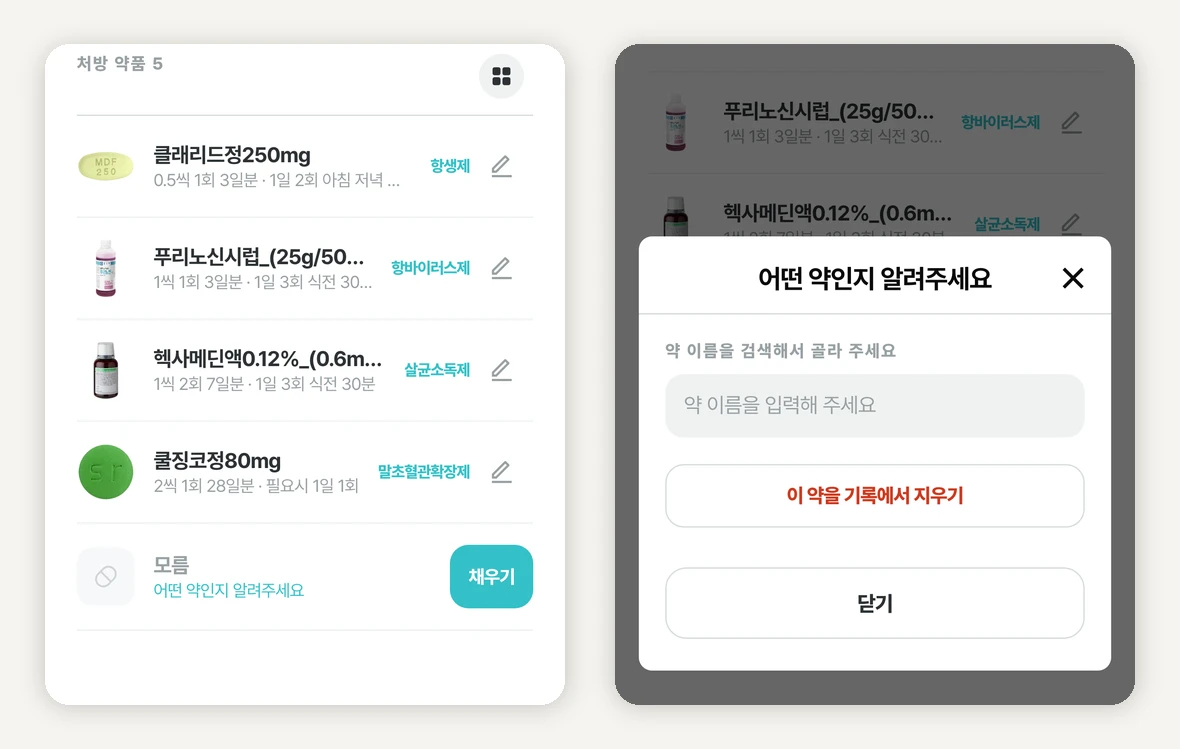
The result screen lists the drugs it read. Each name carries a pill photo and a drug class, and the line below shows the dose, times per day, number of days and how to take it.
But OCR does not read every row. Crumpled paper, smudged ink and tilted angles are always there. At that point there are two easy ways out: quietly drop the unread row, or fill it with the closest-looking drug. PillCheck does neither. If a row disappears from a medication record, that drug drops out of the interaction check, and if a different drug with a similar name slips in, the app ends up giving guidance about the wrong medicine.
So an unread row stays as a placeholder called “Unknown” (모름). The record keeps which row was empty, and when the user taps Fill (채우기) they can search for the drug and pick it, or remove that row from the record. The only way to change a drug is to search and pick. Letting people type a name freely would create records that do not connect to the drug database. The dose, times per day and number of days can be edited directly.
It is the same principle as the envelope instruction, “Making up characters is worse than leaving them out.” In a medication record, marking what you do not know as unknown is safer than pretending to know.
How personal information was kept out
A single prescription carries the patient's name, resident registration number, the clinic and its contact details. What PillCheck needs is the drug table. There is no way to send only the needed part of a photo, though, so the photo does pass through the server and the text-recognition service. That is stated on the screen, not hidden. Instead, the design goal was to keep none of it.
There are three layers to not keeping it. First, the PillCheck server does not store the photo. Once reading is done, only the values that go into the medication list remain. Second, the reading result the server sends back to the phone has no field for the patient's name, resident registration number or phone number to begin with. With no field, there is no place for them to end up by mistake. On top of that, just before the result goes out, it is checked once more for anything shaped like a resident registration number or a phone number. Third, the server logs keep only counts, such as how many rows were read, never what was read.
The notice itself is tied to the code. Automated tests guard its key sentences, so if one of them is dropped or changed, the tests flag it first. The aim is to stop the promise on screen and the actual behaviour from drifting apart without anyone noticing.
The opening sentence, “Please register only your own prescription”, is deliberate too. There is intentionally no line inviting people to photograph a family member's prescription, so that no record is created without its owner knowing. The Envelope tab involves one more processing step, so it has its own notice, which you can read in the same place before taking the photo.
Test data: made-up prescriptions and masked ones
Building OCR takes a lot of prescriptions, because you read, score, fix and read again. Using real prescriptions as they are would turn development itself into a process that circulates personal information. So the material was limited to two kinds.
The first is synthetic prescriptions. Synthetic data means data newly made up to resemble the real thing. Four prescription layouts were filled with invented patients, doctors, clinics, contact details and numbers, and only the drug columns used real drug lists. Resident registration numbers were generated with a deliberately wrong final check digit, so they cannot match a real number even by chance. Besides the clean originals, versions slightly shrunk, tilted and blurred to look like phone photos were made too. The prescription in this article's screens and in the how-to video is one of these.
The second is masked real documents. Real documents were used only after everything except the drug table was blacked out. The key was to define masking by what to keep, not by what to erase. Only the table area, anchored on its column headers, is kept, and if the headers cannot be found, no file is produced at all. A failure cannot leak a partly masked document. Even after passing the automatic check, each image was looked at again by a person.
How AI was used to build it
PillCheck OCR was built together with an AI coding agent, an AI that takes instructions and reads, edits and runs code itself. The agent here was Claude Code, and most of the code changes touching OCR list it as a co-author.
One thing was not handed to the AI: the standard for what counts as a pass. The AI's output was held in check in three ways.
One, the pass line was written down first. Before scoring, the threshold that results must meet is saved to a file, and if the threshold was written later than the scoring, that score is invalid. Neither a person nor the AI can quietly move the bar after seeing the results.
Two, things were broken on purpose. To check that a test really protects something, a version of the code with a key connection deliberately cut is made, and the test must report a failure. This is called mutation testing. For example, one test must fail if filling an “Unknown” row by search stops recording that drug's identifier.
Three, another AI played the opposing side. The planning document was refined until AIs with separate planner, architect and critic roles agreed, and the implementation was reviewed separately by AI models from other companies that were told to find flaws. When the same model writes and reviews, it misses the same places.
Keeping personal information away from the AI agent follows the same principle. The text recognition used for masking real documents ran on the working computer, not an external service, and the agent was given only the masked output. The text before masking never entered the agent's conversation.
The how-to video follows the same rules
The video of just over a minute was also made with AI. The screens were captured from the live www.pillcheck.co.kr by an automated browser, the narration was synthesized with an AI voice, and the scenes were assembled in code.
The prescription in the camera view is the synthetic one described above. No real account was signed in to run a reading, either. Only the reading request was answered with a response built from the synthetic prescription's answer key, the record of its contents written down when it was generated. Everything else, the pill photos, drug classes and search results, came as real values from the live service. So making the video cost nothing in readings and left no records in anyone's account.
You can watch it here (in Korean). https://youtu.be/q5hYerY6ZO0
What to take away when building AI features that touch personal information
Three of the methods used in PillCheck OCR carry over to other work.
First, make separate promises about what you send and what you keep. If the feature only works by sending a photo, say so, and then state specifically what you do not keep. A line like “we handle it securely” is not a promise.
Second, start with made-up test data. Before pasting real customer documents into an AI, run it first on the same layout filled with fake values. Whatever can be checked with the synthetic version, finish there.
Third, make a place to mark what you do not know. Letting AI fill blanks plausibly looks convenient, but for medicine, money or contracts, where a wrong answer is costly, being told a field is empty is better. If you hand document cleanup to AI today, add one line to your instructions: “If it cannot be read, leave it blank and do not fill it with a similar value.”