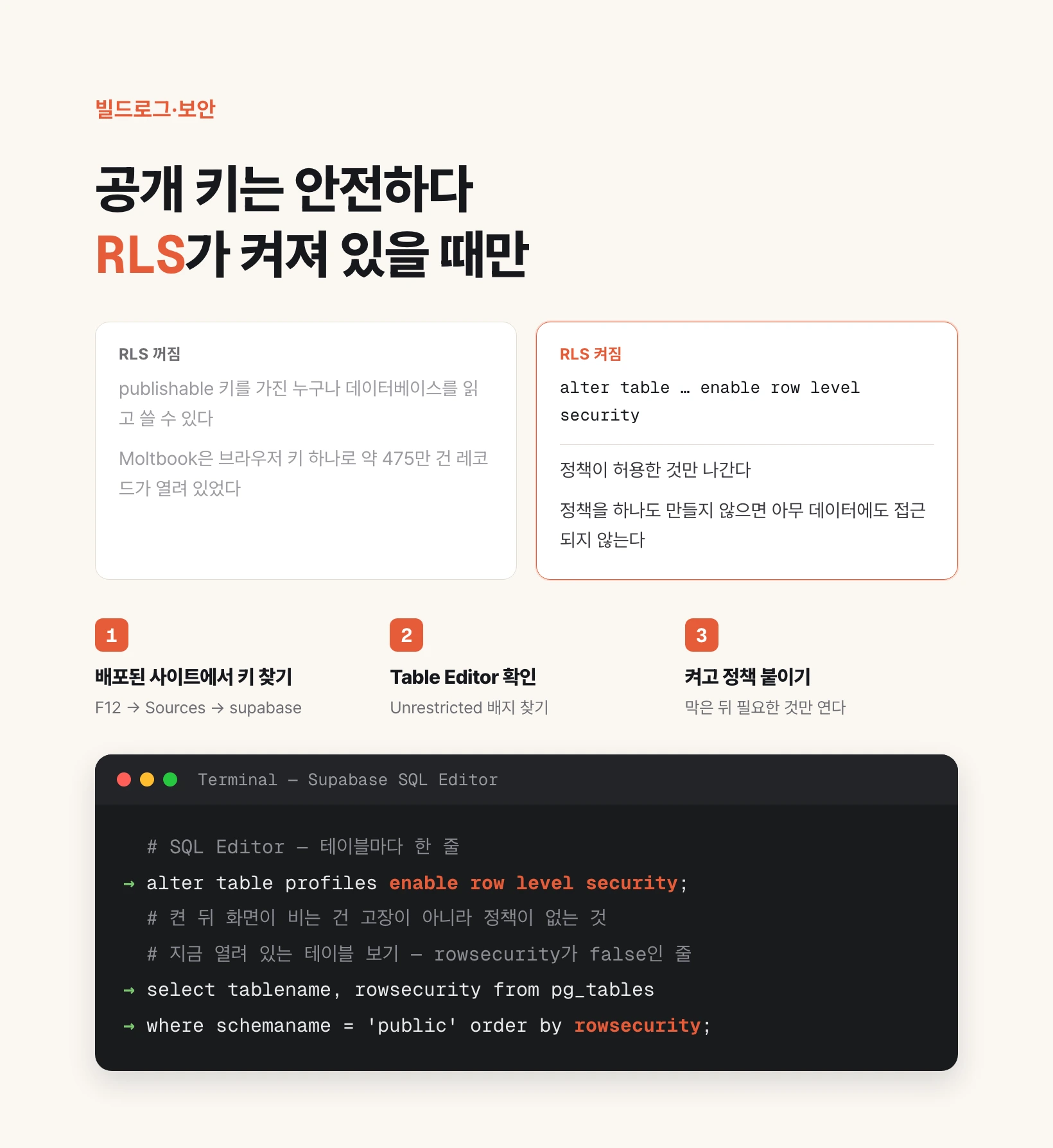
What RLS is, and why a public key hangs on it alone
Supabase is built so the browser talks to the database directly. That is why your app gets two keys. One is the publishable key (formerly anon), the other is the secret key (formerly service_role). The first is meant to ship inside the browser; the second must never be there.
Supabase's own documentation calls the publishable key safe to expose in a web page, a mobile or desktop app, and in source code. That safety is conditional. The key itself carries no notion of who may see what. Row Level Security is what makes that judgement instead.
RLS stands for Row Level Security. It makes the database itself decide, row by row, whether the requester is allowed to read that row. It is a native Postgres feature; Supabase simply gives you a screen to switch it on and write the rules.
So the chain runs like this. The key is public. Anyone can therefore address the database. If RLS is on and policies exist, only what the policies allow goes out. If RLS is off, everything goes out. There is no step in between.
| Key type | New name | Old name | In the browser | Subject to RLS |
|---|---|---|---|---|
| Public | sb_publishable_... | anon | Normal (exposure assumed) | Yes |
| Private | sb_secret_... | service_role | Never | No (BYPASSRLS) |
How Moltbook was left open

Moltbook was a social service where AI agents posted to each other, and it went viral quickly after launch. Its founder wrote on X that he had not written a single line of code for it, that he only had a vision for the technical architecture and AI made it real.
The security firm Wiz found the Supabase endpoint and the publishable key inside the deployed JavaScript files. Nothing has gone wrong yet. As said above, that key is supposed to be visible.
What came next was the problem. When the researchers sent requests to the database with that key, the data came back with no permission error. RLS was off. Mapping the schema showed roughly 4.75 million records exposed, among them 1.5 million API authentication tokens, 35,000 owner email addresses, 29,631 early-access signup addresses, and private messages exchanged between agents.
Wiz put it plainly: when properly configured with Row Level Security, the public API key is safe to expose, but without RLS policies that key grants full database access to anyone who has it, and in Moltbook's implementation this critical line of defense was missing. On the timeline Wiz published, the first contact was January 31 at 21:48 UTC and the final fix — all tables secured — landed at 01:00 UTC on February 1.
The lesson is not that vibe coding is dangerous. It is that AI is optimised for producing code that works, and it does not decide your access model for you. Wiz made the same point.
Three-minute check, part one: find the key on your live site
Start by looking at what your app actually ships to the browser. Use the deployed address on the internet, not your development screen.
Open that page in Chrome and press F12 (Command+Option+I on a Mac) for DevTools. Go to the Sources tab, open search with Command+F or Ctrl+F, and type supabase. Reloading with the Network tab open shows the same thing.
If you see your project endpoint and a long string beginning with sb_publishable_ or eyJ, that is normal. Again, seeing it is not the incident. In a browser-to-database setup it cannot be hidden.
What is an incident is a value beginning with sb_secret_ or the word service_role. That key bypasses RLS entirely, so no policy can save you. If you find one, rotate it in the Supabase dashboard and move the code that used it to the server side.
Three-minute check, part two: find Unrestricted in the Table Editor
Now look at the real line of defence. Sign in at supabase.com, open your project, and go to Table Editor in the left menu.
In the table list, any table with RLS off is marked as unprotected with an Unrestricted badge. A table carrying that badge can be read and written right now by anyone holding the publishable key.
Tables created through the dashboard's Table Editor have RLS on by default. The dangerous ones are tables created with a create table statement in the SQL Editor. Ask an AI to create a table and it usually takes that path, leaving RLS off. That is why apps built by vibe coding fall into this trap so often.
Check every table. One open table means everything in it is effectively public.
One line turns it on, and why the screen goes blank
Open SQL Editor in the left menu and run one line per table, replacing profiles with your own table name.
Reload the app afterwards and the list may look completely empty. Do not panic. Nothing broke; it behaved exactly as specified. As the Supabase docs state, once RLS is enabled and no policies exist, no data is accessible with a publishable key.
The data has not gone anywhere. It is still in the database. There is simply no policy yet saying it may be shown to this requester. The next section adds that policy.
Do not reverse the order. You do not write policies and enable RLS later; you enable it, close everything, then open only what is needed. That is what keeps a forgotten table from staying open.
alter table profiles enable row level security;Writing policies: start with reads
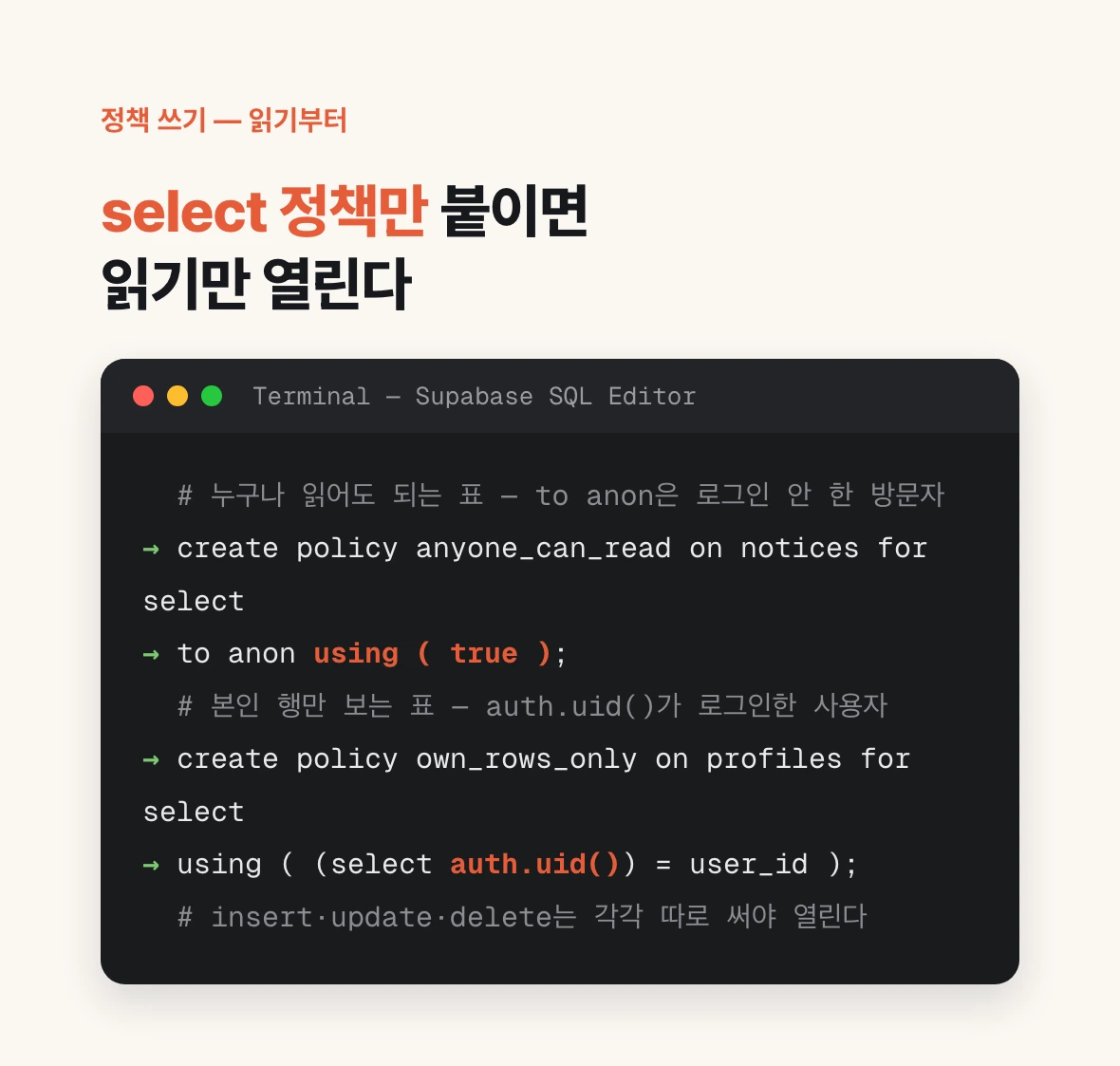
A policy states which operation (select, insert, update, delete) is allowed, for whom (anon, authenticated), and under what condition. Give it a name you will recognise later.
For a table anyone may read without signing in, such as notices, it looks like this. to anon means visitors who are not signed in, and using ( true ) means allow it unconditionally.
For a table where each signed-in person sees only their own rows, the condition changes. auth.uid() is the identifier of the current user, and the row is returned only when it matches user_id.
Writes must be granted separately. A select policy opens reads only; insert, update and delete stay closed. Writing one policy per operation is correct, and having the default be closed is what keeps you safe.
One common mistake: the blank screen is annoying, so people paste using ( true ) onto every table. That puts you back exactly where you were before enabling RLS. The goal is not a screen that renders; it is that only what should leave, leaves.
create policy anyone_can_read
on notices for select
to anon
using ( true );create policy own_rows_only
on profiles for select
using ( (select auth.uid()) = user_id );How to instruct an AI, and what to leave behind today
You can hand this check to an AI, but the instruction has to be specific. Ask it to check the security and you get generalities, and in the worst case a policy that opens everything.
It also helps to know one verification query, so you can see the whole picture instead of clicking table by table. Every row where rowsecurity is false is a table that is open right now.
Leave three things behind today. One, confirmation that no secret key appears in your deployed app. Two, confirmation that RLS is on for every table in the public schema. Three, a one-line note per table explaining why that policy. The third is what stops you repeating the mistake on the next table you add.
None of this is work you do before building a service. It is work you do today on what is already online. Moltbook was open while people were pouring in, and the fix took hours.
List every table in the public schema of my Supabase project with its RLS status as a table.
For each table with RLS off, first ask me whether the data in it may be public,
then propose the alter table statement and a least-privilege policy separately based on my answer.
Write select, insert, update and delete policies individually,
and use using ( true ) only on the tables I said were public.select tablename, rowsecurity
from pg_tables
where schemaname = 'public'
order by rowsecurity, tablename;