Starting with what MCP is
MCP stands for Model Context Protocol. In plain terms it is a standard that lets an AI call services outside itself. Claude sits underneath, and you attach MCP servers to it one at a time. Once attached, that service's capabilities become tools you can simply use inside the chat.
There are already several MCP servers that generate video. But an ad is not finished by a video generator alone. What to sell, why that angle, and which hook opens it all have to be settled first for the video to turn into results.
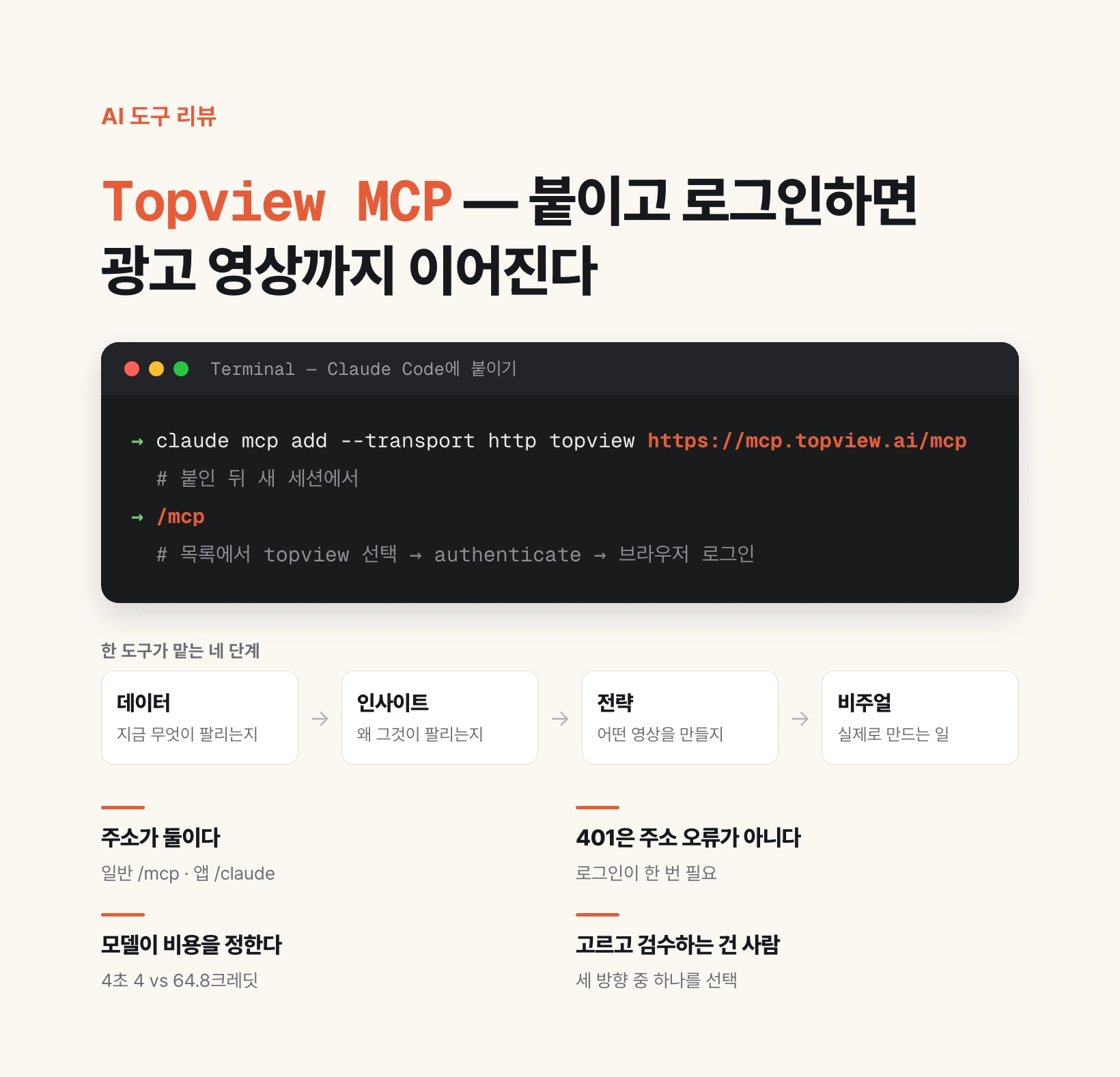
That is exactly the claim Topview MCP makes about itself. The first line of its page reads "A full-stack AI marketing agent that turns market insights into campaign-ready content." One tool carries all four stages: data, insight, strategy, visual.
Broken out, the four are: data is gathering what sells right now, insight is extracting why it sells, strategy is deciding what video to make because of that, and visual is actually producing it. The design inverts the usual order of making a video first and attaching a reason afterwards.
Attaching it — the URL differs by client
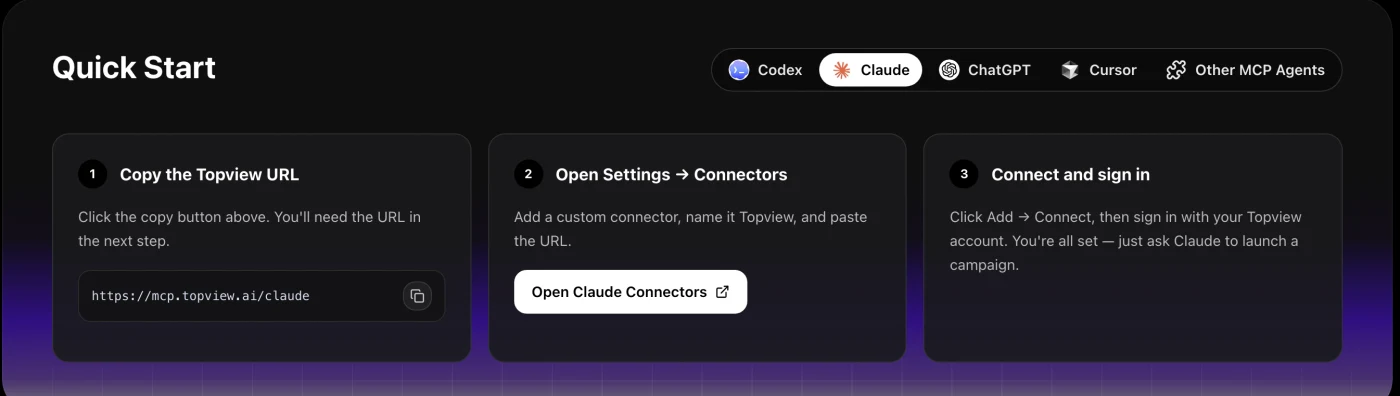
This is where most people get tripped up. Topview publishes a different URL per client. On the Quick Start section of topview.ai/mcp, switching the tab between Codex, Claude, ChatGPT, Cursor and Other MCP Agents changes the instructions each time.
In the Claude app (claude.ai) you attach it as a connector: open connectors in settings, add a custom connector, name it Topview, and paste https://mcp.topview.ai/claude. Then press connect and sign in with your Topview account.
Terminal clients such as Claude Code use the general MCP URL. The command is below. After attaching, open a new session and type /mcp — Topview appears in the list, and if it says authentication is required, choose authenticate and sign in through the browser.
claude mcp add --transport http topview https://mcp.topview.ai/mcp

# then, in a new session
/mcp        # select topview → authenticate → sign in via browser
The fastest way to check whether you are authenticated
Both URLs return 401 if you open them without signing in. Checked directly, the body comes back as `{"error":"unauthorized","error_description":"Authentication required"}`. So pasting the URL is not enough — a one-time sign-in is mandatory. Conversely, a 401 does not mean you typed the wrong address.
If the tool list looks empty right after install, the authentication step was usually skipped. Claude does say authentication is required, but that line is easy to scroll past.
The official guidance also offers a copy-paste route: the Codex tab tells you to send "Help me install this MCP locally and provide the login authorization guide: https://mcp.topview.ai/mcp" verbatim to your agent. If typing the install command feels heavy, that sentence works as-is.
| Where you use it | URL | How to attach |
|---|---|---|
| Claude app (claude.ai) | https://mcp.topview.ai/claude | Settings → Connectors → add custom connector |
| Claude Code · Codex · Cursor | https://mcp.topview.ai/mcp | claude mcp add --transport http |
| Other MCP clients | https://mcp.topview.ai/mcp | That client's HTTP MCP registration |
What actually happens when you ask it to work
Once attached, the question becomes what to ask for. Following one public demonstration makes the flow clear. It opened with "tell me what is selling well on TikTok Shop right now, and look at Amazon data too."
The agent queried both platforms, summarised the top sellers, and pointed out the overlapping trends. Picking one product moves straight to the next stage — and the interesting part is that it looks at data once more before planning. It checks what kind of content actually sells that product, then builds the ad direction.
In the demo that check produced three directions: before-and-after transformation, cost comparison, and routine simplification. Hooks, script ideas and storyboard directions came with each. The only thing the human did was pick one of the three.
After the pick, an image is generated first, an eight-second video is built from that scene, and subtitles and voiceover follow. In the demo, adding a lip-synced cut in front took one more request.
This flow matters because it shows where the human sits. The job is not describing the video to be made; it is choosing among proposed directions.
Canvas — the process is kept, not just the output
What happens after production matters more, because an ad is not made once. It is varied and reused.
Topview puts Canvas in that seat. Every image and video made so far lays out on one screen, together with the prompts and the steps that produced them. In the demo, asking to "lay out everything made so far on the canvas" returned a link.
You can also open a timeline there and edit by hand. Both paths stay open: hand everything to the agent, or have the agent build the skeleton and finish it yourself. It reads as a collaboration tool more than an automation tool.
The other surfaces the site advertises follow the same grain: besides Canvas there is Drama Studio for micro-drama production, Board for model and asset management, and 3D Shot Composer for staging scenes and camera angles.
What it costs — counted in credits
Topview bills in credits, and consumption varies enormously with what you generate.
Two anchors from the official pricing page (checked 12 August 2026) give you the feel. For video, Seedance 2.0 at 720p and four seconds is 4 credits; for images, Nano Banana 2 at 1K is 0.4 credits each. The same four seconds on the higher model, Seedance 2.5 at 720p, is 64.8 credits — more than a tenfold gap.
In the demo, one eight-second short-form ad — image plus video plus subtitles and voice — cost 8.2 credits, starting from a balance of 260. Which model you choose decides most of the bill.
Check the monthly plan prices on the page itself. Some entries were inconsistent at the time of checking, so they are not reproduced here. Comparing your model's unit price against the monthly credit allowance is enough to budget.
Things to know before you start
First, the data is a reference, not evidence. The revenue and view figures in the demo are values the tool retrieved; quoting them requires checking the original source separately. That goes double for numbers you put into ad copy.
Second, generated video is material for review, not final output. Product appearance can come out wrong, and phrasing can fall foul of advertising rules. For anything claiming an effect or benefit, a human has to look at it.
Third, credits are real money. Pulling several variants to compare is a good habit, but running them all on a top-tier model adds up fast. Sketch the direction on a cheap model and re-render only the chosen version on the expensive one.
Fourth, this tool moves the starting line rather than replacing the person. Work that began at a blank screen now begins at "pick one of three directions." The eye that picks and the eye that reviews are still yours.