What the Toss Securities Open API opens up
An API is a counter that programs knock on instead of people. Think of it as a door the broker opened so that the lookups and orders you normally tap through in the app can be sent as structured requests. Unlike scripts that click through the app screen, this is an official channel, so there is no risk of your account being sanctioned for it.
The API is organised into five groups: Auth, market and stock information (Market Data, Stock Info, Market Info, Market Indicators, Ranking), accounts and assets (Account, Asset), orders (Order, Order History, Order Info) and conditional orders (Conditional Order, Conditional Order History). It covers Korean (KRX) and US equities.
Market and stock information is objective data served identically to every user, so a token alone is enough to call it: current price, orderbook, trades, candles (1-minute and daily), price limits, the stock master, purchase warnings, exchange rates, market calendars for Korea and the US, turnover and gainer rankings, and index data including investor-level trading value.
Accounts, orders and conditional orders touch your own account, so on top of the token they require an account identification header. That is the half this article is really about.
Only REST is available today. WebSocket streaming is marked as planned, so for now you poll the endpoints you need when you need them.
Where and how to apply
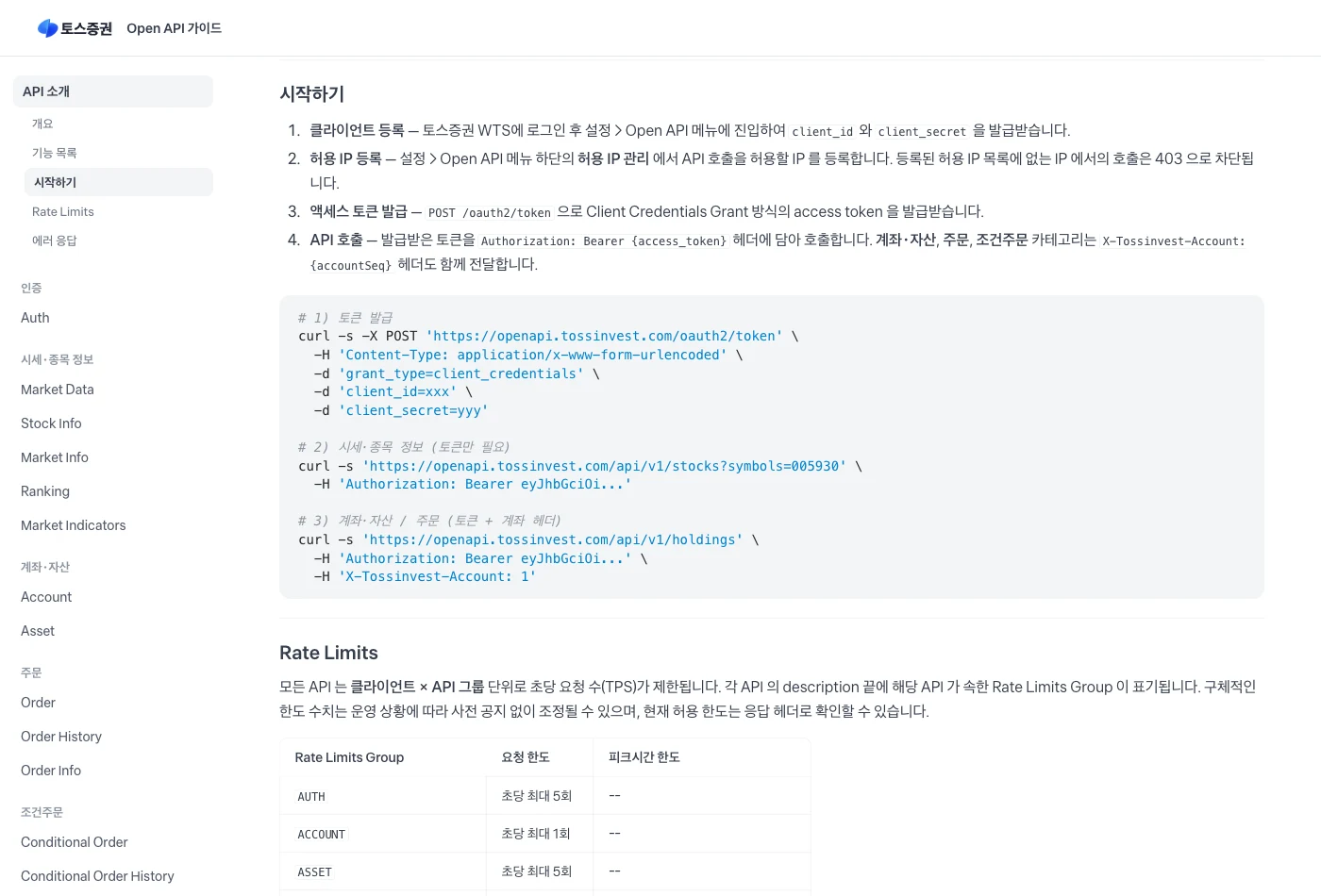
The application desk is not a developer form but the Toss Securities WTS at tossinvest.com. Log in with an existing Toss Securities account, open Settings, and you will find an Open API menu where you issue the client_id and client_secret yourself. There is no review queue; it completes on the spot.
The client_id is the username and the client_secret is the password. In many cases the secret cannot be viewed again once you leave the screen, so copy it somewhere safe immediately.
The second step is the real gate. Lower on the same screen, allowed-IP management is where you register the IP that will call the API. A call from an IP that is not on that list is blocked with a 403 no matter how valid the key is. You can check your public IP with a single curl ifconfig.me in the terminal.
Home and office lines can change their public IP, which is worth knowing in advance. If a 403 appears out of nowhere, it is usually not the key but the address. If you plan to run the automation on a server or in the cloud, register that machine's outbound IP.
Access opens account by account, so if you do not see an Open API menu in Settings, your turn has not arrived yet. In that case the banner's pre-registration puts you in the notification queue.
Get a token and make the first call
Every call requires an OAuth 2.0 access token issued through the Client Credentials Grant, where a program exchanges its own id and secret for a token rather than a human passing through a login screen. That is what makes it suitable for unattended automation.
Three properties matter. The token lives for 86,400 seconds, or 24 hours. There is no refresh token, so you simply request a new one from the same endpoint when it expires. And only one token per client is valid at a time, so a new issuance immediately invalidates the previous one. If several scripts each request their own token they will knock each other out, so cache the token in a file and share it until it expires.
The official guide shows client_id and client_secret in the request body. In my environment that form failed with invalid_client and the HTTP Basic authentication header worked instead. Use whichever one your setup accepts.
Once you hold a token, start with calls that do not touch the account. Stock information and prices work with the token alone. Then list your accounts to find accountSeq, which is the value you put into the X-Tossinvest-Account header for holdings, orders and conditional orders.
curl -s -X POST 'https://openapi.tossinvest.com/oauth2/token' \
  -H 'Content-Type: application/x-www-form-urlencoded' \
  -d 'grant_type=client_credentials' \
  -d 'client_id=YOUR_CLIENT_ID' \
  -d 'client_secret=YOUR_CLIENT_SECRET'

# response: {"access_token":"eyJ...","token_type":"Bearer","expires_in":86400}curl -s -X POST 'https://openapi.tossinvest.com/oauth2/token' \
-u "$TOSS_API_KEY:$TOSS_SECRET_KEY" \
-H 'Content-Type: application/x-www-form-urlencoded' \
-d 'grant_type=client_credentials'TOKEN=eyJ...
# 1) stock information (token only)
curl -s 'https://openapi.tossinvest.com/api/v1/stocks?symbols=005930' \
-H "Authorization: Bearer $TOKEN"
# 2) account list — this is where accountSeq comes from
curl -s 'https://openapi.tossinvest.com/api/v1/accounts' \
-H "Authorization: Bearer $TOKEN"
# 3) holdings (token + account header)
curl -s 'https://openapi.tossinvest.com/api/v1/holdings' \
-H "Authorization: Bearer $TOKEN" \
-H 'X-Tossinvest-Account: 1'What Claude Code and Codex are, and how to install them
Claude Code from Anthropic and Codex from OpenAI are AI coding agents that live in your terminal. Instead of handing you code in a chat window for you to paste, the agent reads and writes files on your machine and runs commands itself. That suits API integration work, which is a loop of reading documentation, writing code, running it and checking the result.
Installation is one line if Node.js is present: npm install -g @anthropic-ai/claude-code or npm install -g @openai/codex, then run claude or codex. The first run asks you to sign in or register a key — Claude Code with a paid Claude subscription, Codex with a ChatGPT account or an OpenAI API key.
Either one alone is enough. If you use both, the point is cross-checking: have one review the code the other wrote. For code that places orders, that review earns its keep.
One rule is not optional. Keep the issued keys in a .env file and add that file to .gitignore so it never reaches your repository. Never paste keys into a chat window or hard-code them. A brokerage key is the kind of secret that lets someone else place orders in your account.
One more: do not run the agent in a mode that executes every command without approval while it can reach the order API. Many people enable that for convenience, but where live orders are possible, per-command confirmation is the correct default.
# terminal AI agents (Node.js required)
npm install -g @anthropic-ai/claude-code   # run: claude
npm install -g @openai/codex               # run: codex

# keep keys in .env and out of the repository
cat >> .env <<'EOF'
TOSS_API_KEY=your_client_id
TOSS_SECRET_KEY=your_client_secret
EOF
echo '.env' >> .gitignore
What to actually ask the agent for
The first task is to make it read the official documentation. Toss Securities publishes a machine-readable version — the canonical OpenAPI JSON and a markdown overview — so pointing the agent at those URLs stops it from guessing endpoints and request shapes.
Then start with reads. Ask it to build a script that prints your holdings and unrealized profit as a table, reading keys from .env, and you get token issuance with caching, the account lookup and the holdings call in one place. Run it and compare the numbers against the app by eye. Skip that comparison and everything you automate afterwards sits on an unverified foundation.
Once reads line up, describe the trading rule in words — say, sell everything when price falls 20 percent from its high. What matters is not how the rule is coded but whether you can state exactly when and against which value it is evaluated: closing price or intraday, checked once a day or continuously.
Finally, freeze the work you repeat into the agent's skill or command files. You stop re-explaining the same thing, and the safety rules live inside that definition too.
Read the Toss Securities Open API spec first.
- spec JSON: https://openapi.tossinvest.com/openapi-docs/latest/openapi.json
- overview: https://openapi.tossinvest.com/openapi-docs/overview.md

Then build a script that takes TOSS_API_KEY/TOSS_SECRET_KEY from .env,
issues a token and prints my holdings as a table of name, quantity,
market value and profit. Cache the token in a file for 24 hours and
re-issue once on a 401. Do not add any order code yet.
The gates to install before you hand over orders
The moment reads work, orders work. One POST with the same token and header is a real fill. So decide the safeguards before you write the order code.
It helps to think in two layers: what the API gives everyone, and what you add in your own script.
The headline device from the API side is the idempotency key. Put a clientOrderId on the order request and the same request sent twice by a retry is accepted only once; sending different content under the same key is rejected, which catches mistakes as well. There is also a rule that orders of 100 million KRW or more are refused unless confirmHighValueOrder is true.
My own layer looks like this. Dry-run is the default, so arguments alone never place an order. A live order requires both an execution flag and a matching symbol confirmation. An amount ceiling lives in a file and anything above it is refused without a separate flag. Limit orders are the default and market orders open only when stated explicitly. Before sending, a buy checks buying power and a sell checks sellable quantity.
Build that layer to fit your own code. The shape matters less than the principle: a live order needs one more explicit human confirmation, and automation must not be able to exceed a ceiling on its own judgment.
| Layer | Device | What it prevents |
|---|---|---|
| API | clientOrderId idempotency key | A retry submitting the same order twice |
| API | confirmHighValueOrder | Orders of 100M KRW or more going out unconfirmed |
| API | Buying power and sellable quantity lookups | Throwing orders that exceed the balance |
| My script | Dry-run default | A mistyped argument placing a live order |
| My script | Execution flag plus symbol confirmation | An order landing on the wrong symbol |
| My script | Order amount ceiling | Automation executing more than intended |
| My script | Limit by default, market only when stated | Slipping through a thin book at market |
curl -s -X POST 'https://openapi.tossinvest.com/api/v1/orders' \
  -H "Authorization: Bearer $TOKEN" \
  -H 'X-Tossinvest-Account: 1' \
  -H 'Content-Type: application/json' \
  -d '{
    "symbol": "005930",
    "side": "BUY",
    "orderType": "LIMIT",
    "quantity": 10,
    "price": "70000",
    "clientOrderId": "my-order-20260725-001"
  }'
Conditional orders — let the broker's servers do the watching
Automating a stop loss or a take profit normally means a program that watches the price continuously, and that program stops watching when its machine sleeps or shuts down. Conditional orders hand the watching to the broker's servers.
There are three types. SINGLE watches one condition. OCO watches two at once and cancels the remaining one as soon as either fires — the classic stop-and-target pair, where both legs are sells and the first trigger price sits above the current price while the second sits below it. OTO starts watching the second condition only after the first one fills, with a buy first and a sell second, so entry and exit are registered together.
Know the constraints too. OCO and OTO support limit orders only, one grouped conditional order per symbol, and registration is rejected if the price you set has already met the condition. SINGLE has no per-symbol count limit.
Against a watcher you wrote yourself the trade-off is clear. Conditional orders are indifferent to the state of your computer and react faster, but the conditions are limited to plain price levels. Anything that needs computation — a moving average, a breakout to a new high — still has to be evaluated on your side. In practice the comfortable split is to give defensive lines like stops and targets to conditional orders, and keep the computed entry decisions in your own script.
curl -s -X POST 'https://openapi.tossinvest.com/api/v1/conditional-orders' \
  -H "Authorization: Bearer $TOKEN" \
  -H 'X-Tossinvest-Account: 1' \
  -H 'Content-Type: application/json' \
  -d '{
    "symbol": "005930",
    "type": "SINGLE",
    "quantity": 100,
    "orderType": "LIMIT",
    "clientOrderId": "my-cond-20260725-001",
    "expireDate": "2026-09-10",
    "first": {
      "orderSide": "SELL",
      "triggerPrice": "295",
      "orderPrice": "295"
    }
  }'
Handling rate limits and errors
Every API is throttled per client and per API group. Market data allows ten requests per second and orders six, dropping to three between 09:00 and 09:10 right after the open. Listing accounts is the tightest at one per second, so values that barely change — the account number, for instance — should be fetched once and cached.
Exceeding the limit returns a 429. Wait for the Retry-After header, and if it repeats, back off at one, two and four seconds with a little jitter. Successful responses also carry the remaining allowance, so slowing down as that number drops is the safer pattern.
Errors follow a fixed envelope, so you can branch on the code alone: expired-token when the token has aged out, insufficient-buying-power when the balance falls short, order-hours-closed outside trading hours, price-out-of-range beyond the daily limits, and idempotency-key-conflict when the same key carries different content. Keep the requestId from the response if you need to raise a support ticket.
Ask the agent for this error handling up front. Left to itself it tends to write only the happy path, and a happy-path script wired to a scheduler fails silently.
In order, this is how to start
First, issue the Open API keys in Toss Securities WTS settings and register your allowed IP. Second, get a token with curl and read one stock record. That confirms the connection.
Third, install Claude Code or Codex, put the keys in .env and have it build the holdings script; compare the numbers against the app. Fourth, write the order script with dry-run as the default and the live-order gates in place from the start. Fifth, place one live order at a tiny size and verify modification and cancellation too. Sixth, move defensive lines such as stops and targets onto conditional orders.
One obvious point to close on. Automated trading repeats a wrong rule quickly and faithfully. Start small, run it in dry-run long enough to trust it, and accept that the outcome is entirely your own responsibility.
How to verify whether the rule would actually have made money — backtesting it against historical data — is the subject of the next piece.