Why the AI Acts Like a Clueless New Hire
When you first try vibe coding (building software by directing an AI instead of writing the code yourself), you often watch the AI work brilliantly but off-target, because it doesn't know your situation. It piles on features you didn't ask for; you say "fix this one spot" and it touches the parts next to it; it says "all done" and yet the button doesn't actually work when you press it.
It's not that the AI is incapable. It just doesn't know what you want or what your project is - exactly like a talented new hire who doesn't know the company on day one. What it needs is a few sticky notes: standing instructions on the desk so you don't have to re-explain every time.
Where You Post Those Notes - the Harness
The place you post those notes is a file called CLAUDE.md (or AGENTS.md). It's a plain text file that sits at the top of your project folder, and the AI reads it automatically at the start of every conversation. Setting this up in advance so the AI works your way is what's called a harness.
What do you write in it? Happily, a handful of principles developers settled on long ago make excellent notes. They fall into two groups - (A) how to direct the AI, and (B) how to keep code and information tidy.
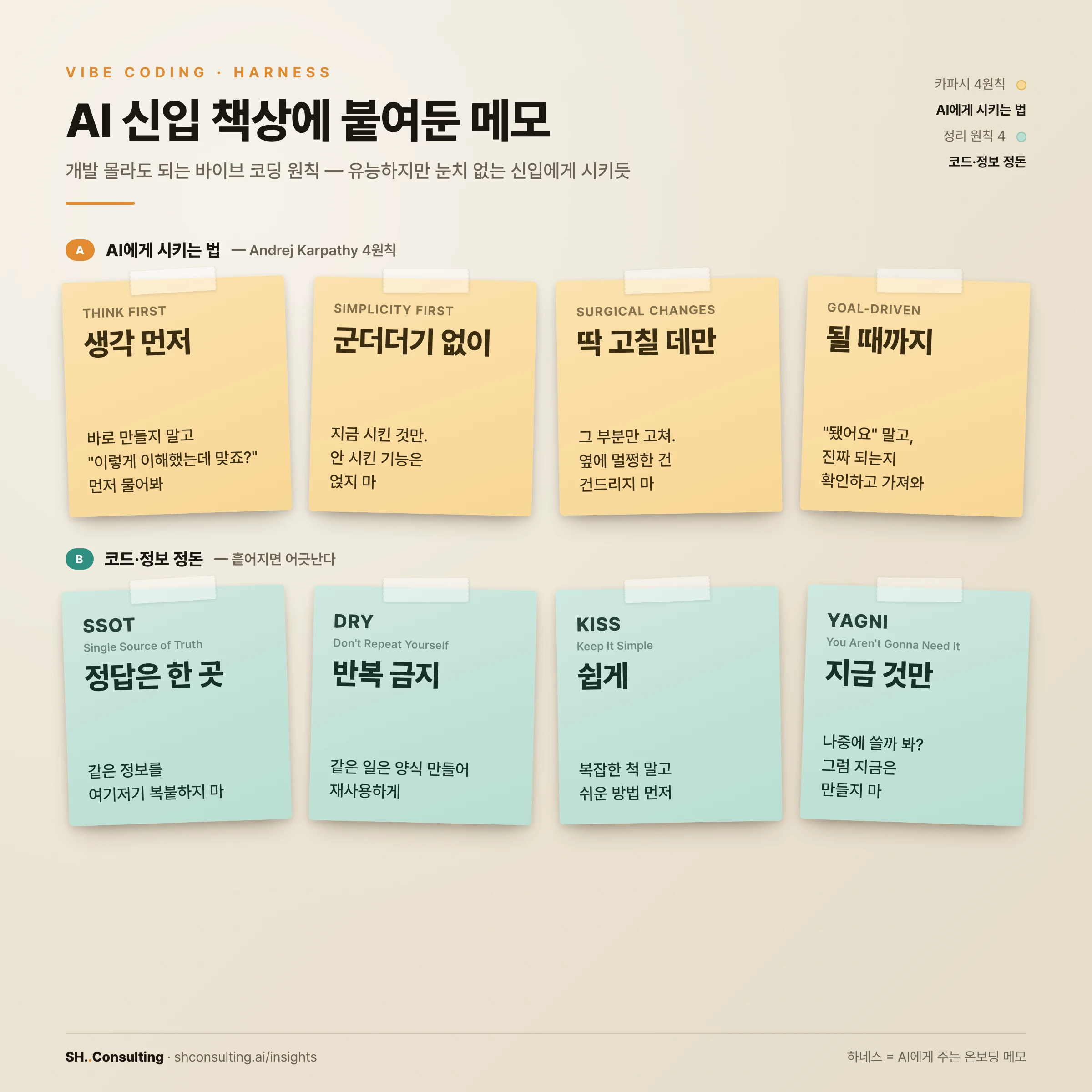
Group A - How to Direct the AI: Andrej Karpathy's Four Principles
Andrej Karpathy is the AI researcher who coined the term "vibe coding." Here are the four instructions he laid out for directing an AI to write code, put in plain terms for non-developers.
Think first. The more capable the new hire, the faster they run off and build it their own way. Say "make a signup" and they build email signup - but you wanted Kakao login, so it's back to square one. So have the AI say "here's how I understood it - is that right?" before building. Five seconds of aligning by words saves thirty minutes of tearing it all down.
No extras (Simplicity First). The AI has a habit of "helpfully" adding features you never asked for. Request a single save button and you get autosave and version history too. You use none of them, yet all three become things that can break. Have it build only the minimum you asked for.
Surgical changes. You say "just make the button blue" and it rewrites the whole button, accidentally deleting the click behavior. The color changed, but pressing it does nothing. Have it change only the part you asked about and leave unrelated code alone.
Goal-driven. With no definition of done, the AI stops at "looks done" - having built the screen but skipped wiring up the actual save. Pin down "the post must survive a page refresh after saving," and it will fix and retry on its own until it reaches that state - this is a large language model's greatest strength.
Group B - Keeping Code and Info Tidy: SSOT, DRY, KISS, YAGNI
These keep the code itself clean. You don't need them on day one, but knowing them keeps what the AI builds from getting tangled later.
One source of truth (SSOT). Copy the same fact into several places and it will inevitably drift, because you fix one and forget the rest. Keep it in one place and have everything else reference it. Don't repeat yourself (DRY) is the code version: if the same code shows up more than twice, make it once and reuse it. Here's a real code example.
Keep it simple (KISS). Don't be clever and complicated; pick the easy-to-understand way first. You aren't gonna need it (YAGNI). Don't build "might need it later" now. As you may have noticed, KISS and YAGNI are essentially the same idea as Karpathy's "no extras."
// Bad - the brand color is scattered in many places
button_color = "#E1892F"
title_color  = "#E1892F"
link_color   = "#E1892F"
// To change it you must edit all three, and missing one leaves them mismatched

// Good - define once and reference it (SSOT + DRY)
brand_color  = "#E1892F"
button_color = brand_color
title_color  = brand_color
link_color   = brand_color
// Now changing brand_color once updates button, title, and link at once
It Looks Like Eight, but It's Really Four Common-Sense Rules
We've seen eight, but strip out the overlap and there are only four common-sense rules to remember.
Don't be intimidated by eight acronyms. "Confirm before starting and verify at the end / keep it simple / touch only what you were assigned / gather into one place" - those four sentences are the whole thing.
| The plain idea | Principles it groups | What you tell the new hire |
|---|---|---|
| 1. Confirm first, verify at the end | Think First + Goal-Driven | "Is this what you meant?" first; real proof instead of "done" |
| 2. Keep it simple | Simplicity First + KISS + YAGNI | Only what I asked; don't build ahead |
| 3. Only what you were assigned | Surgical Changes | Just that part; leave the rest alone |
| 4. Gather into one place | SSOT + DRY | One source, one template; no copy-paste |
A CLAUDE.md You Can Paste As-Is (Real Example)
Put those principles into an actual file and it looks like this. Save it at the top of your project folder as CLAUDE.md and you're done. (Use CLAUDE.md with Claude Code; if you mix several tools like Cursor and Codex, put the same content in AGENTS.md.)
# Rules the AI follows in this project

I am not a developer. Explain technical terms in plain language, briefly and simply.

## How to work
- Think first: Before writing code, explain in plain language what you'll build and how, and get my confirmation. If my request is ambiguous, ask instead of guessing.
- No extras: Build only the minimum that solves what I asked. Don't add features I didn't request.
- Surgical changes: Change only the part I asked about; don't touch unrelated code.
- Goal-driven: First define the success criteria (e.g. the post survives a page refresh after saving), then loop until it actually works.

## Keep code and info tidy
- One source of truth (SSOT): Keep the same setting or fact in one place and reference it.
- Don't repeat yourself (DRY): If the same code appears more than twice, extract it into a function and reuse it.
- Keep it simple (KISS): Prefer an easy-to-understand approach over a clever complex one.
- You aren't gonna need it (YAGNI): Don't build "might need it later" now.

## Safety
- Before anything hard to undo (like deleting files), always ask me first.
Start Right Now
Four steps. (1) Open the project folder you're building in. (2) Create a new CLAUDE.md file at the top - or just tell the AI, "create a CLAUDE.md file and put these rules in it." (3) Paste in the content above. (4) From the next conversation, the AI reads these notes first and starts from there.
Being good at vibe coding is less about writing good code and more about setting the stage so the AI can help you well. And that stage is exactly these few notes stuck to the new hire's desk.