Why the vocabulary keeps slipping
Start vibe coding and the words pour in: deploy, port, API, container, build. Look each one up and it makes sense that moment, then blurs again a few days later.
That is what learning them as loose pieces does. These are not independent facts; they are names for positions laid out in order along a single flow. Without the order they are twenty unrelated words. With it they are one line.
So this series does not open with tool instructions. Across nine posts it walks that line front to back. Today we look at the whole of it at once.
What happens when you type an address
Put an address in the browser bar and press enter, and three things happen in order.
One, your browser asks a computer somewhere for what this screen needs. Two, that computer sends files back. Three, the browser reads them and paints a screen.
Whether you are signing up, watching video or writing a comment, only the surface differs. Inside, it is this three-step repeating.
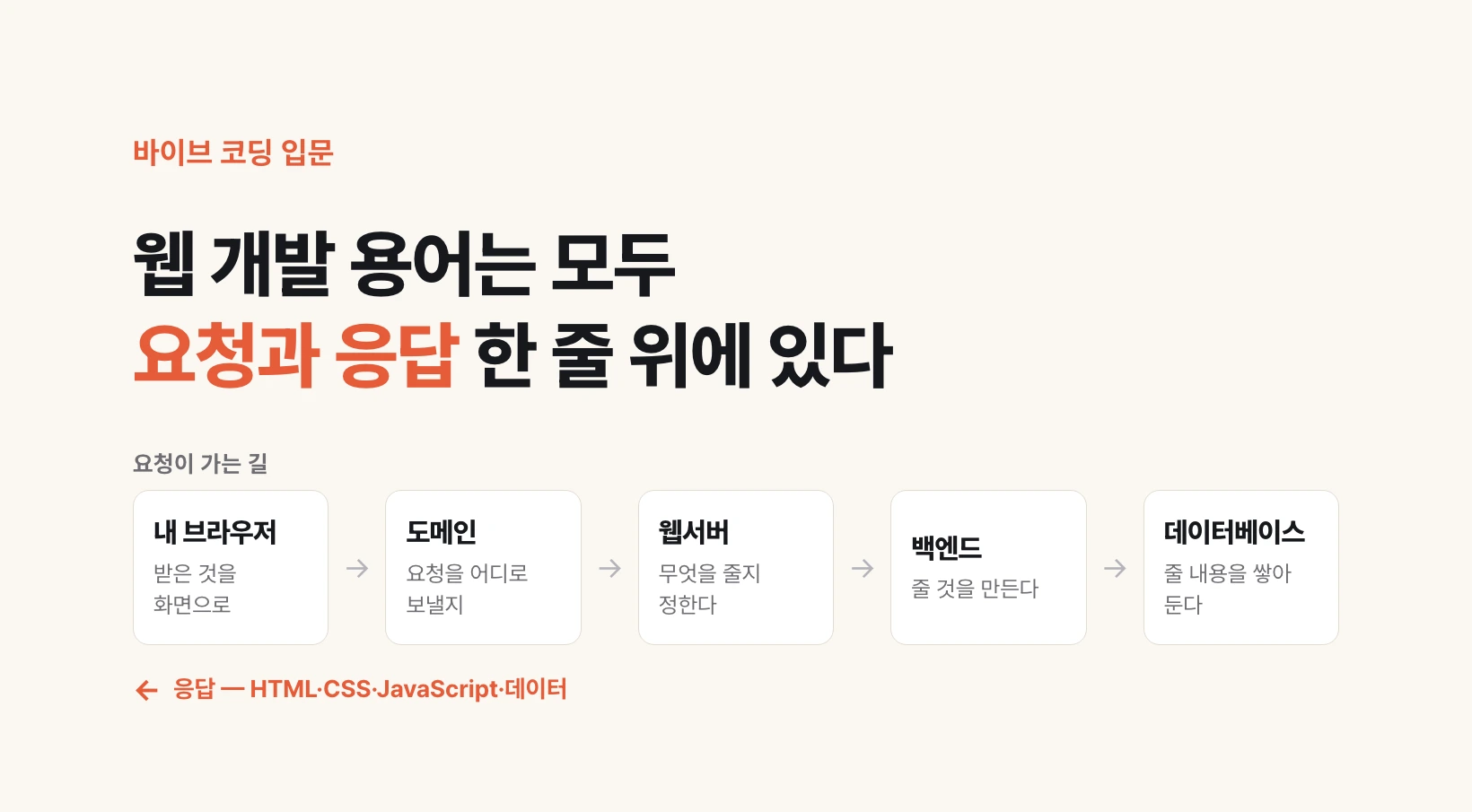
my browser  ──── please send what this screen needs ────▶  server
            ◀─── HTML · CSS · JavaScript · data ───

the browser reads what came back and paints the screen
A server is not special hardware

The computer that answers is called a server. The word invites thoughts of specialized equipment, but it is just a computer.
One thing differs: it is left running so it can answer whenever a request arrives. The word itself comes from serving.
Which means your laptop can be a server. Connected to a network, powered on, running a program that answers requests, and the conditions are met. Starting a server on your own machine during development and opening it in a browser is exactly that.
Where each thing you learn attaches
Draw this line once and every technology ahead has a fixed place on it.
Deciding where the request goes is IP, port and domain. Deciding what to hand back is the web server. Producing what gets handed back is the backend; painting what comes back is the frontend. Holding the material is the database and storage. And moving the whole thing to another computer is the container.
The nine posts follow exactly that order: from the three files a browser reads, through addresses and the doorkeeper, to frontend and backend, then where data is kept, ending at deployment.
| Post | Position on the line | Names |
|---|---|---|
| 02 | Files the browser reads | HTML · CSS · JavaScript |
| 03 | Where the request goes | IP · port · domain · DNS |
| 04 | What gets handed back | Nginx · HTTPS |
| 05 | Drawing what comes back | Next.js |
| 06 | Producing what is handed back | FastAPI · JSON |
| 07 | Where values are kept | PostgreSQL |
| 08 | Where files are kept | storage · CDN |
| 09 | Moving all of it | Docker · Kubernetes |
Where this map actually earns its keep
Open code an agent wrote and you have a question to ask: which box is this?
One symptom, a page that will not load, has a different cause in every box. An address pointing to the wrong place, a doorkeeper serving the wrong folder, a backend that cannot produce an answer, and an empty database are entirely different problems. Narrow the box first and your search terms change.
The same holds when you ask an agent. "The site is broken" takes far longer than "after deploy the domain resolves but I get a 502." From the next post on, we fill these boxes in one at a time.