Three earlier cases of the same symptom were scattered across four places
This is part 4 of the AX Journey series. Of the five things I put in place from June to October 2026 while leading AX at a development organization that builds services for pharmacies, this piece covers the third: the KB. KB stands for knowledge base, a single document store for the organization’s working knowledge.
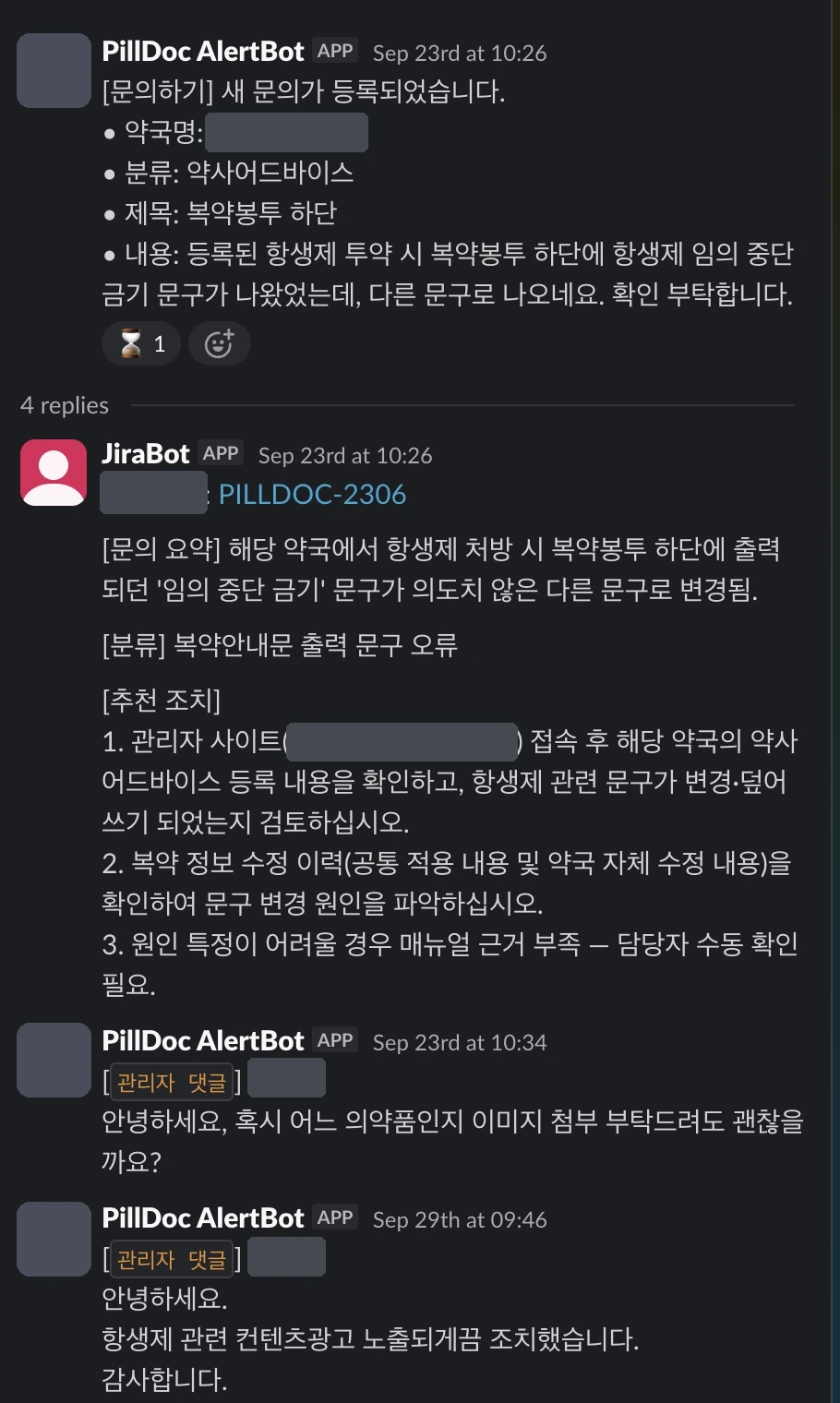
On September 23 a pharmacy left an inquiry. When antibiotics were prescribed, a line saying “do not stop on your own” used to print at the bottom of the medicine envelope, and now different text appeared. The pharmacy filed it under “Pharmacist Advice,” and the CS bot of the time (an automated responder that answers customer inquiries first) also recommended checking the pharmacist advice entry.
The real cause was a different feature: the “pharmacy custom slot,” where a pharmacy puts its own text into the ad space at the bottom of the envelope. It was fixed there on September 29. On September 24 a new CS staff member misclassified an inquiry because of the same name confusion.
Looking back, three earlier cases of the same symptom already existed. But they were scattered across four places. The record existed, but the person who needed it could not find it at the moment they needed it.
Three features with similar names print in different places
The reason for the confusion is simple. Three features print medicine text on paper, and their names all sound alike. They print in different places on the paper, and different people write the text.
Customers describe what they saw on the paper, not the menu name on the screen. “The text at the bottom of the envelope changed” points straight to the custom slot if you know the places, but sounds like pharmacist advice if you only know the menu names. So the KB pages record the place on the paper next to the feature name.
| Feature | Place on the paper | Who writes the text |
|---|---|---|
| Pharmacist advice | Top-left box of the A4 medication guide | The pharmacist, per prescription combination |
| Drug information (drug copy) | Efficacy and caution text attached to each drug | Comes from the drug database |
| Pharmacy custom slot | Ad space at the bottom of the envelope | Registered by the pharmacy · shown only when no paid ad matches |
From CS bot manual to the canonical document for everyone
The KB did not start as a company-wide document. In April 2026 it began as a set of manuals collected so the CS bot could cite evidence when answering inquiries. From April to August the evidence the bot reads was gathered in one place in Confluence, a company wiki tool, and on August 28 the document format was unified.
On September 24 KB pages and an ontology were added. The ontology is a relationship map of how features, screens, data and inquiry types connect; like a subway map, it draws lines such as “this feature uses that data and connects to that inquiry.” From then on, the AI that edits code also follows the same map down to the code and the database.
On October 2 the KB became the canonical source for the whole organization, meaning the original that all copies defer to. Confluence was switched to read-only, because documents edited in two places drift apart again.
The verdict on October 21 was this: “Since all the information is in one place, there is no need to ask someone else, and we could cut down the person-to-person communication that had been the bottleneck.”
Every morning at 7, the changed evidence is collected and rewritten
The KB is not a wiki filled by hand. At 07:00 every day an automated job collects what changed in four places: the organization’s chat conversations, the pharmacy inquiry board, 40 code repositories (storehouses that keep code version by version) and the structure and data of the service database.
Before anything becomes a page, personal information is masked first. Only after values such as pharmacy names, people’s names and contact details are removed does the material go into a page. Then each page is revised under the rule of one page per feature, and the lines of the ontology map are redrawn.
As of October 28 there are about 890 knowledge notes, and the ontology map has 9,609 nodes and 19,237 edges. A node is a station on the map (one feature, screen or piece of data), and an edge is a line between stations (a relationship between two of them).
Three kinds of readers use these pages. The CS bot uses them as evidence for answers, the coding AI as material it looks up before working, and people as documents they search on the site. Because all three read the same pages, their answers do not contradict each other.
What one KB page looks like
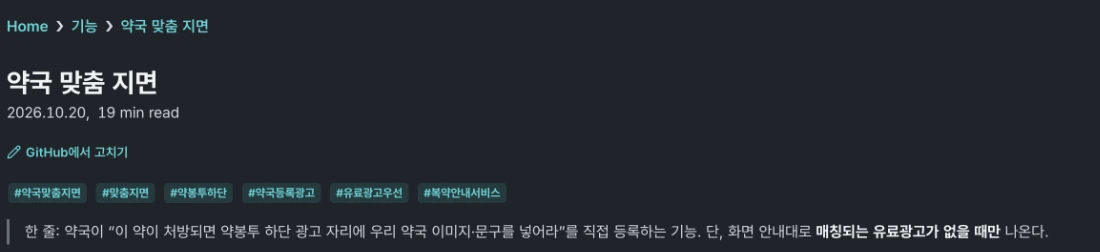

A KB page is a company document that sums up one feature on one page. A one-line summary sits at the top, followed by “Where it is” (screen and code location) and “Causes and how to check.” Each page has an edit link, so whoever spots an error submits a fix right there.
The biggest change after the September misclassification is the “neighbors easily confused” section. Features with similar names or overlapping symptoms are placed side by side, with one line on how each differs. The custom slot page says plainly: “If a warning prints at the bottom, it is the custom slot, not pharmacist advice.”
This section is where wrong calls are recorded as they happened. It notes not who was wrong but what was heard and where it led. The point is that the next person who hears the same words does not take the same wrong path.
The CS bot now cites KB page names as evidence
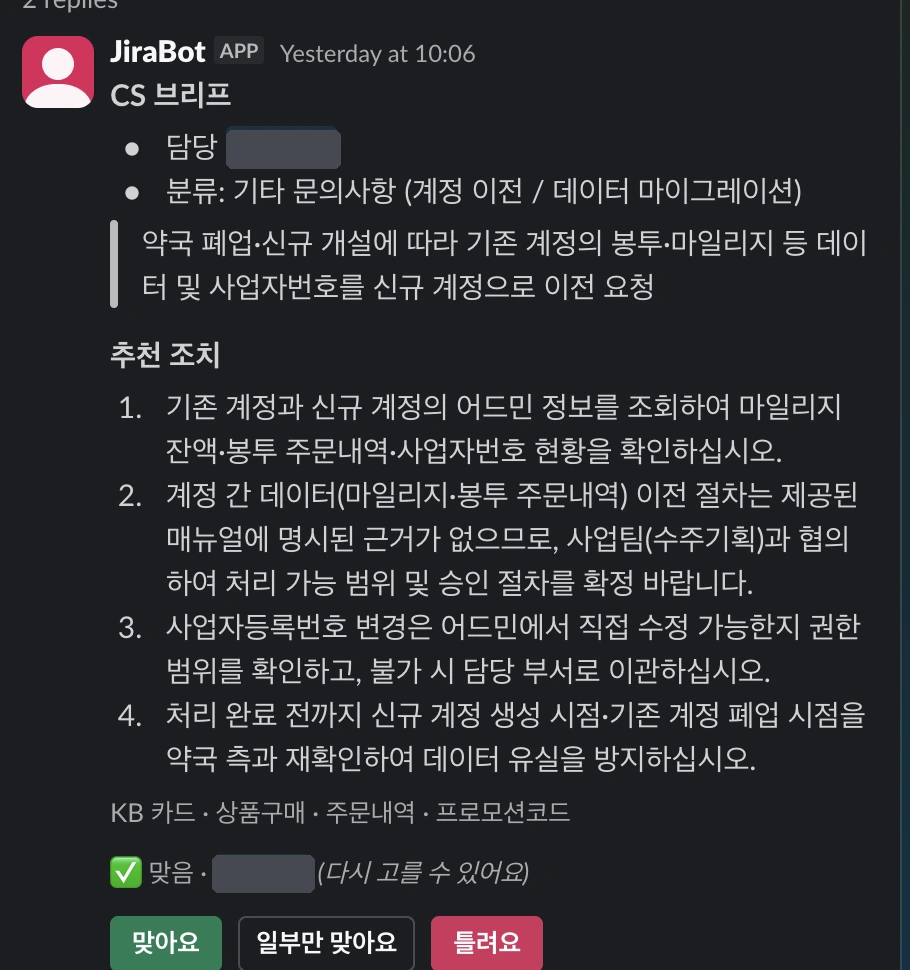
When an inquiry comes in now, the CS bot first posts a brief, a condensed report that the staff member can read and act on immediately. It states the inquiry summary, category and recommended actions, and below them the names of the KB pages it used as evidence.
Seeing the evidence page names lets the staff member decide quickly whether to trust the bot’s answer. If something is not in the pages, the bot writes that the manual has no stated basis and hands the case to a person. An honest “I don’t know” beats a made-up answer.
Under the brief are three buttons: Correct, Partly correct and Wrong. The verdicts stay on record, building up a log of people judging whether the bot was right.
Try this today — one “neighbors easily confused” section
You do not need to build a whole KB. Pick two features or tasks your team often confuses: menus with similar names, or inquiries with the same symptom that go to different departments.
Open one shared document, create a section called “neighbors easily confused,” and put the two side by side. For each line add one sentence on what differs and one sentence a customer or colleague actually said. Example: “The text at the bottom of the envelope changed” → not pharmacist advice but the pharmacy custom slot.
Hand this document to an AI such as ChatGPT or Claude together with an inquiry and have it draft a reply; you will see the difference. Where people got confused, AI gets confused too. Once that spot is written down, people and AI make fewer mistakes in the same place.
The next part covers the fourth of the five steps: the Gate Keeper, where code merges only after passing an AI PR review and screen inspection.