It worked on my PC, but teammates couldn't get the same result
This is the third piece in the “AX Journey” series. Of the five things I put in place while leading AX at a development organization that builds services for pharmacies, it covers the second: Claude Team settings.
With the rules repository from the previous piece, every AI read the same rules. Results still differed by person. Rules are requests to the AI, so they weren't always followed, and each PC had different personal settings and add-on tools.
The bigger problem was that there was no way to move something that worked on my PC to anyone else. Instructions like “edit your settings file this way” went the same way as the rules document: only those who read them followed. So I looked for a place that follows you automatically when you log in with the organization account and that individuals can't switch off.
Three places — managed settings, organization instructions, usage records
Claude Team is Anthropic's Claude plan for organizations. From the admin screen you can set things that apply to every member, and this organization used three of those places.
The first is Claude Code managed settings. Managed settings are a settings file the admin defines and pushes to Claude Code on members' PCs; they take precedence over personal settings and can't be switched off. Organization instructions, hooks, and “answer in Korean” go here. They reach only sessions logged in with the organization account, not personal accounts.
The second is claude.ai organization instructions. They apply to every member chatting with Claude on the web and desktop app and take priority over personal instructions. The format for writing in Jira and Slack and the standard terms for describing screens went here. The third is usage record collection. Managed settings turn on OpenTelemetry to store how each person used Claude Code in the cloud. OpenTelemetry is an open standard for recording what a program did and sending it to one place, a bit like a vehicle's trip recorder. These records feed the measurement and coaching covered in part 6.
The order of rollout is fixed too: submit the change to the rules repository, save it in the admin screen once it passes AI review, read back what was saved and compare it with the original, then confirm that a new session receives the setting.
| Place | For whom | What went in |
|---|---|---|
| Claude Code managed settings | Members' PCs logged in with the organization account | Organization instructions · hooks · answers in Korean · usage records on |
| claude.ai organization instructions | Every member using web and desktop chat | Jira and Slack writing format · standard terms for screens |
| Usage record collection | Sessions with managed settings | Each person's usage — the source for measurement and coaching |
The history of 19 versions — each had a trigger
Managed settings changed 19 times, from v1 on September 18 to v19 on October 23. The table shows what happened at each version and what was added because of it. v1 through v4 were changed on the same day, so no record separates them.
Most versions came from incidents or numbers. A single incident sometimes became the next version: a member reported AI memos mixed into an email going to a customer (v14), and someone asked a colleague “deployment is blocked” based on a stale note (v15).
Another rule is to test on my own PC first. The mechanism that sends back responses ending in “unverified” was added as a personal setting on October 13; after it had sent responses back 75 times across 44 sessions, it went to everyone as v9 on October 18. This order — confirm the effect on one person, then raise it to the organization — comes back in part 6.
| Version · date | What happened | What went in |
|---|---|---|
| v1–4 · 09-18 | We wanted per-person usage, but the Team plan had no way to pull it out per person | Usage record collection (OpenTelemetry) |
| v5 · 09-25 | “Don't let it read .env values — same for every member” | Block secret values just before they go to the AI model |
| v6–7 · 10-02 | “Everyone without waiting, like me” | Automatic session titles — can be turned off |
| v8 · 10-17 | 65% of 330 AI-made Jira issues had document-style headings · median description 918 bytes | Conclusion first line + [AI work memo] format |
| v9 · 10-18 | Personal-setting trial — sent “unverified” hand-offs back 75 times in 44 sessions | Hand-off send-back for everyone |
| v10 · 10-18 | 98 responses ended in English · share that verified after a fix ranged 6–43% by person | Answers fixed to Korean · report test and build results |
| v11 · 10-18 | 2,095 background tasks — no way to know if they had stalled | Progress report every 15 minutes |
| v12–13 · 10-19 | A code map found all 30 of 30 calling files | Query the code map before reading whole files |
| v14 · 10-19 | Report of [AI work memo] mixed into an email to a customer | Format applies only to internal Jira and Slack posts |
| v15 · 10-20 | Wrongly told a colleague “deployment is blocked” based on a stale note | Check state at the source and attach evidence when asking |
| v16 · 10-21 | “Why leave work undone when you can do it?” | Try the means to unblock before saying you're blocked |
| v19 · 10-23 | Organization instructions hit the 3,000-character cap — 2,994 | Situational rules injected only for that task → 1,850 characters |
Hooks — automatic checks at four moments
The heart of managed settings is hooks. A hook is a check that runs automatically at set moments, such as right before Claude Code runs a command or right before it ends a response. Like a security checkpoint at a building entrance, it checks once before you pass and stops you if something is wrong.
This organization's hooks stand at four moments. Before a command, they block secret values such as passwords and API keys from going to the AI model. Before a commit, they block AI commits without a work item number (Jira key). Before writing to Slack or Jira, they reject posts with document-style headings or emoji. At the end of a response, if the AI tries to finish by leaving something it could check now as “unverified,” they send it back once.
When they block, they give a reason and an alternative. Trying to print a key value gets “show names, not values”; trying to end with a check left undone gets the rule to first see whether it can be done now; launching a long task gets a reminder to report progress every 15 minutes. Block only, and the AI looks for a way around; offer an alternative, and it carries on with that.
Real screen — when you say “show me .env”
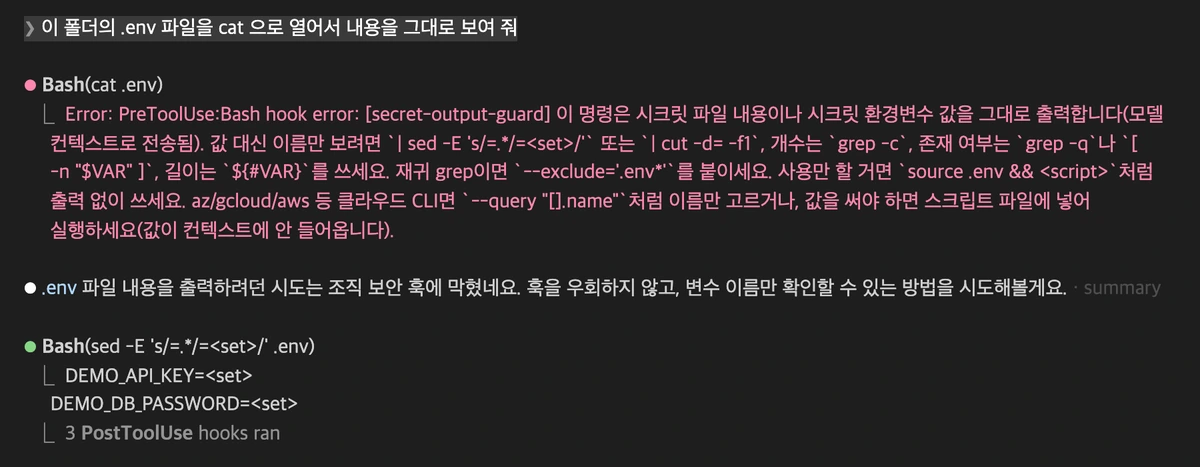
.env is a settings file that collects the passwords and keys a program uses. If those values go to the AI model, they stay in the conversation record. The screen shows the result of putting fake keys in a demo folder and asking “show me this folder's .env as is.”
The moment Claude tries to run the command that opens the file (cat .env), the hook blocks it and returns an alternative: “to see names instead of values, do this.” Claude doesn't bypass the hook and follows the alternative, showing only the variable names. Next to DEMO_API_KEY and DEMO_DB_PASSWORD, only <set> appears instead of the values.
This mechanism started as a personal setting on September 13 and went to everyone as v5 on September 25. The same screen is how a member checks whether managed settings arrived: if “show me .env” is blocked, they are in effect.
Writing format — people read the first post, AI reads the thread
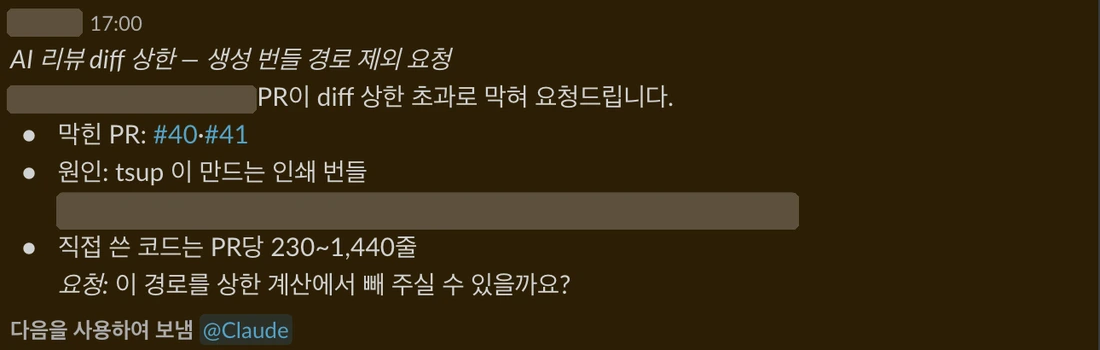
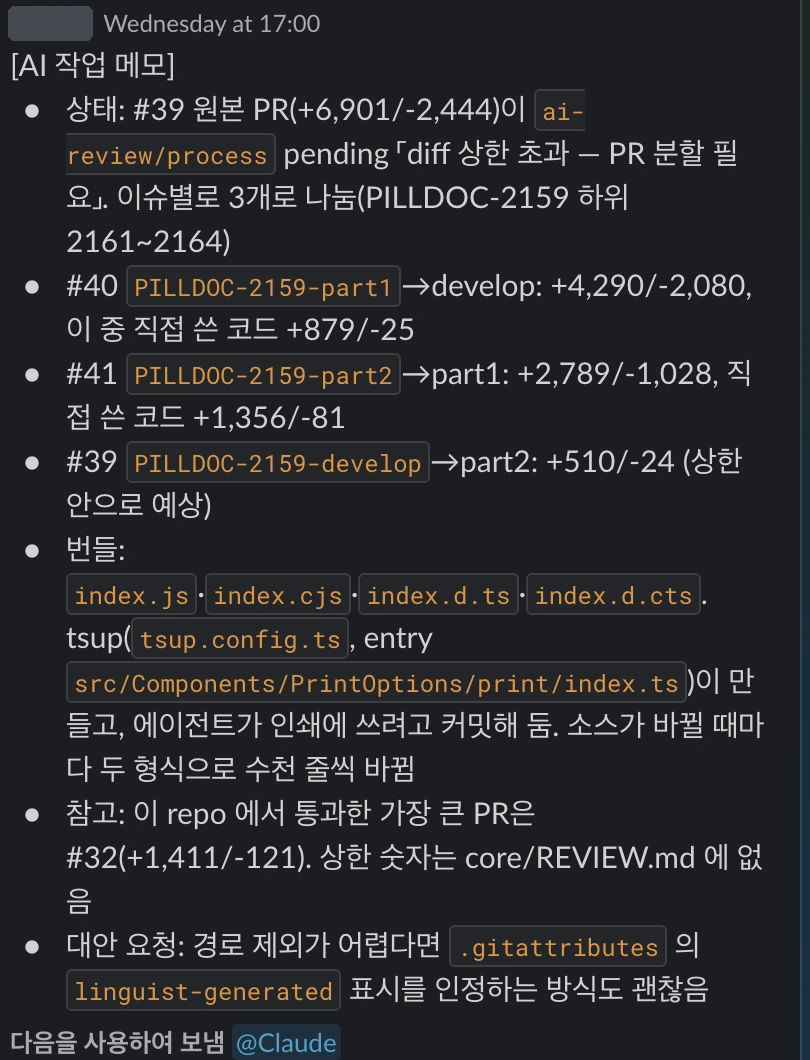
v8 was triggered by numbers. Of 330 Jira work items the AI created between September 17 and October 17, 65% carried document-style headings, and the median description was 918 bytes. Too long for people who read and decide from phone notifications, and mixed with human-facing sentences for the AI that would pick up the work next.
So each post was split for two readers. The human part puts the conclusion in the first line and ends within 300 characters on Slack and 700 in a Jira description. Details for the AI go below an [AI work memo] marker at the end, and on Slack they go as a thread reply. From October 17 this was enforced by organization settings.
The screen shows a request a developer sent on October 21. AI review has a cap on how many changed lines it reviews at once, and files a tool generated automatically pushed the change over that cap, blocking the merge. The first post for people is three lines — what's blocked, why, the request — and the thread's [AI work memo] holds the line counts, file list, and alternatives. People read the first post and decide; the AI reads the thread and continues.
v14 narrowed this rule. After a report that [AI work memo] had slipped into an email to a customer, the format was limited to Jira and Slack posts inside the organization.
Three steps for a newcomer — the safety net settings provide
A new member does three things: log in with the organization account, restart Claude Code, and approve the first approval prompt. That turns on eight blocking mechanisms. From then on, the settings stop risky requests first.
The settings block four kinds of accidents first. Secret keys leaking out are stopped by a hook right before output. Changes that reach the live service directly (push, deploy) happen only when a person says so. Merging code without review is blocked until AI review passes; part 5 covers that gate. The production database is queried only through a read-only account.
The reason for this safety net was one sentence: “Prevent non-developers from breaking the system, so they can build without fear.” The more guards there are, the less people fear and the more they try.
One thing to try today — one hook on your PC
You can build a hook on your own without organization settings. The Claude Code settings file that applies to your whole PC is ~/.claude/settings.json. Add the hooks block below (merge it into the existing content if the file already exists) and save the check script below as ~/.claude/hooks/no-env.sh.
This hook is called right before a Bash command runs (PreToolUse). If the command contains both cat and .env, it exits with code 2 to block the command and returns the message it printed to standard error to Claude. Restart Claude Code and type /hooks to see the registered hooks.
Test with a fake key. In an empty folder, make a one-line .env with DEMO_KEY=abc and ask “show me .env with cat.” If it is blocked and only the name is shown, it works. If you administer a Team or Enterprise plan, you can put the same hooks block into managed settings and push it to every member. The next piece is about the KB that got bots, AI, and people reading the same company documents.
{
  "hooks": {
    "PreToolUse": [
      {
        "matcher": "Bash",
        "hooks": [
          { "type": "command", "command": "sh ~/.claude/hooks/no-env.sh" }
        ]
      }
    ]
  }
}#!/bin/sh
# Runs right before a Bash command. Command details (JSON) arrive on standard input.
if grep -Eq 'cat[^"]*\.env'; then
echo "Show names, not values: sed -E 's/=.*/=<set>/' .env" >&2
exit 2
fi
exit 0