Where do the values the AI reads go?
.env is a file that collects API keys and passwords in one place. Think of an API key as the pass a program shows when it enters an external service. Why the file is kept separate from the code was covered in the previous article. This article deals with the next question. What happens when my AI coding tool opens that file?
Claude Code and Codex run commands on my computer with my account's permissions. That means any file I can open, the AI can open too. And because the AI has to read command output to decide its next action, the output goes into the conversation and is sent to the servers of the company running the model. Anthropic's Claude Code data usage documentation also states that all user prompts and model outputs are transmitted over the network. If the AI prints .env to the screen, the passwords become part of that conversation.
How long it is kept after being sent depends on the account type and settings. According to the same documentation, for individual plans (Free·Pro·Max) it is 5 years if you allow your data to be used for model improvement and 30 days if you do not, and for team, enterprise, and API accounts it is 30 days by default. You can change the setting at any time in the privacy settings on claude.ai. Codex has the same structure in that it must send command output to the model to work, and its retention terms need to be checked separately in OpenAI's policies.
It is not only a server problem either. So that you can resume an interrupted conversation, Claude Code keeps conversation history on my computer in the ~/.claude/projects/ folder as plain, unencrypted text for 30 days by default. A password printed to the screen even once also remains in that file.
Reading is different from seeing
That does not mean you can stop the AI from using .env. Programs need to read keys to run. There are two things to distinguish here. A program reading a value, and the AI seeing a value.
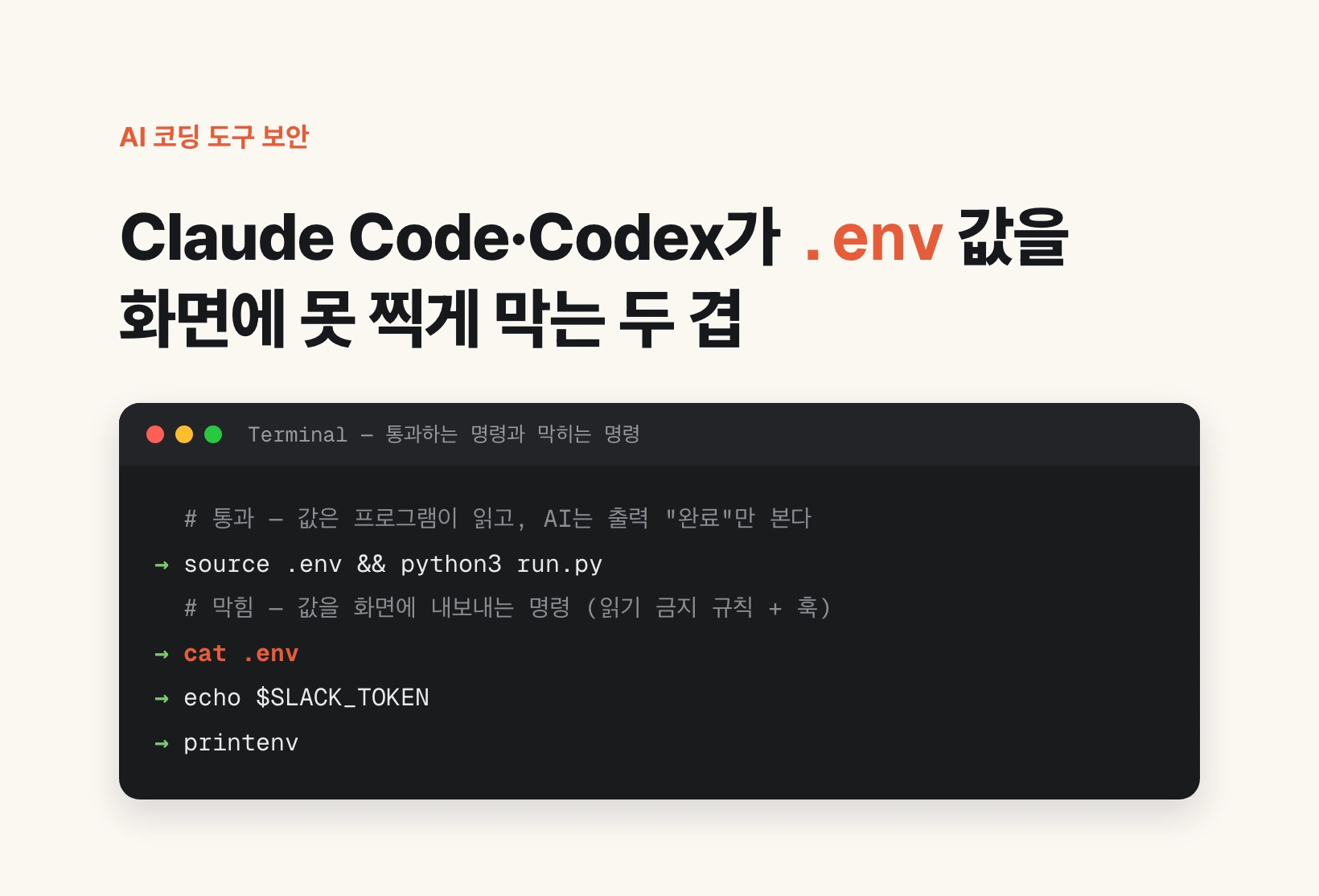
When the AI runs `source .env && python3 run.py`, the one opening .env is the program run.py. The password goes only from my computer to the external service, and what comes back to the AI is just output the program prints to the screen, such as "done". The same applies when a command contains only a variable name, as in `curl -H "Authorization: Bearer $SLACK_TOKEN"`. Replacing the name with the actual value is done by the shell on my computer. The shell is the program that takes commands from the terminal, the window where you type commands as text, and runs them.
Leaks happen when the AI runs a command that sends a value to the screen. That is when it prints the file contents as-is with `cat .env`, prints a variable's value with `echo $SLACK_TOKEN` (a variable is a slot that holds a value under a name tag), or runs `printenv`, which lists all stored values. What needs to be blocked is not all file access but this output.
.env ──> python3 run.py ──> external service      (where the value goes)
                 │
                 └──> screen output "done" ──> AI ──> model server   (what the AI sees)
Masking is a promise, not a mechanism
On the day I first asked this question, Claude was already masking values. When reading the file, it attached a command that replaced the values with <set> and showed only the key names. It is a good habit, but it is a rule the AI keeps on its own.
The rule breaks in two cases. One is the AI's mistake. During debugging, the search for the cause of a failure, it may print a value as-is to check it. The other is prompt injection. This is an attack in which instructions hidden inside a web page or document the AI reads trick the AI into doing something it would not otherwise do. In neither case can the AI's good intentions stop it.
So this article's answer is this. Rather than agonizing over whether to trust the intentions of Claude and Codex, first build a structure in which values cannot get out regardless of intent. It is like giving a human employee the authority to open the safe without telling them the safe's combination.
Step 1: Claude Code's rule forbidding .env reads
The easiest first layer is the permission rule Claude Code officially provides. Put the content below in the .claude/settings.json file in your home folder. settings.json is the settings file that determines how Claude Code behaves. If the file already exists, just add the two lines to the deny list inside permissions.
According to the official documentation, this rule applies not only to Claude's file reading tool but also to file commands used in the shell such as cat·head·tail·sed, and to input redirection such as `< file`. `//**/` means it applies to a .env anywhere on the computer. The `.env.*` line blocks files like .env.local, and it also blocks .env.example, the sample file meant for sharing.
The documentation also states the limits. It does not apply to `grep -r`, which searches for text across a whole folder without naming a file, or to cases where a script written in Python or Node (both are programming languages) opens the file by itself. To block access by all programs at the operating system level, it advises turning on the sandbox. The sandbox is an isolation mechanism that makes commands the AI runs operate only inside a defined fence. Also, this rule is a Claude Code setting, so it does not apply to Codex.
{
  "permissions": {
    "deny": [
      "Read(//**/.env)",
      "Read(//**/.env.*)"
    ]
  }
}
Step 2: Hooks — a checkpoint just before a command runs
A hook is a link that makes an AI tool automatically call my script at a specific moment. Among them, PreToolUse is called right before the AI runs a command or tool. The script receives what the AI is about to run, and if it should be blocked, returns a deny signal. The command is then not run, and the reason for the denial is passed to the AI. Claude Code and Codex use the same format for this deny signal, so one script can be attached to both.
Below is a short example that blocks only the two most common cases that the Step 1 rule misses. Running env·printenv alone, which lists all stored values, and commands that print variables whose names contain TOKEN·SECRET·PASSWORD·_PW·_KEY with echo or printf. Save it as ~/.claude/hooks/block-env-print.py. python3 must be installed on your Mac.
import json, re, sys

cmd = json.load(sys.stdin).get("tool_input", {}).get("command", "")
secret = r"\$\{?[A-Z0-9_]*(TOKEN|SECRET|PASSWORD|_PW|_KEY)[A-Z0-9_]*"
if re.fullmatch(r"\s*(env|printenv|export -p)\s*", cmd) or re.search(r"(echo|printf)[^|;&]*" + secret, cmd):
    print(json.dumps({"hookSpecificOutput": {
        "hookEventName": "PreToolUse",
        "permissionDecision": "deny",
        "permissionDecisionReason": "Blocked: this command prints a secret value. Use the value, do not print it.",
    }}, ensure_ascii=False))
How to attach the hook to Claude Code and Codex
For Claude Code, add a hooks section to the same settings.json. matcher is the field that chooses which tool to set up the checkpoint on, and Bash is the shell command execution tool. Keep it side by side with the Step 1 permissions in one file.
For Codex, write it in the same shape in ~/.codex/hooks.json. There is one difference. Codex runs a hook only after the user has checked its definition and trusted it. Until you open Codex and mark the newly added entry as trusted in the /hooks command, the hook is skipped.
After attaching it, test it once. When I put 10 sample commands through this example, the 5 commands that print values were blocked, and the 5 commands that only use values, only show character counts, or have nothing to do with secrets were allowed. Six of them are listed in the table below. In the actual tool, ask the AI to run printenv and see whether it is blocked.
| Command | Result | Reason |
|---|---|---|
| printenv | Blocked | Lists all stored values |
| echo $SLACK_TOKEN | Blocked | Prints the token value to the screen |
| printf "%s" "$OPENAI_API_KEY" | Blocked | Prints the API key value to the screen |
| source .env && python3 run.py | Allowed | The program only uses the value |
| curl -H "Authorization: Bearer $SLACK_TOKEN" … | Allowed | The command contains only the variable name |
| echo ${#SLACK_TOKEN} | Allowed | Prints only the character count, not the value |
{
  "hooks": {
    "PreToolUse": [
      {
        "matcher": "Bash",
        "hooks": [
          {
            "type": "command",
            "command": "python3 \"$HOME/.claude/hooks/block-env-print.py\""
          }
        ]
      }
    ]
  }
}{
"hooks": {
"PreToolUse": [
{
"matcher": "^Bash$",
"hooks": [
{
"type": "command",
"command": "python3 \"$HOME/.claude/hooks/block-env-print.py\""
}
]
}
]
}
}The hook actually in use: what it blocks, what it allows, what it cannot block
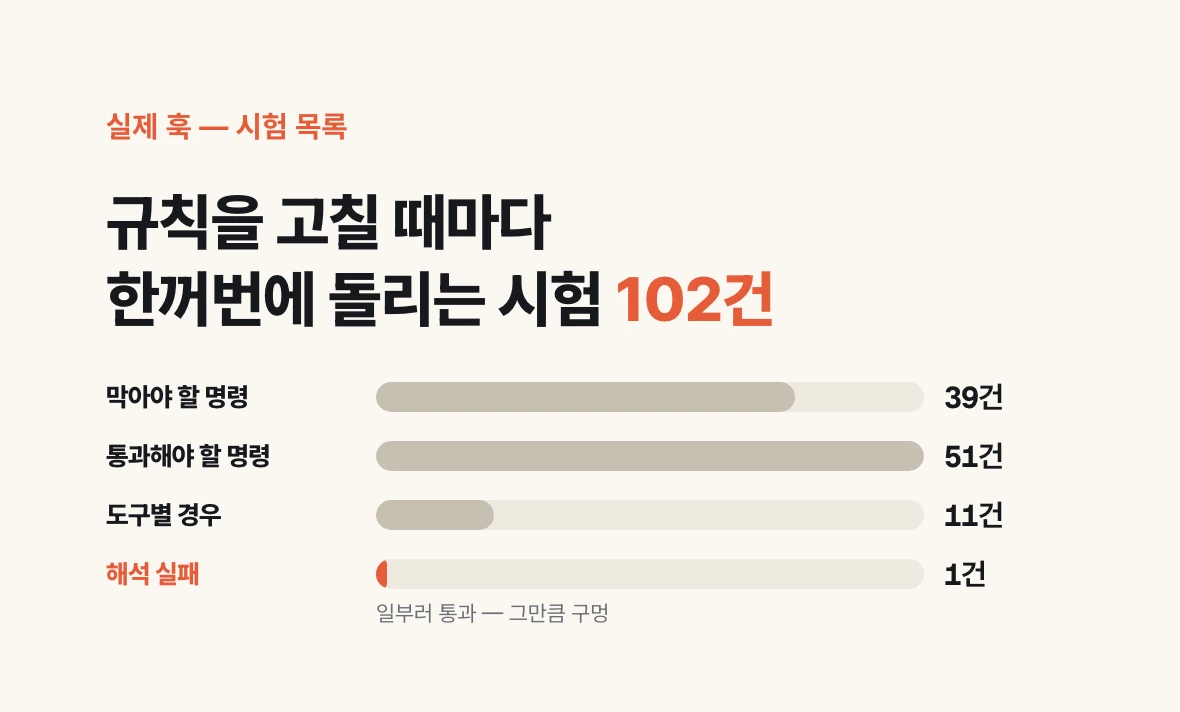
The example is the entry point. The hook I actually use is a single Python script that extends the cases on the same principle, and I attached it to both Claude Code and Codex on September 11, 2026. Every time I change the rules, I run 102 cases at once, 39 commands that must be blocked, 51 commands that must be allowed, 11 tool-specific cases, and 1 parse failure, to confirm that both directions are correct. The alternative commands suggested when blocking are also on the allowed list, so that nothing gets blocked again after being fixed as instructed.
The 1 parse failure is a case that is allowed on purpose. If the script cannot parse a command, it does not block it and lets it run. It is a trade-off chosen because blocking every ambiguous command would stall work, and it is a hole to that extent.
In the two days after I attached it, this hook blocked my AI three times. On September 12, a command that tried to print an API key variable with printf and a command that opened .env inside Python code were blocked. The AI read the reason for the denial and reran them in a form that did not print values. On September 13, code that searched past conversation history to write this article was blocked. The search term list merely contained the text ".env" and did not actually open .env, so it was a false positive that blocked something that did not need blocking. The AI moved the code into a script file and ran it. This last scene shows the hook's limit exactly. What happens inside a script file cannot be known by looking at a single command line. cat·grep·sed·jq·cut in the table below are all commands that show file contents on the screen or filter out only part of them.
| Category | Examples |
|---|---|
| Blocked | Printing .env contents with cat·head·grep·sed·jq, opening .env with the file reading tool, running env·printenv alone, echo of variables with secret names, one-line Python·Node code that opens .env, grep for secret names across a whole folder with no exclusion conditions |
| Allowed | Running a program after source .env, sed that masks values, grep -c that only counts lines, cut·jq keys that extract only key names, checking file size·modification date, saving output to a file |
| Cannot block | A script file printing values by itself, options that make a command print its process in detail such as set -x or curl -v, copying the file under another name and then reading it, allowing on parse failure, tools that do not go through hooks such as Codex's web search |
Why you should attach it first even if it is not 100%, and what to do next
A hook sees commands only as text. So the wider the blocking range, the more false positives, and it cannot fully stop an AI trying to get around it. Still, most accidents come from habit rather than malice. The cat .env printed without thinking while debugging and the printenv run to check settings are those habits, and blocking these two takes just two rule lines and a short script.
There are three next steps. First, if values have already been printed in a conversation, get those keys reissued. Changing the key is more certain than deleting it from the conversation history. Second, keep a separate .env for each project containing only the keys that project needs. If every project loads one file holding dozens of keys, a single mistake sends out those dozens all at once. Third, check the data settings of the plan you use once.
There is one thing to do today. Put the two lines of the rule forbidding .env reads in ~/.claude/settings.json, then ask Claude Code "run cat .env" and see whether it is blocked.