What Grok Bot is
Grok Bot is an agent product from xAI. An agent is not a chatbot that only talks. It is a program that opens mail, builds a spreadsheet, and signs into a site to finish the job. The official line is short: a team of always-on agents, each with a computer, working inside the tools and apps a person already uses.
It launched on 11 August 2026, still in early beta. The company had already been handing sales outbound, marketing, office operations, and bug fixes to bots internally, then opened that setup to the outside. The seat is different from asking a question in ChatGPT or the Grok chat window. Questions go in a window. Work is handed to a bot.
The Code Factory review says the author deleted Hermes and OpenClaw after using this. Both are open-source AI assistants: you type “do this” in Telegram or Slack and they create files and write code on your machine. This article does not rerun that comparison. That piece already exists. Here I only write what Grok Bot is, who can open it, and what someone now testing Buzz should look at before moving.
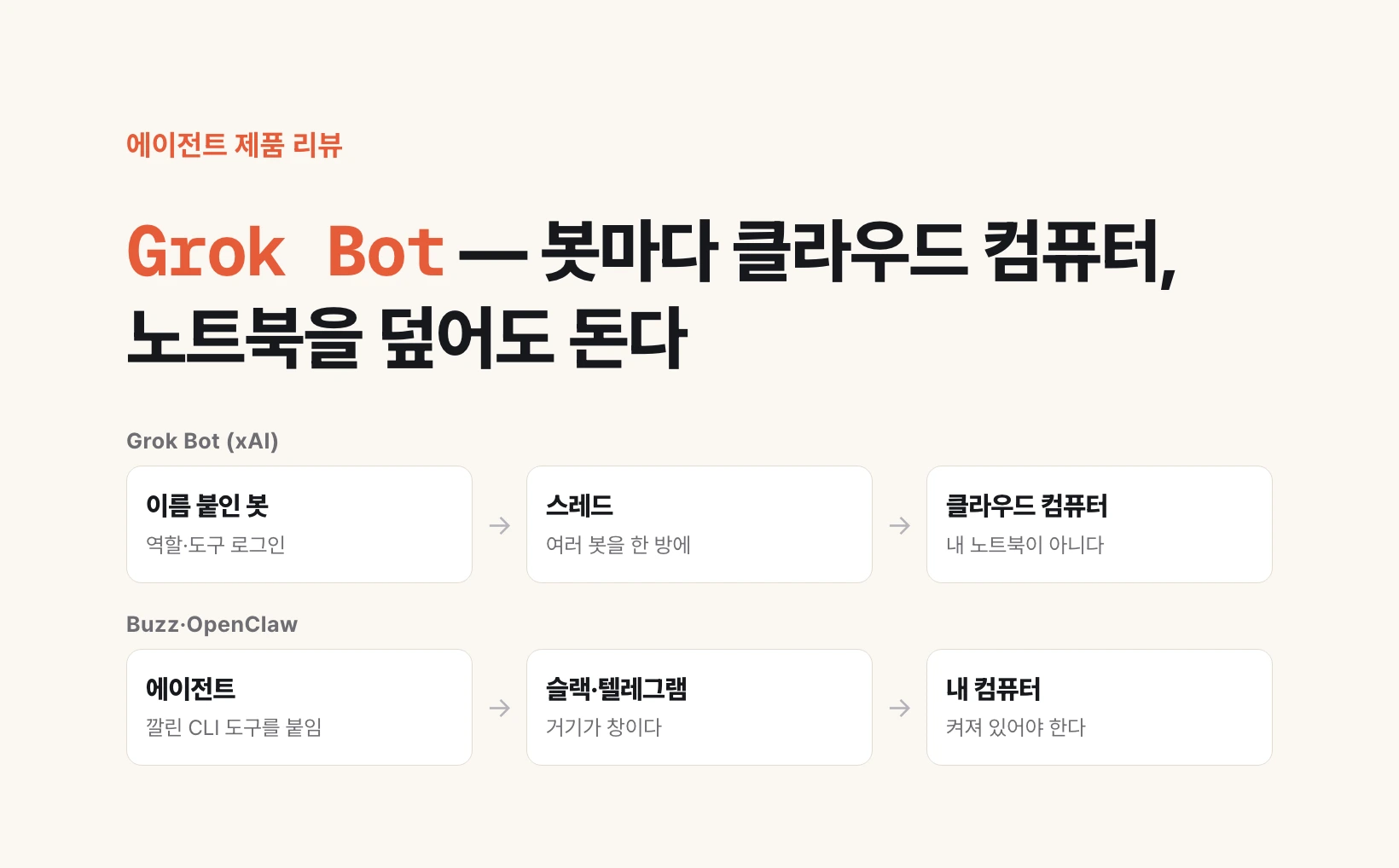
Three parts — bot, thread, computer
You only touch three things on the screen. A named bot, a thread that gathers several bots, and the computer that bot uses.
A bot is one person. You give it a name, write down what it owns, and sign it into the tools it needs. One bot can sort YouTube collab mail, another can read a contract, another can send an invoice PDF. Official docs call a bot a single persistent, named teammate.
A thread is the room that puts those bots in one conversation. You can talk to one bot, or drop several into the same thread and let them pass work. The middle of the system remembers who owns what, so even a chat with one bot can hand a job to another that already handles it well. You spend less time copying notes between windows.
The computer is the product. The label says “This computer,” but it is not your laptop. It is a cloud computer from xAI. The bot signs in there, opens a browser, checks mail, and writes numbers into a sheet. Closing your laptop does not turn that computer off. That is the opposite of OpenClaw, Hermes, and Buzz, which use your machine as the workshop.
Who can open it, and where you get it
It is not open to everyone yet. As of the launch post, only SuperGrok Heavy, Cursor Ultra, and Cursor Teams Premium subscribers can use it on desktop and iOS. Enterprise accounts are on a waitlist. Free Grok or ordinary SuperGrok does not open the door.
The product page is x.ai/bot. The macOS installer comes from Cursor’s download servers, and the iPhone app sits in the same family. A thread you start on the desktop continues on the phone. That is also what the reviewer stressed: you can watch what the bot is doing from your phone while you are out.
I am not pinning a dollar figure in this article. The public xAI price list and Cursor’s plans move, and the reviewer’s “about $200 a month” does not match every Heavy number circulating outside. The only question that matters is access. If you already have one of those three subscriptions, you can open it. If you do not, you cannot test it without opening one.
How to make the first bot
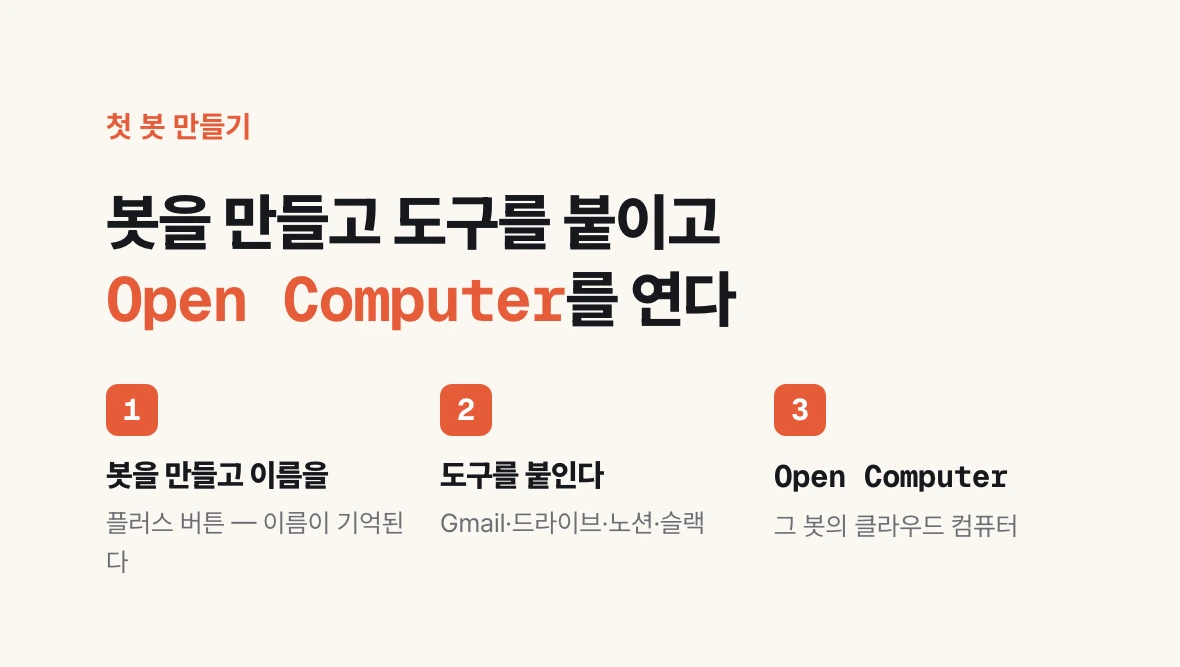
The official path is three lines. Download the app. Create your first teammate. Hand off work. The review video fills that in with a few more taps.
The app looks like Telegram or Slack. Tap plus, make a bot, give it a name. The name is remembered. Call it “Airbnb research” and the bot treats itself as the person who does that job.
Then attach tools. In the review, Gmail, Google Drive, Notion, and Slack connect directly. Sign in with the account you already use and the bot works inside that tool. The official phrasing is that bots sign into the apps a person already uses.
If the job needs a computer, tap Open Computer. The screen that opens is that bot’s cloud computer. Chrome launches there. Logging into a Facebook ads manager and clicking a calendar happen on that screen. It does not steal focus from your laptop. The place where an ads console refused to sit still on API or MCP moves into this one window.
Once you have several bots, put them in one thread. The reviewer split a YouTube collab into four: one that finds the collab record in mail, one that updates Notion, one that reviews the contract, one that builds and sends the invoice PDF. One sentence — review the Hostinger dedicated-video contract and send the invoice — and the four fill their own squares.
Show the screen, and it becomes a routine
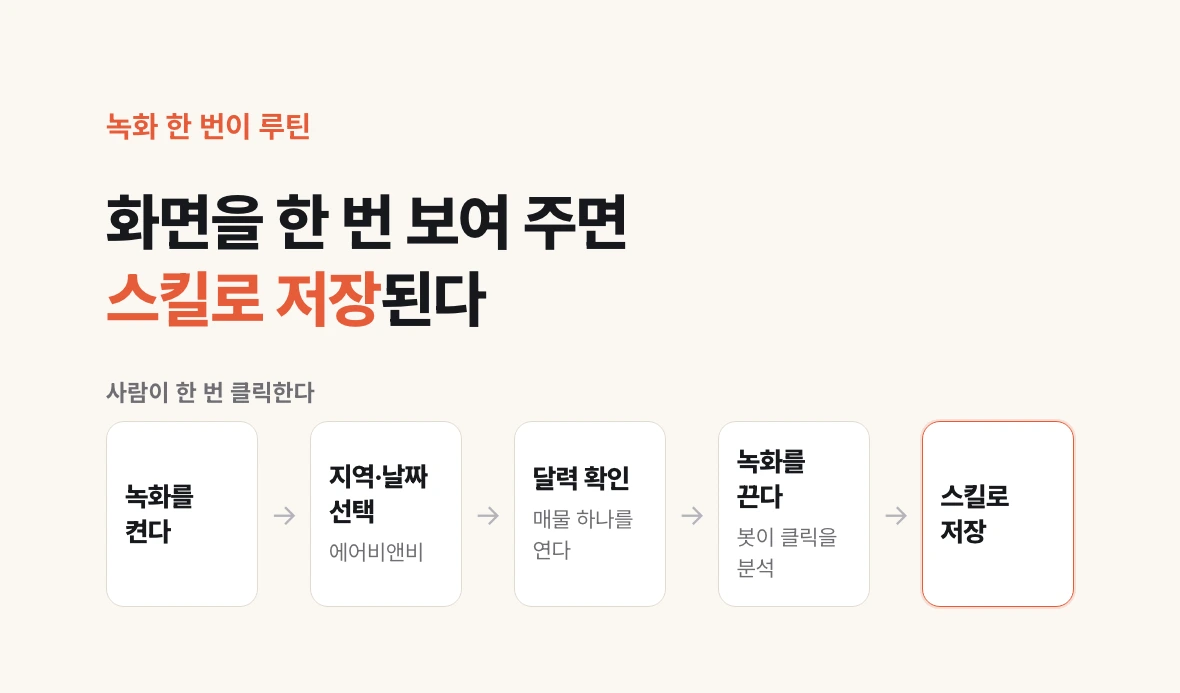
A site with no API cannot be automated from a command alone. Occupancy on a lodging calendar, parts of an ads console, an internal page behind a login — those are the seats. Grok Bot lets you show the clicks once and save that flow.
In the review, the author starts a recording, opens Airbnb, picks a city and dates, opens a listing, checks the calendar, and stops. The bot analyses the clicks, writes a report, and saves the same path as a skill. After that, changing the city name repeats the research. It can run at a set time every day, or only when something happens.
The official line is: ask it to follow along the next time you do the job. It watches the steps, keeps your corrections, and runs on its own next time. That is the opposite of automation tools that ask you to design a workflow and wire boxes first. Showing the work comes first.
Buzz, OpenClaw, and Hermes in one table
What I am testing now is Buzz. It is an open-source collaboration app Block released in July 2026, and it looks like Slack. The decisive difference is that it does not call a new model API. It attaches command-line tools already on this machine, such as Claude Code or Codex. You can run several agents inside subscriptions you already pay for. The cost is clear: that computer has to stay on.
OpenClaw and Hermes sit in the same place. They run on your PC or on a server you leave on, and Telegram or Slack is the window. The software is close to free; you pay for the model. Grok Bot is closer to a product that swallowed both the window and the computer. The door in is narrower — three paid subscriptions.
The table below is the line that decides a move. It is not a feature-count table.
| Criterion | Grok Bot | Buzz | OpenClaw · Hermes |
|---|---|---|---|
| Computer | xAI cloud | Your PC | Your PC or your server |
| Works with the lid closed | Yes | No | Not unless you leave a server on |
| Door in | SuperGrok Heavy · Cursor Ultra · Teams Premium | Install the app and attach a CLI you already have | Install, then a model subscription or usage billing |
| Window | Dedicated app · desktop and iPhone | Slack-like channels | Telegram · Slack |
| Sites with no API | Show the screen, save a routine | Browser and CLI on your machine | Browser and CLI on your machine |
| Status now | Early beta, 11 Aug 2026 | What I am testing | Open source |
Why I will read more reviews before I move
One review does not prove a product. The Code Factory video is a two-day write-up, and the flow on screen is clear. A beta can look different a week later, and the subscription door is narrow enough that collecting write-ups from people in the same seat takes time.
I am watching two lines. First: how much of my work actually has to keep running with the computer off. If mail triage and Notion updates sit on that line, Grok Bot is the better seat. Second: whether the Claude and Codex subscriptions I already pay for, plus the Buzz channels, already do that work. If they do, opening another monthly subscription does not explain itself.
So for now I keep running Buzz. “Delete Hermes and OpenClaw, leave only Grok Bot” is a direction, not a command I ran today. When more reviews pile up, and the square of work that only runs if this machine stays awake is sharp, I will move.
If you can follow along, you already have one of the subscriptions. Get the app at x.ai/bot, make one bot, hand it one job you repeat every week, close the laptop, and check on the iPhone whether it finished. That is the fastest way to feel how this is not a chat window.