Why planning consent is tedious
Before an insurance planner in Korea can design a plan for a customer, each insurer needs a document in which the customer agrees that their information may be used for planning. This is called planning consent (가입 설계 동의). Signing it does not enroll anyone in a policy; it is permission to start planning.
The burden comes from forms being separate per insurer. To compare products from three insurers for one customer, the planner needs consent on three insurers' forms and has to send each one. On paper that means printing, meeting to get signatures and sending again per insurer, repeated for every customer times every insurer.
How it flows in Insudoc
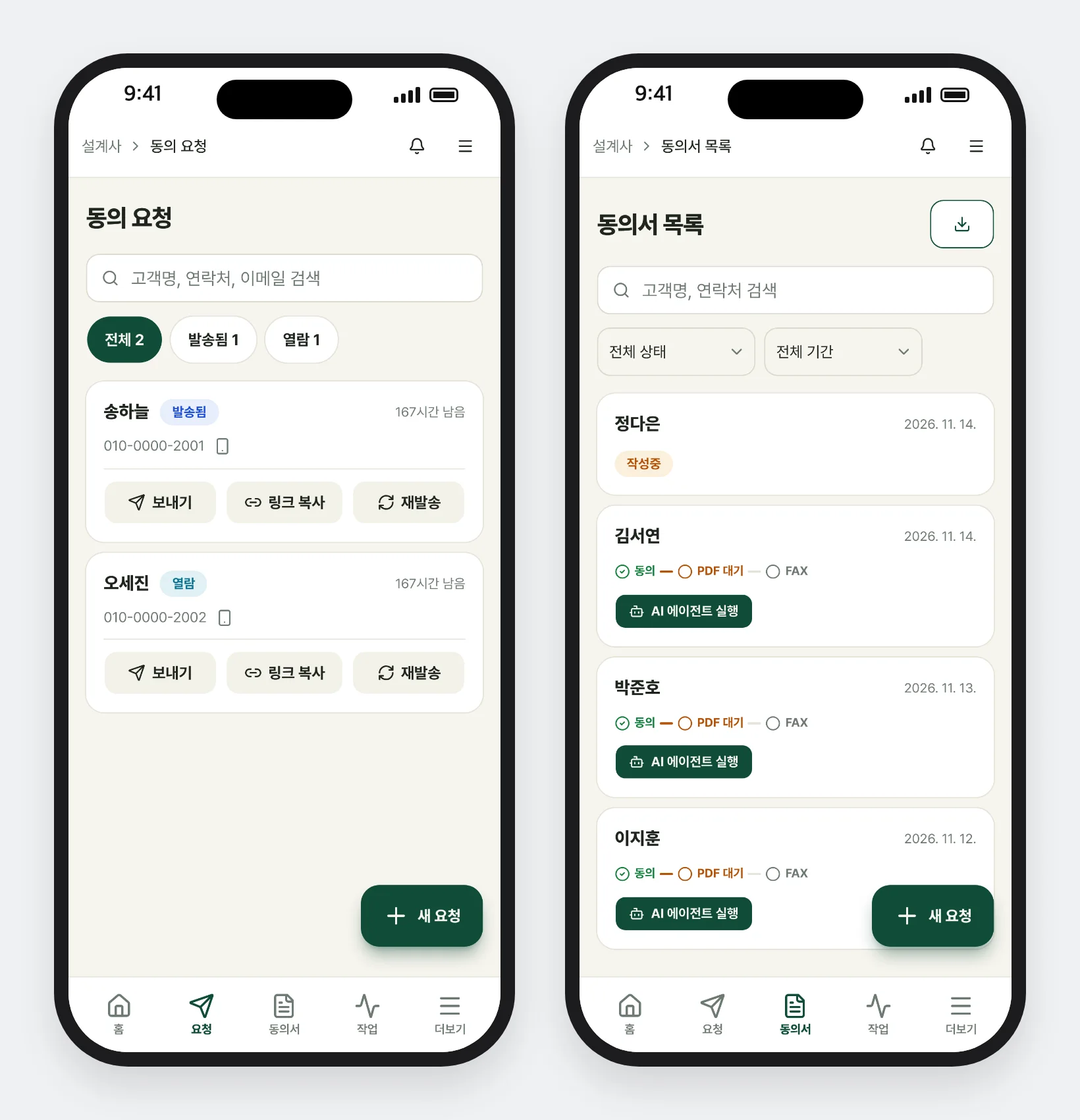
The planner creates a consent request. Each request gets its own link. Email is sent by the service; text messages and KakaoTalk are sent from the planner's own phone.
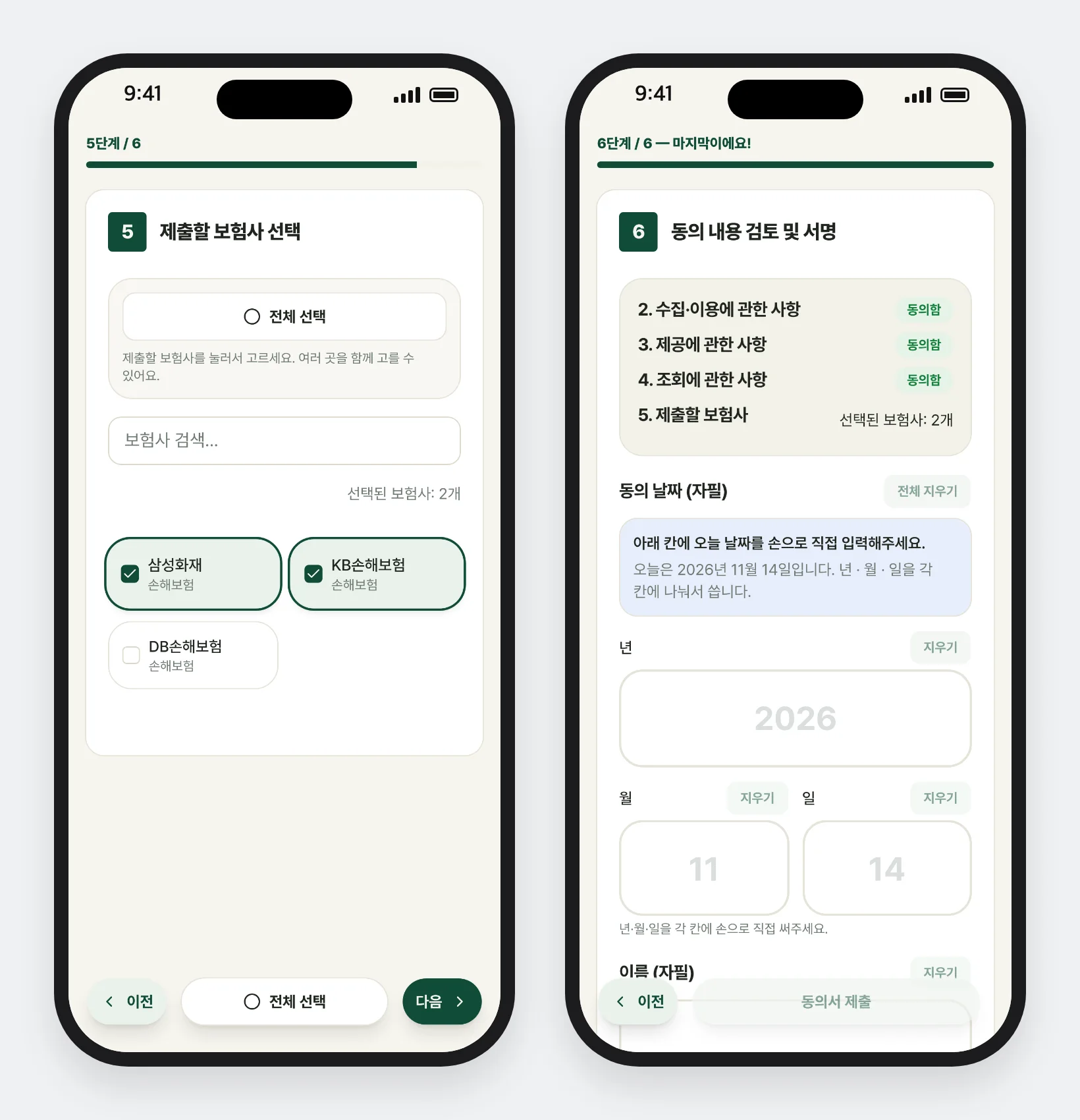
The customer opens the link in a mobile browser and goes through six steps: reviewing the collection and use, provision and inquiry consent items, choosing the insurers to submit to, and finally writing the date, their name and a signature by hand. There is no app to install and no sign-up, and the signature is written once no matter how many insurers are chosen.
When the customer submits, an issuance job is created for each chosen insurer and an AI agent issues the consent PDF on each insurer's own form. Here, the AI agent is a program that signs in to the insurer's system with the insurer account the planner registered in advance and clicks through the screens in the order a person would, to fetch the document.
The planner checks the signed copy and faxes it to the insurer. The consent list shows consent, PDF and FAX as separate stages. A customer signature does not mean the submission is complete, so check through to FAX.
Insurers issued automatically today
As of November 14, 2026, the public support list has nine insurers: KB Insurance, Samsung Fire & Marine, Heungkuk Fire & Marine, Meritz Fire & Marine, DB Insurance, Hyundai Marine & Fire, Hana Insurance, Lina Non-life Insurance and Lina Life.
For insurers not on the list, download the signed consent and handle it directly. Actual issuance can be delayed by the state of the registered insurer account (such as an expired password) or insurer maintenance.
What you can try today
If you are a planner: sign up at www.insudoc.co.kr. Signing up starts a 7-day trial with up to 20 submissions and no payment details. Submissions are counted per insurer, not per customer; one customer sent to three insurers counts as three. Send your first request to yourself or a colleague as the customer to walk through the customer's screens.
If you are not a planner: write down one task in your work where "log in to a site, issue the same form, send it by fax or email" repeats for every person times every organization. Insudoc keeps only what a person must do in that loop, the customer's signature and the planner's final check, and hands the rest to an AI agent. Marking the steps a person must do in your own task shows what can be automated.
Before you use it
Before sending a request, explain to the customer who the planner is and why consent is needed, and have the customer read and sign it themselves. Each consent link carries access to the customer's form, so do not post it on public boards or social media.
How Insudoc works does not replace each insurer's submission requirements. If an insurer asks for different documents, follow that insurer's guidance.