What Record a skill actually is
Record a skill is an Anthropic feature in the Claude desktop app that records the work you actually do on screen and converts it into something Claude can execute again. What gets captured is more than video: clicks, keystrokes and your voice through the microphone are recorded together and sent to Claude.
A 'skill' here is a written description of the order and the criteria Claude should use for a specific job. For a person it would be a work manual. Until now you had to write that manual yourself and hand it to Claude. Record a skill extracts it from a demonstration instead.
So the shift is from explaining to showing. Rather than writing out every step in a prompt, you do the job once the way you would when handing it to a new hire. For anyone who has postponed automation because they were not confident writing prompts, that difference is decisive.
Where it lives and what you need
It is available only in the Claude desktop app on macOS and Windows, not in the browser version, and it opens on paid plans such as Pro, Max and Team.
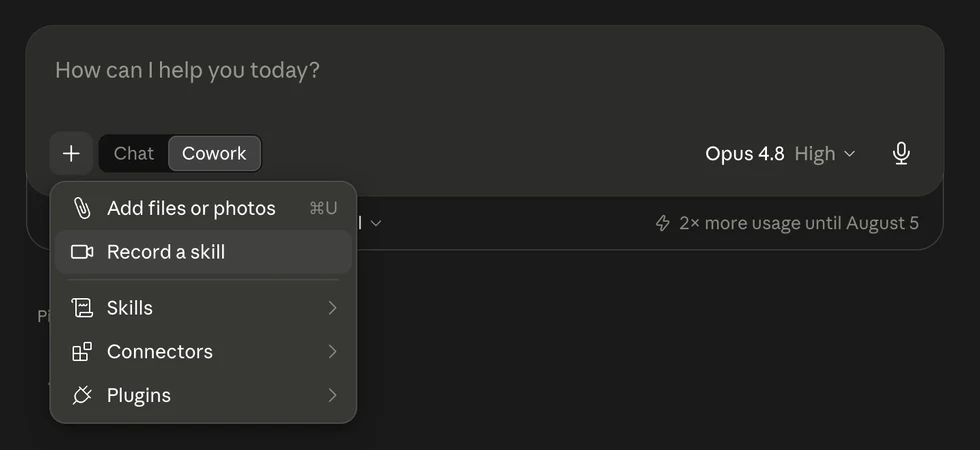
Open the app and, in the mode selector under the composer, choose Cowork rather than Chat. Cowork is the mode in which Claude works alongside you with direct access to folders, apps and connectors on your machine. Then press the + button on the left of the composer and you will see 'Record a skill' directly under 'Add files or photos'.
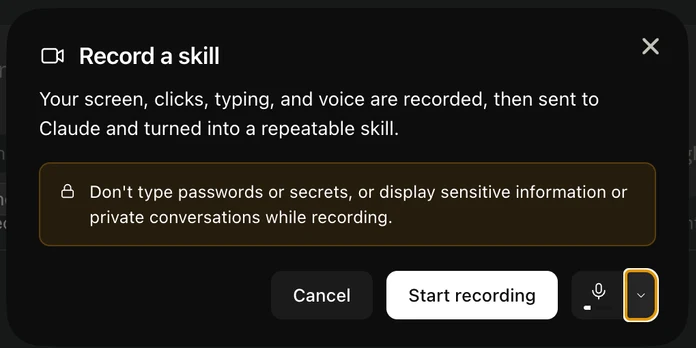
Clicking it opens a notice explaining that your screen, clicks, typing and voice will be recorded, sent to Claude and turned into a repeatable skill. The arrow next to the microphone button lets you pick which microphone to use. When you are ready, press Start recording.
What to check before you start
The notice carries a warning: do not type passwords or secrets, and do not display sensitive information or private conversations while recording. The reason is that the capture covers everything visible on screen, not only the window you are actively using.
Translated into practice, that means three rules. Turn notifications off before recording, because a single messenger popup puts a private conversation on screen. Close tabs and windows unrelated to the task. And do not use this feature to teach any job that puts customer names, national identity numbers, bank accounts or card numbers on screen.
If the job you want to teach does handle sensitive data, there is a way around it. Build a set of example records with the same structure but fake values, and demonstrate on those. Learning a procedure does not require real values.
A different example: the Monday morning weekly report
The public demonstration copied receipt photos into a monthly expense sheet. Take a different job instead — one almost every office worker has a version of. The weekly report you build every Monday morning.
The procedure usually goes like this. Open two or three dashboards or admin screens. Copy last week's figures item by item. Paste them into a fixed report template. Calculate the change against the previous week. Add a one-line reason wherever something dropped sharply. Share it with the team. It takes thirty minutes to an hour, and it repeats identically every week.
Three things make this a good fit. It repeats on a fixed cycle, the sequence lives in your hands rather than in a document, and human judgement enters once or twice along the way. Pure repetition would be served by a simple automation tool; pure judgement has to stay with a person. This feature belongs where the two are mixed.
You have to talk while recording
The screen records what you clicked. It cannot record why you did it. Racing through the task in silence therefore transmits only half of what matters. Speak out loud as you go, the way you would explain it to a colleague taking it over.
In the weekly report example, sentences like these become the skill's criteria verbatim. 'These figures run from last Monday to Sunday.' 'If the week-over-week change drops past minus ten percent, mark it red.' 'Ad spend is entered net of VAT.' 'If a value is missing, do not fill it with zero — write needs checking.'
Those spoken criteria become the rules inside the skill. This is why the work of someone who explains while doing outlasts the work of someone who quietly does it well: only one of the two becomes an asset the organisation keeps.
What happens when you stop the recording
Press stop and Claude analyses the recording. After a short wait it first shows you its reading of what the workflow does. In the demonstration it correctly identified the job as reading receipt images and entering them by hand into a monthly expense report, and it reconstructed the flow — which columns each value went into, and that the category was a human judgement call. It even caught an amount the presenter had typed incorrectly.
Next it proposes how to implement the work and asks for the permissions it needs. In the demonstration it offered two routes — granting folder access and connecting a writable spreadsheet connector, or driving the computer screen directly — and the more reliable of the two was chosen. If you decline the permissions, no skill is produced.
Finally you have to press Save skill. Without that press, the procedure you just built lives only inside that conversation and disappears. Save it and a skill file is written, after which a single sentence such as 'put together this week's report' runs the same job.
Always test the skill on different material
Of course it works on the material you recorded with. The real question is whether it works on material it has never seen. The demonstration re-ran the skill built from July documents against a fresh batch of about ten August receipts and checked the date, vendor, amount and category line by line.
The same applies at work. Once the weekly report skill exists, run it against some week from last month and put the result next to the report a person produced. Where it is wrong, correct that part in words. You do not have to record the whole thing again.
A skill is not a one-off artefact but a document that accumulates criteria as you use it. Expect one more rule to be added every time an exception shows up.
What should you record first
The selection test is simple. Does it repeat weekly or monthly? Does the procedure live only in one person's hands rather than in a document? Does it take more than thirty minutes at a time? If all three are true, record that one first.
The things to avoid are equally clear. Jobs that put sensitive data on screen, jobs you will do exactly once, and creative or strategic work where the judgement is completely different every time are all poor fits.
If you are starting out, pick the single most tedious task you own. There is no need to make it perfect. A bad skill can be deleted, and a recording takes minutes. Once you have one, the fastest way forward is to work through with Claude what the next most inefficient part of your job is.
Why this shift matters
The biggest barrier to handing work to AI has been transferring context. Writing down what you already know often took longer than doing the job itself, which is why so many people who believed in automation never started.
Record a skill lowers that barrier to a demonstration. People who cannot explain their work in writing can still do their work. Showing what you can already do is enough, so documentation skill is no longer the entry ticket to automation.
At an organisational level the effect is larger. Procedures that lived only in individual hands become executable assets after a single recording. We are moving out of the era of writing good prompts and into the era of showing well, and what remains valuable in that era is the judgement of what to show.